
Participant
May 4, 2022
Question

Is it possible to grab the css properties of a character style, with extendscript?

  • May 4, 2022
  • 1 reply
  • 906 views

Hello, 


I was digging around character styles, related to a task I'm working on, and noticed this:
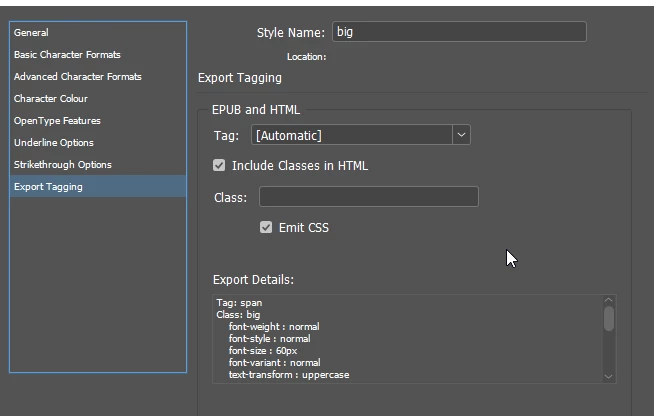
 

The information below 'export details' is perfect for what I need, but I can't find it anywhere on the character style object. I thought it might live in 'styledExportTagMaps' under 'exportAttributes', but I just get an empty string. Am I missing something!?


Many thanks,

Olly

This topic has been closed for replies.

1 reply

rob day
Community Expert
Community Expert
May 4, 2022

Hi Olly, There doesn’t seem to be away to get the css from the style object.


You might be able to export a temporary HTML file, read back the generated CSS file (which would be IDGeneratedSTyles.css), and get the needed text string from the read file. So, after a temp HMTL export of some selected text get the generated CSS, and search the returned text via regex to get your style:


//sample on the desktop
var path = File(Folder.desktop + "/Test-web-resources/css/idGeneratedStyles.css");
var myText = readFile(path)
$.writeln(myText)
//returns the idGeneratedStyles.css text

function readFile(p) {
	var f = new File(p);
	f.open("r");  
	var x = f.read();  
	f.close();
	return x; //returns the text in the file
}


Participant
May 4, 2022

Hi Rob!


Thanks for this, I did worry it might require something like this. I don't think I will be able to go down this route due to our infrastructure but thanks for letting me know the information is not available on the api - I will likely have to cherry pick from the individual properties on the char style itself.

rob day
Community Expert
Community Expert
May 4, 2022

I don't think I will be able to go down this route due to our infrastructure


Do you mean you are not allowed to use the exportFile() method?


This writes the CSS to the System’s temp folder and the getStyleCSS() function returns the CSS—you could also go to the desktop or document folder. The advantage of the temp folder is it’s hidden.


The document needs to have a character style named "MyStyle" change as needed:


var doc = app.documents.item(0);
var styleCSS = getStyleCSS("MyStyle")

alert(styleCSS)


/**
* Gets the emitted CSS for a character style 
* @ param the name of the style to get 
* @ return the CSS string 
* 
*/
function getStyleCSS(n){
    var f = new Folder(Folder.temp + "/getcss")
    f.create();
    //var f = new Folder(Folder.desktop)
    var cs = doc.characterStyles.itemByName(n)
    cs.emitCss = true;
    var tf = doc.textFrames.add({contents:"A"});
    tf.parentStory.appliedCharacterStyle = cs;  
    var exPath = f + "/" +  doc.name + ".html";
    var cssPath = f + "/" +  doc.name + "-web-resources/css/idGeneratedStyles.css";
    tf.exportFile(ExportFormat.HTML, File(exPath));
    var cssText = readFile(cssPath)
    tf.remove();
    var regx = new RegExp("span."+n+"[^\\]]+\\}")
    return cssText.match(regx)
}

/**
* Read a text file 
* @ param file path 
* @ return file’s text 
*/

function readFile(p) {
	var f = new File(p);
	f.open("r");  
	var x = f.read();  
	f.close();
	return x; //returns the text in the file sampletext.txt
}