



dublove
Legend
Oct 15, 2026 1:17 PM UTC
Question

Is it possible to know which points of the object are included in the dragging virtual box when dragging the mouse?

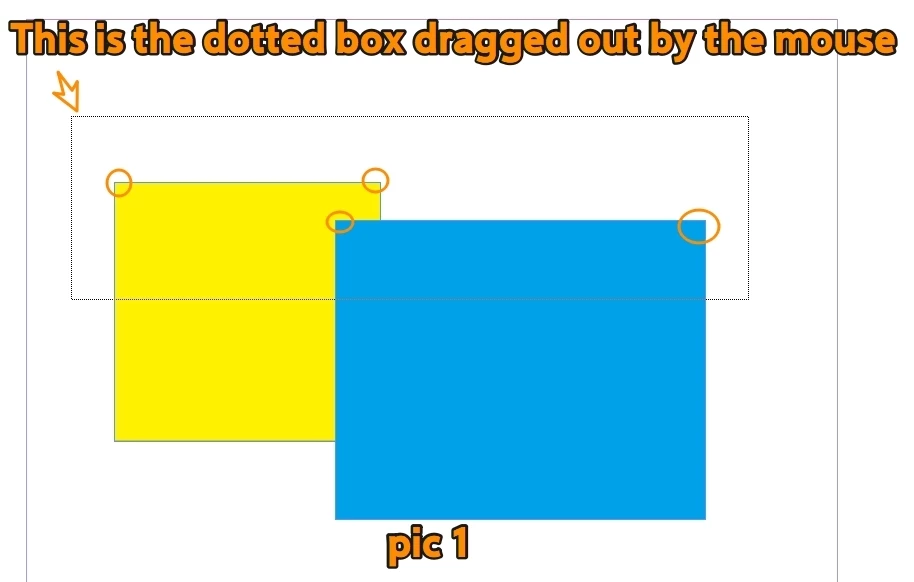
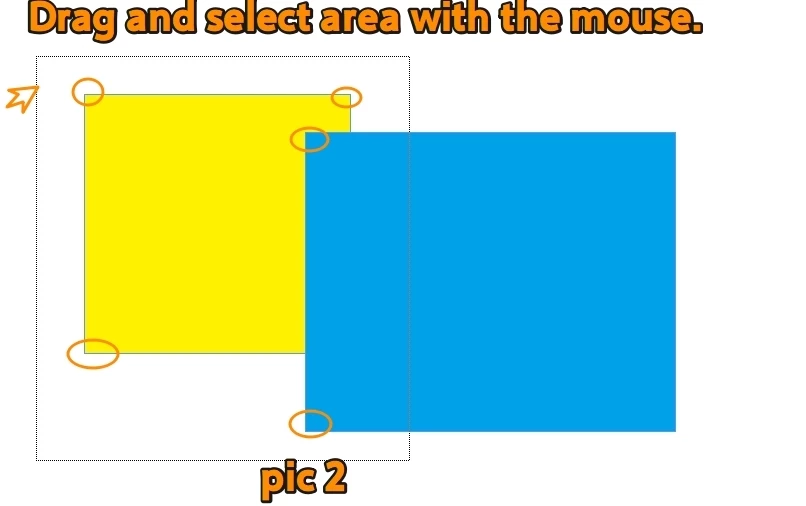
As shown in pic1 and pic2 below, I have dragged and selected two rectangles using the selection tool. Is there a way to know whether the virtual box I dragged is from pic1 or pic 2.
 

    2 replies

    Abhishek Rao
    Community Manager
    Community Manager
    Oct 15, 2026 2:17 PM UTC

    Hi ​@dublove,


    Thanks for sharing the screenshots and sample file.

    InDesign's marquee selection is temporary, so once you release the mouse button, the selection rectangle disappears. Currently, there isn't a built-in option to retrieve the exact marquee area used or determine whether the selection was made as shown in Pic 1 or Pic 2.

    I understand that this functionality is important to your workflow, and I'm sorry it's not currently available. Would you mind submitting a feature request on our InDesign UserVoice page and sharing your use case? This helps our product team evaluate and prioritize requests.

    Please share the UserVoice link in this thread so other users can upvote it and follow any updates.

    Feel free to reach out if you have any further questions. We'd be happy to help!
    Abhishek

    Translate
    dublove
    dubloveAuthor
    Legend
    Oct 15, 2026 2:35 PM UTC

    I think it's possible.

    The object can be selected when the "dragged selection area" of the mouse overlaps with the object's boundary.

    Translate