

Is it possible to modify the shortcut file with InDesign scripts to set the shortcut key of scripts?
We know that every time the scripts are reinstalled, or the scripts name changes.
The shortcuts set for the script will not work and you will have to set them.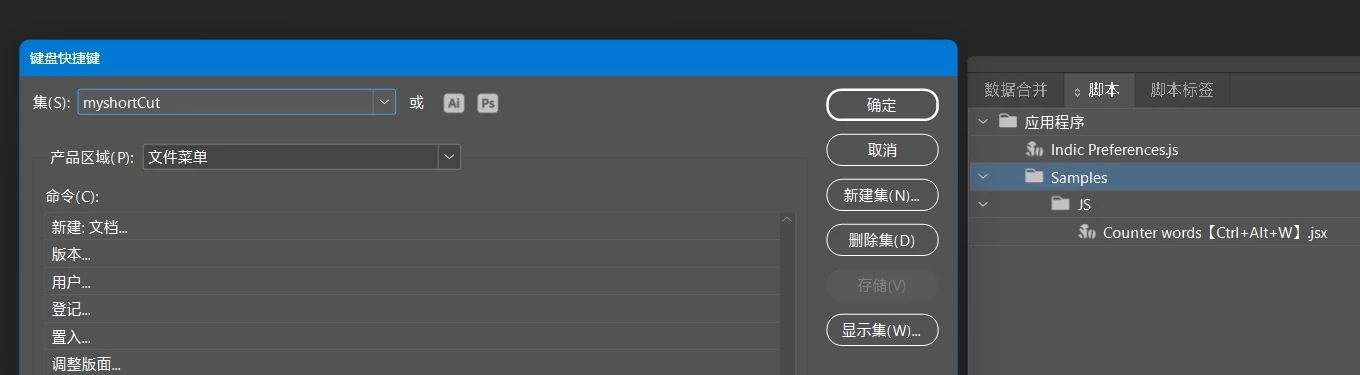
My shortcuts File look like this:
C:\Users\adm\AppData\Local\Adobe\InDesign\Version 19.0-J\zh_CN\Caches\myshortCut.txt
C:\Users\adm\AppData\Roaming\Adobe\InDesign\Version 19.0-J\zh_CN\InDesign Shortcut Sets\myshortCut.indk
My scripts are stored in D:\Program Files\ID about\JS\
Then, in C:\Program Files\Adobe\Adobe InDesign 2024\Scripts\Scripts Panel\Samples\
Created JS.lik
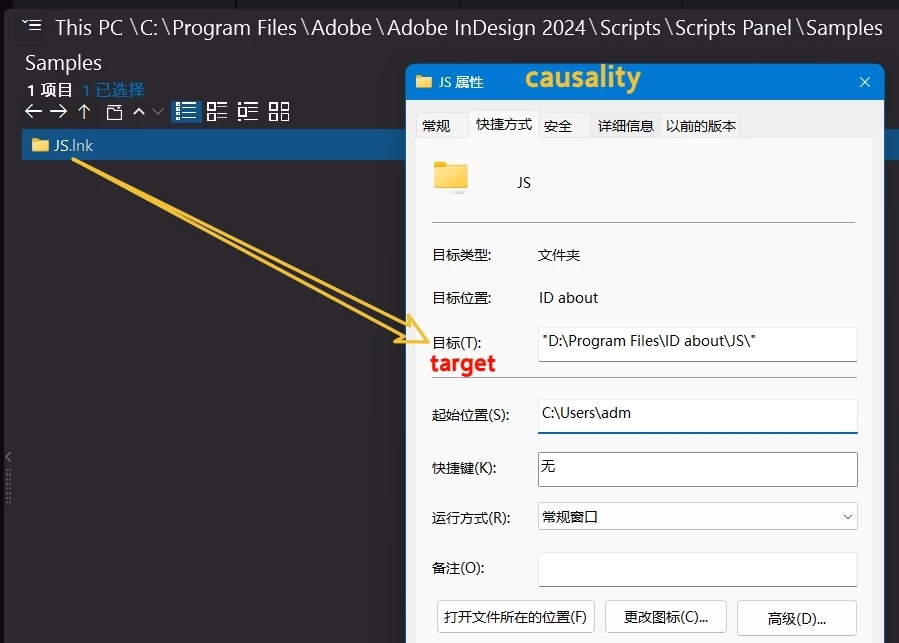
I thought of a way to use ID's script to modify the shortcut file myshortCut.indk( maybe myshortCut.txt), to realize the setting of script shortcuts.
Take "Counter words【Ctrl+Alt+W】.jsx( or jsbin)" as an example:
As long as the storage path are not changed, then read the Ctrl+Alt+W】section and write to myshortCut.indk to modify it.
There is no 【】 will not need to set.
Thank you very much.


 AdChoices