
Inspiring
January 29, 2024
Answered

Is it possible to place several images in a text frame separated by enter/return?

  • January 29, 2024
  • 2 replies
  • 364 views

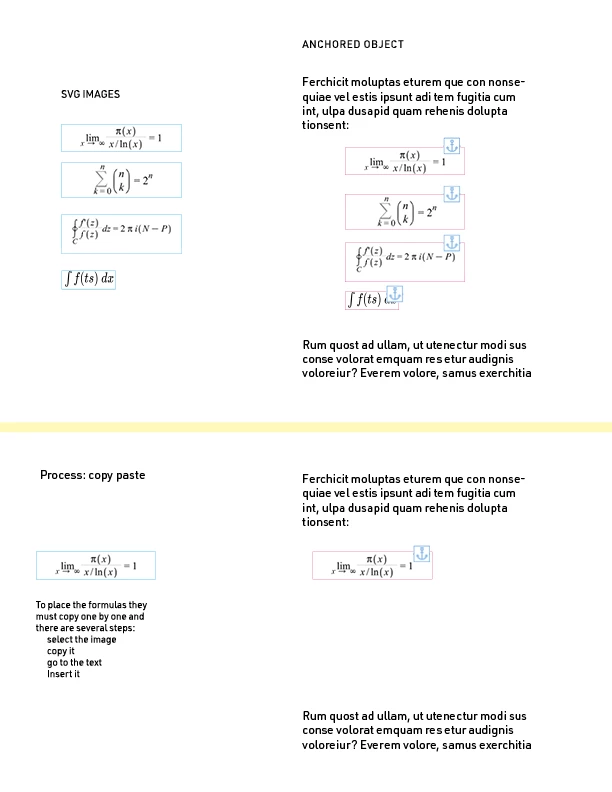
In a text there are several moments where many equations follow each other and putting them one by one seems to be the only way. These images become anchored objects, which in this case is the ideal way to control them.


However, I don't see any other way to do it manually, which in hundreds of pieces makes the process almost impossible.


it is not possible to group them into an image as these formulas are in flowed text and in some cases should be passed from one page to another.
This topic has been closed for replies.
Correct answer James Gifford—NitroPress

It could be scripted, yes  —but I'm not a script guy, so can't help further in that regard.


Equations are always a problem because of the fussy formatting, which transfers poorly as text and limits options and accessibility as images. But ID really only handles placement of one image at a time. You can select several in a folder and Copy, but Paste within ID is one at a time, as is (then) anchoring. Which you've probably found out.


I don't no now a script could do much more than automate several fairly quick steps, leaving you to still position the images. But I tend to underestimate the range of scripting sometimes.


If you didn't tag Scripting in your original post, edit it and click that label. It will help draw attention from the script guys.

2 replies

James Gifford—NitroPress
Legend
January 29, 2024

It could be scripted, yes  —but I'm not a script guy, so can't help further in that regard.


Equations are always a problem because of the fussy formatting, which transfers poorly as text and limits options and accessibility as images. But ID really only handles placement of one image at a time. You can select several in a folder and Copy, but Paste within ID is one at a time, as is (then) anchoring. Which you've probably found out.


I don't no now a script could do much more than automate several fairly quick steps, leaving you to still position the images. But I tend to underestimate the range of scripting sometimes.


If you didn't tag Scripting in your original post, edit it and click that label. It will help draw attention from the script guys.

Inspiring
January 29, 2024

Thanks a lot. I will tag it.

James Gifford—NitroPress
Legend
January 29, 2024

You can anchor as many images (or independent text boxes, pretty much the same thing) as you like on a single page. It's more or less just a matter of placing the element, dragging the anchor to a correct paragraph end, setting its text-wrap characteristics, and then adjusting its position.


For print, this is pretty much all you need to worry about, along with some spacing settings and such, and it's best to use Object Styles to apply consistent values to each instance (or have several Object Styles to accommodate variations). Styles make it easy to adjust spacing and other characteristics globally, just as they do for paragraphs and characters.


If there is any intent to export to EPUB, you will have to watch the details much more carefully, as ALL graphcs etc. MUST be anchored to adjacent text, or they will "fall off" to the end of the document.


If I interpret your actual question correctly, yes, you could use a text frame and anchor multiple images within it. The spacing, text wrap, anchor characteristics, etc. would be quite complex and may not be very "stable." requiring some touchup each time the text reflows. But there's no reason you can't use that approach instread of independent anchored graphics or boxes.

Inspiring
January 29, 2024

James, Thanks.

Here the point is how to catch a certain number of images (equations) and insert them in a single frame.

Fortunately is not a question related to any doubt (for now) about anchored elements. It seem just a mechanic problem to avoid repeating operations.

It is something like:

1. catch a group pieces (just images) but not one by one.
2. paste inside a text frame separated by returns.
Now these pieces are anchored and easily handled.


You didn't mention but perhaps it is a script task?