

dublove
Legend
March 21, 2026
Question

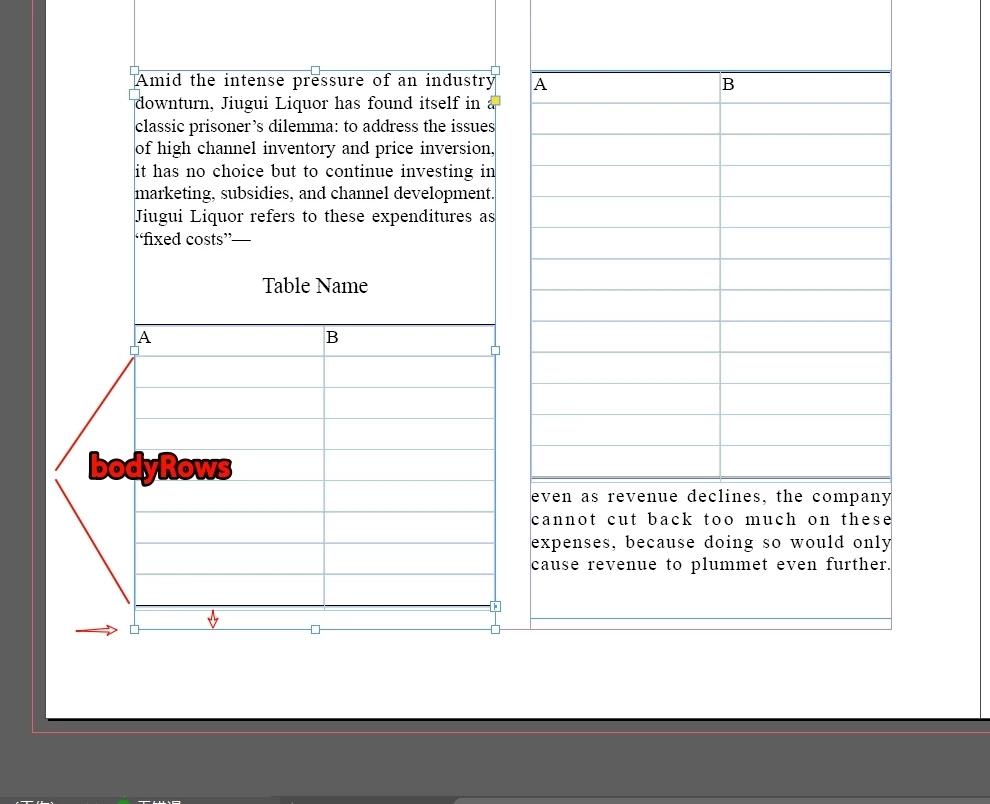
Is it possible to quickly adjust the bodyRow to  align to the textFrame bottom,  in the script?

  • March 21, 2026
  • 2 replies
  • 64 views

Sometimes my table doesn’t quite fill the text box, so I have to manually adjust the row height, which takes several attempts and is quite a hassle.

Is there a way to use a script to adjust the row height of the table body so that the text box is quickly aligned at the bottom?
 

    2 replies

    rob day
    Community Expert
    Community Expert
    March 22, 2026

    Hi ​@dublove , Do you really want the rows of your tables to have inconsistent heights?


    You could adjust the Space Above and/or Below of your Table Name paragraph, which would probably be easier to script via a while statement.


    Here I’ve removed your empty paragraph returns:


    dublove
    dubloveAuthor
    Legend
    March 22, 2026

    Hi rob day.

    If you delete the blank lines and adjust the top and bottom margins of the table, there will be noticeable gaps, which won’t look very good.

    I just want to adjust the line height to reduce the bottom spacing (bottomSpace).

    Community Expert
    March 22, 2026

    I’d imagine something like this 

    Get the height of the text frame
    You need the total height available for the table.
    Get the height of the table content
    Measure the current table height (sum of all rows).
    Calculate the difference
    extraSpace = textFrame.height - table.height
    Distribute the extra space to the rows
    Usually added to the last row (or proportionally across all rows).
    Set the new row height
    Adjust the .height property of the row(s) to fill the frame.

    var doc = app.activeDocument;
    var tf = app.selection[0]; // select your text frame first

    if (tf.constructor.name == "TextFrame") {
    var table = tf.tables[0]; // assumes only one table in the frame
    var tableHeight = table.height;
    var frameHeight = tf.geometricBounds[2] - tf.geometricBounds[0]; // bottom - top

    var extraSpace = frameHeight - tableHeight;

    if (extraSpace > 0) {
    // Add extra space to last row
    var lastRow = table.rows[table.rows.length - 1];
    lastRow.height = lastRow.height + extraSpace;
    }

    alert("Table aligned to bottom!");
    } else {
    alert("Please select a text frame with a table first.");
    }


    dublove
    dubloveAuthor
    Legend
    March 22, 2026

    @Eugene Tyson 

    That idea might not work out.

    This might require working through the document page by page.

    How do I determine the following values:
    1. The height of the original selection (h1).
    2. The height of the potential target (h2).
    3. The number of rows (rowSel).


    I need to repeatedly adjust the minimum row height: h = h2 / rowSel.

    We can assume that a 0.5mm gap between the bottom border of the table on this page and the text box is the desired result.

    Until BotSp = 0.5mm


    Community Expert
    March 22, 2026

    Thanks for the additional info
     

    You don’t need to iteratively adjust the row height. You can calculate it in one pass:

    Get frame height (h2)
    Subtract your desired gap (e.g. 0.5mm)
    Divide by number of rows

    Then set all row heights to that value.

    Alternatively (better visually), scale existing row heights proportionally:

    scale = targetHeight / table.height

    and multiply each row height by that avoids uneven-looking tables.

    Option 1 — Even row heights (simple + predictable) Fills the frame by making all rows the same height:

    var tf = app.selection[0];

    if (tf.constructor.name !== "TextFrame") {
    alert("Select a text frame first");
    exit();
    }

    if (tf.tables.length === 0) {
    alert("No table found");
    exit();
    }

    var table = tf.tables[0];

    // Frame height
    var frameHeight = tf.geometricBounds[2] - tf.geometricBounds[0];

    // 0.5mm gap (converted to points)
    var gap = 0.5 * 2.83465;

    // Target table height
    var targetHeight = frameHeight - gap;

    // Row count
    var rowCount = table.rows.length;

    // New row height
    var newHeight = targetHeight / rowCount;

    // Apply
    for (var i = 0; i < rowCount; i++) {
    table.rows[i].height = newHeight;
    }


    Option 2 — Proportional scaling (recommended) Keeps the current row proportions and just scales everything to fit:
     

    var tf = app.selection[0];

    if (tf.constructor.name !== "TextFrame") {
    alert("Select a text frame first");
    exit();
    }

    if (tf.tables.length === 0) {
    alert("No table found");
    exit();
    }

    var table = tf.tables[0];

    // Frame height
    var frameHeight = tf.geometricBounds[2] - tf.geometricBounds[0];

    // 0.5mm gap (points)
    var gap = 0.5 * 2.83465;

    // Target height
    var targetHeight = frameHeight - gap;

    // Current table height
    var currentHeight = table.height;

    // Scale factor
    var scale = targetHeight / currentHeight;

    // Apply scaling to each row
    for (var i = 0; i < table.rows.length; i++) {
    table.rows[i].height = table.rows[i].height * scale;
    }