
Doe Johns
Inspiring
January 26, 2022
Answered

Is it possible to set table column widths without dragging?

  • January 26, 2022
  • 2 replies
  • 532 views

Hi all. InDesign is amazing, but how can I set table column widths without dragging their borders with the mouse?


I mean (= I hope to find) a window where I can specify the width of each column, either in picas/points or percentage. Does it exist somewhere?


Or, what is the "mainstream" or recommended way to create tables like "40-15-15-15-15"? (The values are given as percentage.) I have a document where some tables should be "40-15-15-15-15" and some "52-12-12-12-12". I'm trying to figure out how to create them properly and how to handle such cases in the future.
This topic has been closed for replies.
Correct answer SJRiegel

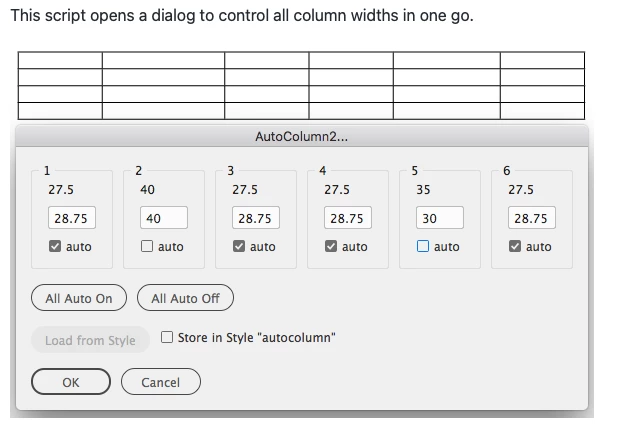
There is a free script you can get to help with this. It also has the option of storing the set of column widths in a table style, so they can be automatically applied to other tables.


2 replies

Community Expert
January 26, 2022

Hi John,

I'd suggest a script by Gerald Singelmann:


Auto Column
https://github.com/gsingelmann/indd_autocolumn


Regards,
Uwe Laubender

( ACP )

Frans v.d. Geest
Community Expert
Community Expert
January 26, 2022

Ah yes, forgot about that one, and I have it even installed! 

Frans v.d. Geest
Community Expert
Community Expert
January 26, 2022

Yes, if you choose Window/Text and Tables/Tables, you can set an exact (or minimum) width for columns.


  • In the Table panel, specify Column Width and Row Height settings.
  • Choose Table > Cell Options > Rows And Columns, specify Row Height and Column Width options, and then click OK.


Doe Johns
Doe JohnsAuthor
Inspiring
January 26, 2022

Hi, Frans. Sorry, but I don't see an option to adjust the width of all of the columns in one step there. 


Here is a screenshot from Libreoffice Writer. This is an example what I'm trying to find:


I prefer percentage, but I can deal with picas/points if necessary. The key advantage is that I can set all of the values in one step.


InDesign workflow, from what I see, is different. You cannot specify all of the values in one step; instead, you will need to select a target column/columns first, so there will be at least 2 steps (or more). For a table like 40-15-15-15-15% it will be two steps, and for a table like 20-10-40-20-10% it will be 5 steps, right?


Not as really handy as I hoped it to be 😕😕

Frans v.d. Geest
Community Expert
Community Expert
January 26, 2022

You have to select the columns first, then enter the value.

But, guessing here, you want to pre-define a 'style' with different values and apply that to a table? There is a plug-in called Smart Styles from Woodwing that can create such styles.