
Participant
August 14, 2019
Answered

Is it possible to write a script in InDesign to do conditional formatting in table cells?

  • August 14, 2019
  • 4 replies
  • 5152 views

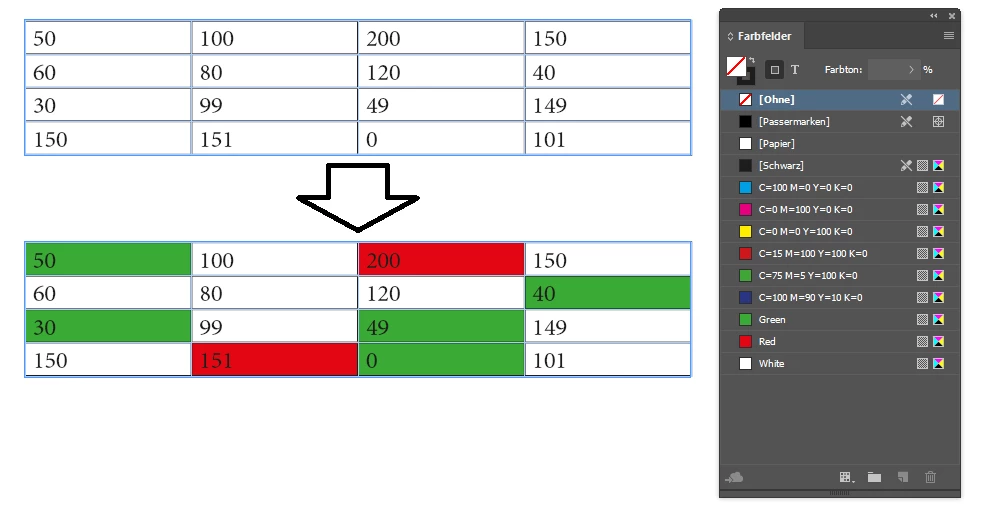
I have lots of data heavy excel documents that use conditional formatting to automatically colour a cell depending on the value of its contents.

IE- Green for 0-50, white for 51-150 Red for over 150.

I am copy this data into a design doc in InDesign. I would like to use the same conditional formatting in Indesign so I don't have to colour all cells by hand. I have been told that this is not a native feature in InDesign but it could be possible to write a script for this. Could anyone help with this?

I have a digital team that could do this for me but we need some more information. Has anyone done this before?

Thanks!
This topic has been closed for replies.
Correct answer xxxxxxxxxxxxxxxxxxxxyyyy

Hi,

you can try this one:

app.doScript(main, ScriptLanguage.JAVASCRIPT, undefined, UndoModes.ENTIRE_SCRIPT, "Conditional cell formatting");

function main() {

    sel = app.selection[0];

    if (sel.constructor.name != "TextFrame") {

        alert("Please select the textframe that contains the table.");

        exit();

    }

    // create color swatches

    var green = swatchCreator("Green", [75,0,100,0]);

    var red = swatchCreator("Red", [0,100,100,0]);

    var white = swatchCreator("White", [0,0,0,0]);

    tables = sel.tables;

    for (var i = 0; i < tables.length; i++) {

        var cells = tables.cells;


        for (var c = 0; c < cells.length; c++) {


            var cellValue = parseInt(cells.texts[0].contents);


            if (cellValue <= 50) {

                cells.fillColor = green;

                continue;

            }


            if (cellValue >= 51 && cellValue <=150) {

                cells.fillColor = white;

                continue;

            }


            if (cellValue > 150) {

                cells.fillColor = red;

            }

        }

    }

}

function swatchCreator(colorname, values) {

    var swatch = app.activeDocument.colors.item(colorname);


    if (!swatch.isValid) {

        swatch = app.activeDocument.colors.add({

            name: colorname,

            model: ColorModel.PROCESS,

            space: ColorSpace.CMYK,

            colorValue: values

            });

    }

    return swatch;

}

Select the textframe which contains the table(s) and run that script. It will create color swatches Green, Red, White. Then it changes the color of the cells.

Regards

4 replies

Community Expert
February 26, 2020

Hi Thomas,

the code posted here cannot work. First I thought there were some typos, but now I know:

The code was damaged by transfering this thread from the old to the new Adobe Forum software last year.


You have to edit the code to fix it according to my post here:

https://community.adobe.com/t5/indesign/is-it-possible-to-write-a-script-in-indesign-to-do-conditional-formatting-in-table-cells/m-p/10739832#M160774


Regards,
Uwe Laubender

( ACP )

thomasa67380583
Participant
February 26, 2020

I try to edit the code, but I still got no error-message and the script doesn't work either.

for (var i = 0; i < tables.length; i++) {
var cells = tables[i].cells;

for (var c = 0; c < cells.length; c++) {

var cellValue = parseInt(cells[c].texts[0].contents);

if (cellValue >=5) {
cells[c].fillColor = svert_bra;
continue;
}

if (cellValue >= 4 && cellValue <=6) {
cells[c].fillColor = veldig_bra;
continue;
}

if (cellValue >= 3 && cellValue <=5) {
cells[c].fillColor = bra;
continue;
}

if (cellValue >= 2 && cellValue <= 4) {
cells[c].fillColor = mindre_bra;
continue;
}

if (cellValue >= 0 && cellValue <= 3) {
cells[c].fillColor = svakt;
}
}
}
}

Community Expert
November 18, 2019

Hi Colin,

glad it's working now.

Ahem. That said, out of the same reasons crazyPanda's code in the reply, that is currently marked as "Correct", will not work.


Regards,
Uwe Laubender

( ACP )

thomasa67380583
Participant
February 26, 2020

Hi, and thanks for sharing the script.


I try to use this script, I get no errors but it dosn't work on my computer...


Here is my script:


function main() {
sel = app.selection[0];
if (sel.constructor.name != "TextFrame") {
alert("Please select the textframe that contains the table.");
exit();
}
// create color swatches
var svert_bra = swatchCreator("svert_bra", [83,18,78,4]);
var veldig_bra = swatchCreator("veldig_bra", [53,2,99,0]);
var bra = swatchCreator("bra", [9,0,92,0]);
var mindre_bra = swatchCreator ("mindre_bra", [1,51,93,0]);
var svakt = swatchCreator ("svakt", [0,91,78,0])
tables = sel.tables;
for (var i = 0; i < tables.length; i++) {
var cells = tables.cells;

for (var c = 0; c < cells.length; c++) {

var cellValue = parseInt(cells.texts[0].contents);

if (cellValue >=5) {
cells.fillColor = svert_bra;
continue;
}

if (cellValue >= 4 && cellValue <=6) {
cells.fillColor = veldig_bra;
continue;
}

if (cellValue >= 3 && cellValue <=5) {
cells.fillColor = bra;
continue;
}

if (cellValue >= 2 && cellValue <= 4) {
cells.fillColor = mindre_bra;
continue;
}

if (cellValue >= 0 && cellValue <= 3) {
cells.fillColor = svakt;
}
}
}
}
function swatchCreator(colorname, values) {
var swatch = app.activeDocument.colors.item(colorname);

if (!swatch.isValid) {
swatch = app.activeDocument.colors.add({
name: colorname,
model: ColorModel.PROCESS,
space: ColorSpace.CMYK,
colorValue: values
});
}
return swatch;
}


What is wrong with this one?

Community Expert
November 12, 2019

Hi Colin,

what exactly did you select when running the script?

Hm. What's your exact code? Can you post it with code formatting of the forum?


Regards,
Uwe Laubender

( ACP )

Colin Flashman
Community Expert
Community Expert
November 14, 2019

Hi Uwe.


I made a new InDesign document and made a single textframe with a single 4x4 table with exactly the same numbers as per crazyPanda's script. The text frame was then selected with the black arrow tool and the script was run. Here is everything that is in the script below:


app.doScript(main, ScriptLanguage.JAVASCRIPT, undefined, UndoModes.ENTIRE_SCRIPT, "Conditional cell formatting");

function main() {
   sel = app.selection[0];
   if (sel.constructor.name != "TextFrame") {
       alert("Please select the textframe that contains the table.");
       exit();
   }
   // create color swatches
   var green = swatchCreator("Green", [75,0,100,0]);
   var red = swatchCreator("Red", [0,100,100,0]);
   var white = swatchCreator("White", [0,0,0,0]);
   tables = sel.tables;
   for (var i = 0; i < tables.length; i++) {
       var cells = tables.cells;
       
       for (var c = 0; c < cells.length; c++) {
           
           var cellValue = parseInt(cells.texts[0].contents);
          
           if (cellValue <= 50) {
               cells.fillColor = green;
               continue;
           }
       
           if (cellValue >= 51 && cellValue <=150) {
               cells.fillColor = white;
               continue;
           }
       
           if (cellValue > 150) {
               cells.fillColor = red;
           }
       }
   }

}

function swatchCreator(colorname, values) {
   var swatch = app.activeDocument.colors.item(colorname);
   
   if (!swatch.isValid) {
       swatch = app.activeDocument.colors.add({
           name: colorname,
           model: ColorModel.PROCESS,
           space: ColorSpace.CMYK,
           colorValue: values
           });
   }
   return swatch;

}

 In ESTK, the script doesn't like the line:


var cells = tables.cells;


reports the error message "Object does not support the property or method 'cells'.

If the answer wasn't in my post, perhaps it might be on my blog at colecandoo!
Community Expert
November 14, 2019

Hi Colin,

ah. That's just a typo I think.

Since you are iterating over the tables collection with variable i as counter correct this line to:


var cells = tables[i].cells;


And also in the next loop, the loop that is iterating the cells collection with variable c as counter, you should address a single cell with its index [c]:

var cellValue = parseInt(cells[c].texts[0].contents);

And of course also:

cells[c].fillColor = green;


cells[c].fillColor = white;


cells[c].fillColor = red;


Best,
Uwe Laubender

( ACP )

xxxxxxxxxxxxxxxxxxxxyyyy
Participating Frequently
August 14, 2019

Hi,

you can try this one:

app.doScript(main, ScriptLanguage.JAVASCRIPT, undefined, UndoModes.ENTIRE_SCRIPT, "Conditional cell formatting");

function main() {

    sel = app.selection[0];

    if (sel.constructor.name != "TextFrame") {

        alert("Please select the textframe that contains the table.");

        exit();

    }

    // create color swatches

    var green = swatchCreator("Green", [75,0,100,0]);

    var red = swatchCreator("Red", [0,100,100,0]);

    var white = swatchCreator("White", [0,0,0,0]);

    tables = sel.tables;

    for (var i = 0; i < tables.length; i++) {

        var cells = tables.cells;


        for (var c = 0; c < cells.length; c++) {


            var cellValue = parseInt(cells.texts[0].contents);


            if (cellValue <= 50) {

                cells.fillColor = green;

                continue;

            }


            if (cellValue >= 51 && cellValue <=150) {

                cells.fillColor = white;

                continue;

            }


            if (cellValue > 150) {

                cells.fillColor = red;

            }

        }

    }

}

function swatchCreator(colorname, values) {

    var swatch = app.activeDocument.colors.item(colorname);


    if (!swatch.isValid) {

        swatch = app.activeDocument.colors.add({

            name: colorname,

            model: ColorModel.PROCESS,

            space: ColorSpace.CMYK,

            colorValue: values

            });

    }

    return swatch;

}

Select the textframe which contains the table(s) and run that script. It will create color swatches Green, Red, White. Then it changes the color of the cells.

Regards

Participant
August 19, 2019

Thanks so much for this.

Our digital team are looking at implementing it now, so you've been a huge help!