
Is there a dialog that controls starting a book file on Recto page?
Hi, using Win11 with ID 18.4.
I appear to have lost a dialog box that I recall seeing, and I just can't find any more. I'm stumped! Would appreciate guidance. (Or just simple menu directions to it....)
I'm working on a book, and I want all chapters to start on a recto page. This is perfectly normal. Really, I've got this working. I can manage this with a combination of
- Numbering & Section Options (Pages window, Layout menu)
- The Pages window (and parent pages/single page vs spread) and manually adding extra even-numbered pages to each file end.
- The book window
- Document Setup
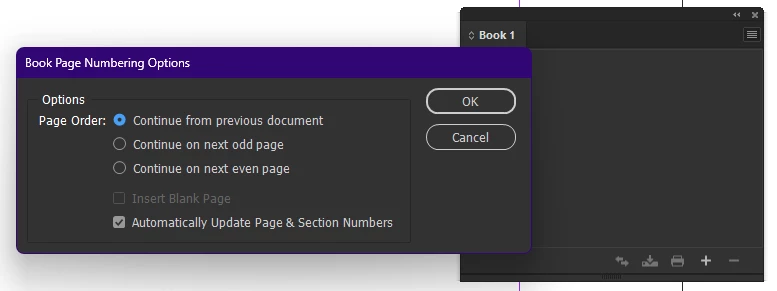
However.... I vaguely remember seeing a dialog where I could specify "Begin file on right-hand page" (or left, for that matter, but I want the traditional recto), and "automatically add extra page at end of file."
My problem is that I can't seem to find this dialog anywhere anymore, and when I search on line (and even in the forum) I get results that explain how to number pages or how to make a chapter start on the left-hand page or other responses that do not involve such a dialog box. I have not been able to find my way back to this remembered dialog. (Much like Shangri-La.)
I'm not referring to Smart Text Reflow at the bottom of Preferences | Type. This was a different dialog that expressly determined recto/verso starting page and adding new pages at file end to ensure that the file ended on an even page. I could be remembering this from Frame, but, frankly, I haven't used Frame in a long while, and I recall this phantom dialog from very recent use (I recall stumbling upon it, and saying "Aha!")
Am I falsely "remembering" something that is not in InDesign, or have I forgotten the magic hidden key combination, like holding CTRL while I click a menu item, or am I just missing something that's right in front of me?
Thanks as always to the community.
-j
 AdChoices