dublove
Legend
June 1, 2026
Answered

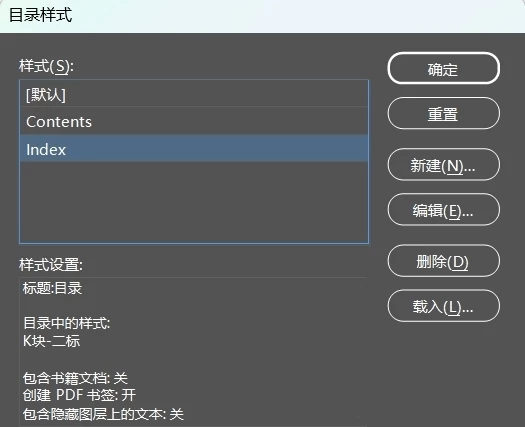
Is there a quick way to duplicate an “Contents Style” exactly?

  • June 1, 2026
  • 2 replies
  • 35 views

Hi everyone.

Every time I need to create an index manually, I rename the “Contents Style” to “Index Style,” save the original ID file (e.g., A.indd) as B.indd, then open the A.indd file and load B.indd in “Contents Styles” panel.
This gives me two identical contents Styles.

It’s a bit of a hassle.
Is there a way to directly copy an identical Table of Contents Style?

 

    Correct answer Eugene Tyson

    TOCStyle.duplicate() is exposed in the scripting

    But it’s not in the UI - interesting


    // Edit these two values if your style names are different.
    var findName = "Contents";
    var newName = "Index";

    var doc = app.activeDocument;
    var source = doc.tocStyles.itemByName(findName);

    if (!source.isValid) {
    alert("No matching TOC style found.");
    } else {
    var copy = source.duplicate();
    copy.name = newName;
    alert("Copied \"" + findName + "\" to \"" + newName + "\".");
    }


    2 replies

    dublove
    dubloveAuthor
    Legend
    June 1, 2026

    Hi ​Eugene Tyson

    Thank you so much.
    I just remembered—it’s called Toc.
    Now I’ll be tinkering with it all day again.

    Eugene TysonCommunity ExpertCorrect answer
    Community Expert
    June 1, 2026

    TOCStyle.duplicate() is exposed in the scripting

    But it’s not in the UI - interesting


    // Edit these two values if your style names are different.
    var findName = "Contents";
    var newName = "Index";

    var doc = app.activeDocument;
    var source = doc.tocStyles.itemByName(findName);

    if (!source.isValid) {
    alert("No matching TOC style found.");
    } else {
    var copy = source.duplicate();
    copy.name = newName;
    alert("Copied \"" + findName + "\" to \"" + newName + "\".");
    }