

Roger Breton
Legend
October 30, 2023
Answered

Is there a quick way to locate where I just saved my InDesign document?

  • October 30, 2023
  • 2 replies
  • 2124 views

May seem like a silly question but I often work on a given document in InDesign but then I need to locate it in the Finder/Windows Explorer in order, say, to copy it somewhere BUT all my Finder/Explorer windows are closed? I know of many ways to get around this "problem" but it's a drag on productivity, if you ask me.


I don't suppose there is nifty way to "Open in Explorer" option anywhere like, you know, in the Links panel where there is an option to "Reveal in Finder/Explorer" on a selected Link? That would make locating the InDesign document on one's hard drive (yes, some people still use hard drives!) a cinch.


Dreaming out loud...
Correct answer Steve Werner

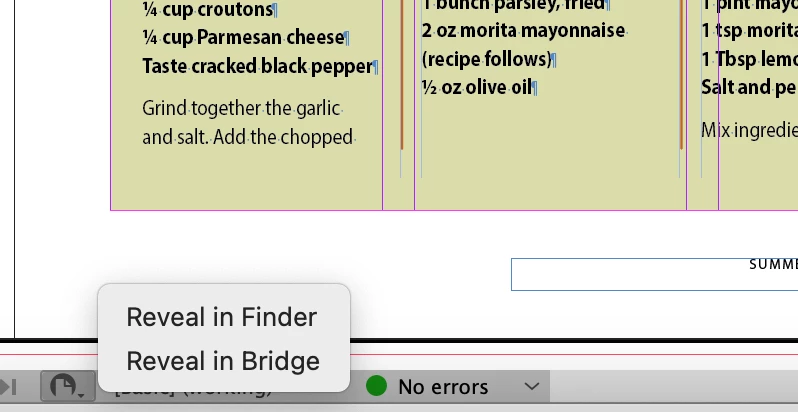
On my Macintosh, on the Status line at the bottom there is a button which when you click on it shows this:


2 replies

BobLevine
Community Expert
Community Expert
October 30, 2023
If you're on Windows and have ID docked to the taskbar, just right click for recent files.
Roger Breton
Legend
October 30, 2023

Hi Bob,

Here's the content of my "Recent" file list :

 Sadly, any of these links only go as far as opening the file in InDesign?

Steve Werner
Community Expert
Steve WernerCommunity ExpertCorrect answer
Community Expert
October 30, 2023

On my Macintosh, on the Status line at the bottom there is a button which when you click on it shows this:


Roger Breton
Legend
October 30, 2023

Got it, Steve!

 That button was there, all along, waiting to be discovered 🙂

Wow! Thank YOU!

BobLevine
Community Expert
Community Expert
October 30, 2023

I misunderstood the question.