



dublove
Legend
July 29, 2026
Answered

Is there a simple way to determine whether an image is outside or inside the textFrame?

  • July 29, 2026
  • 3 replies
  • 21 views

I feel so complicated now.

   var d = app.activeDocument;
var item = d.selection[0];

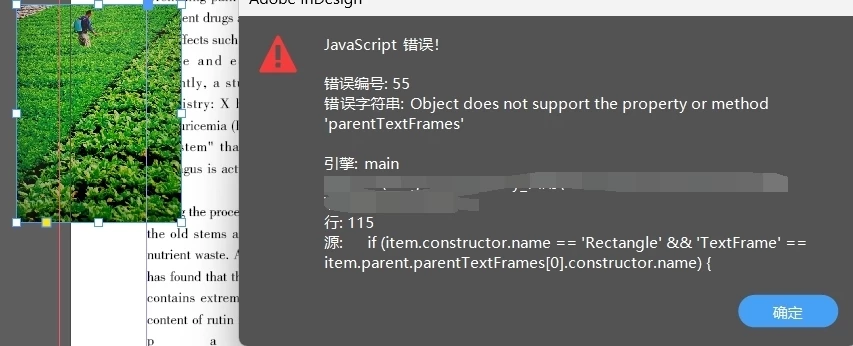
if (item.constructor.name == 'Rectangle' && 'TextFrame' == item.parent.parentTextFrames[0].constructor.name) {

var curFrame = item.parent.parentTextFrames[0];
alert(curFrame);
imgFitFrame(item, curFrame);
}

I feel so complicated now.
When selecting an image, I want to get the text box where the image is located. But it's strange that when I select an image outside the box, there will be an error, and it should not have any response at this time.

At this point, 'item. parent. parentTextFrames [0]' does not exist and prompts' illegal '. What should I do?
 

    Correct answer Manan Joshi

    When it is outside the frame i.e. it is not anchored then item.parent would most probably would Spread and Spread won’t have that property. So you should check that item.parent.constructor.name == “Character” to be sure that the object is anchored or not

    3 replies

    Manan JoshiCommunity ExpertCorrect answer
    Community Expert
    July 29, 2026

    When it is outside the frame i.e. it is not anchored then item.parent would most probably would Spread and Spread won’t have that property. So you should check that item.parent.constructor.name == “Character” to be sure that the object is anchored or not

    -Manan
    dublove
    dubloveAuthor
    Legend
    July 29, 2026

    I used to distinguish the situation where images were pasted into the frame, but it became too complicated and confusing.

    original, alert(item.constructor.name);
    All selection tools return Rectangle
    And directly selecting the tool returns Image, alert (item. parent. constructor. name); Can return Rectangle
    I was confused.

    I will only focus on choosing tools in the future.


    Community Expert
    July 29, 2026

    Nothing to confuse here. Just remember a simple rule, any object placed inside a textframe would have a character as the parent. So for the texframe your image frame is just a character, which happens to be associated with a rectangle which then has an image as a child.

    -Manan