Inspiring
November 10, 2022
Answered

Is there a way to convert anything that is 100%CMYK to a spot color?

  • November 10, 2022
  • 5 replies
  • 3490 views

The issue i'm having is that the artwork is made in photoshop and is 400% coverage. 100%CMYK, is there a way when exporthing the artwork to have it merge with a  spot color?

This topic has been closed for replies.
Correct answer rob day

Ah right - then a batch action to add replace the background layer in photoshop would do it. 

Save to a different folder - and then relink to folder in InDesign.


That way it's not affecting any other colour in the image - right?


That way it's not affecting any other colour in the image - right?


The layers above the black background are blending, so if you fill the background with a lower TAC it will affect the transitions and color appearance.Maybe no one would care, but try changing the black mix to something under 300% and you will see the change:
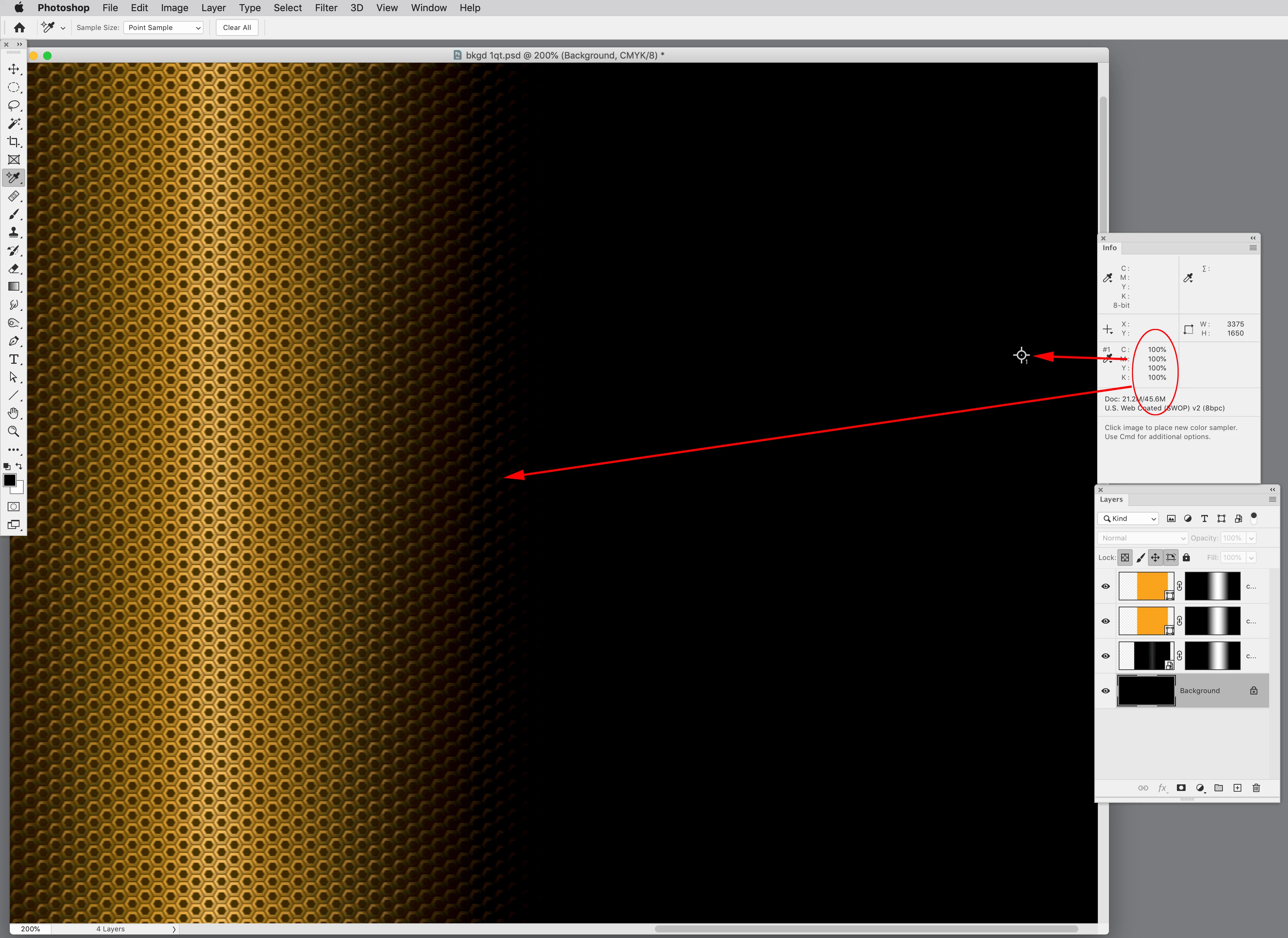
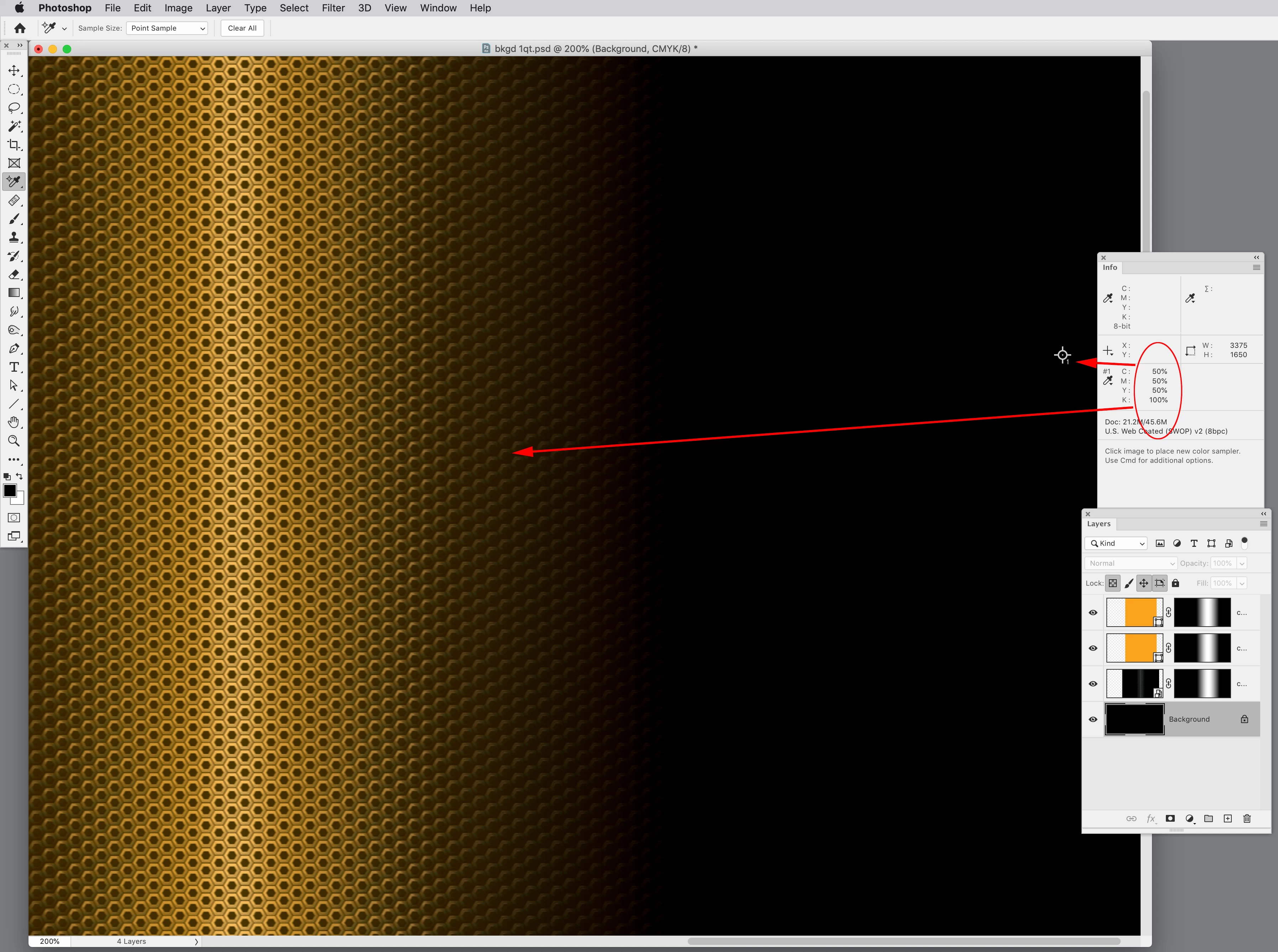


This is a classic example of why we shouldn’t edit in CMYK—it’s easy to violate the required TAC, and is the file really outputting to a US Web Coated SWOP press? There probably will be a color conversion somewhere.

 

5 replies

Community Expert
November 12, 2022

Only getting a chance to look at your file now


From what I see the 4 x 100% channels are the background layer


Why not do a batch action to turn off the background layer and apply a custom spot (see my first post on adding Spot Channels)


If you need help setting that up let us know.


rob day
Community Expert
Community Expert
November 12, 2022

but Total ink is what i'm trying to fix


Hi Eugene, I don’t think @cbishop01 wants to print a Spot plate, it’s just the TAC that needs fixing, so a flattened conversion to Lab or large gamut RGB would get rid of the 400% and keep the color appearance

Community Expert
November 12, 2022

Ah right - then a batch action to add replace the background layer in photoshop would do it. 

Save to a different folder - and then relink to folder in InDesign.


That way it's not affecting any other colour in the image - right?

Jens Trost
Inspiring
November 11, 2022

Hi there,
in my humble opinion the simplest way with the "best" outcome is to record an action in Photoshop, which reduces the layers, converts to RGB/Lab and then back to CMYK. [Edit]You could even leave it in RGB and do the CMYK conversion in InDesign, so you're safe for different CMYK outputs/profiles.[/edit] With that it's just one click within Photoshop.

Just make sure you keep the original.


+ Not a bridgeTalk() expert but I think you can automate that from InDesign so the link gets updated to the flatten image.


Or use batch processing via Bridge (I use Dr. Brown's Image Processor for Bridge on a daily basis).


Or if you're going to rip/print it yourself – maybe your rip has an option to reduce TAC. Some of them do, some require additional (costly) addons... 

cbishop01Author
Inspiring
November 11, 2022

thank you all for the replies. i'll just go into the psd files and fix them there. when i use acrobat it messes with some of the other art

rob day
Community Expert
Community Expert
November 11, 2022

when i use acrobat it messes with some of the other art


If you are trying to preserve the appearance, I don’t think there is an easy way to do it in CMYK mode. Here’s what I get if I replace the 400% background with a 265% rich black—the transition into the rich black is different:


Here’s flatten>convert to ProPhoto>convert to Coated GRACoL 2013:


m1b
Community Expert
Community Expert
November 11, 2022

Sorry @cbishop01 I'm not any help here. I cannot see any room for usefully scripting anything here because I can't see any one process that would solve this for multiple examples, unless they were each set up exactly the same.


The confounding factor is the use of "Hard Light" and "Overlay" transfer modes on the orange gradient layers in CMYK. In my opinion, this sort of job should be done in RGB (which plays well with transfer modes) and then flattened/exported to CMYK using a color profile that gives the appropriate total ink for the print method, or even manually using "Custom CMYK". But if the final background CMYK black would need to be consistent with other background blacks in the job, so you would need to take care of that.

- Mark


(Off topic: if I was setting up this artwork, I'd do it all in Illustrator, and make the honeycomb a pattern, and keep the document in RGB, and then export/rasterize to CMYK for the printing. Or even better, I'd re-jig the artwork so no transfer modes/transparency were needed and do the whole job in CMYK, with full control over the ink everywhere.)

rob day
Community Expert
Community Expert
November 10, 2022

Hi @cbishop01 , If you open the PSD and save it as a flattened Grayscale the black pixels in the grayscale will output to the CMYK black channel. If you then Direct Select the grayscale image, you can apply any spot or process color:


Community Expert
November 10, 2022

Far simpler Rob - was thinking the same - but wanted to show the Ink Alias.. 

Thanks @rob day 

Community Expert
November 10, 2022

Is it a big deal to open in Photoshop and change it to the spot colour there?

https://planetphotoshop.com/working-with-spot-color-channels.html


cbishop01Author
Inspiring
November 10, 2022

I'm not well versed in Photoshop. I'll give this a shot to see if it works ok. thank you

cbishop01Author
Inspiring
November 10, 2022

It doesnt seem to work for me. I'm probably doing something wrong. when i make the background "rich black" it coevers everything with black.