dublove
Legend
August 26, 2025
Answered

Is there a way to distinguish which selection tool is currently being used?

  • August 26, 2025
  • 4 replies
  • 402 views

I have currently selected the frame, but I want to distinguish between the following states:
Is the selection tool being used, or is it a direct selection tool?
Is this possible? Perhaps this would be useful.


Usually, they only display one name:
Rectangle or TextFrame.

var item = app.activeDocument.selection[0];
alert(item.constructor.name);


Thanks. 
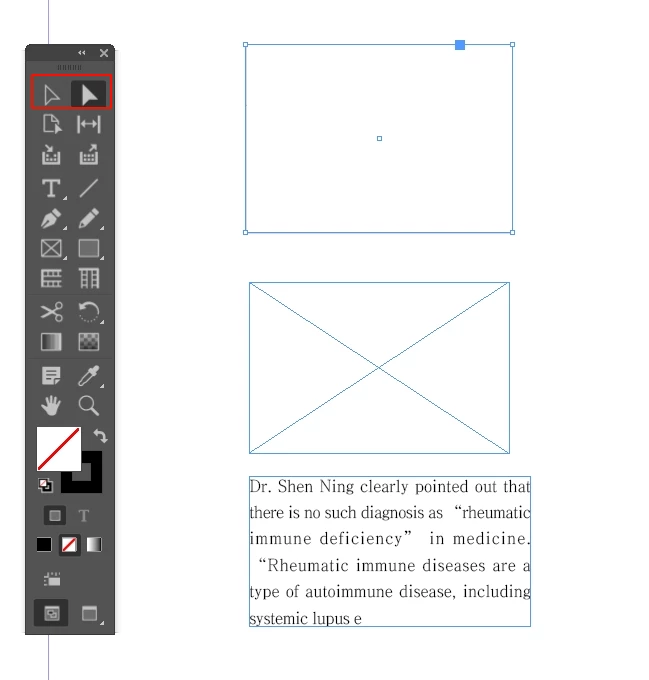
Correct answer Laubender

Hi @dublove ,

I can answer this question with yes.

See into:

https://www.indesignjs.de/extendscriptAPI/indesign-latest/#ToolBox.html


app.toolBoxTools.currentTool


returns the active tool.


Well, it will make a difference if you are working with the selection and if you use a menu command, a menu action, for e.g. transforming the selection. See the difference between UITools.DIRECT_SELECTION_TOOL and UITools.SELECTION_TOOL for example:

app.menuActions.itemByName( "$ID/Flip Horizontal Menu Item" ).invoke();


Graphic frame selected with the selection tool.

Result after running the script:


Graphic frame selected with the direct selection tool, the bottom 2 path points are selected:

Result of the same script:

Regards,
Uwe Laubender
( Adobe Community Expert )


PS: Sorry. Had to edit my reply.

4 replies

rob day
Community Expert
Community Expert
August 26, 2025

As @m1b  and @brian_p_dts  point out, the currently selected tool doesn’t tell you anything about the selection. I could have my Command key pressed with any tool active and select an image:


LaubenderCommunity ExpertCorrect answer
Community Expert
August 26, 2025

Hi @dublove ,

I can answer this question with yes.

See into:

https://www.indesignjs.de/extendscriptAPI/indesign-latest/#ToolBox.html


app.toolBoxTools.currentTool


returns the active tool.


Well, it will make a difference if you are working with the selection and if you use a menu command, a menu action, for e.g. transforming the selection. See the difference between UITools.DIRECT_SELECTION_TOOL and UITools.SELECTION_TOOL for example:

app.menuActions.itemByName( "$ID/Flip Horizontal Menu Item" ).invoke();


Graphic frame selected with the selection tool.

Result after running the script:


Graphic frame selected with the direct selection tool, the bottom 2 path points are selected:

Result of the same script:

Regards,
Uwe Laubender
( Adobe Community Expert )


PS: Sorry. Had to edit my reply.

m1b
Community Expert
Community Expert
August 26, 2025

Thanks @Laubender you are right of course.


Still, my answer takes into account dublove's long-running and mighty struggle to learn scripting and I think they will be misguided by their focus on which tool is active. But I could be wrong.

- Mark

m1b
Community Expert
Community Expert
August 26, 2025

@dublove I agree with Brian forget about the active tool, it is a useless question.


Instead concern yourself with the item(s) you have access to. Your scripts must check them—Do they contain graphics? Do they have a particular constructor? Do they have a particular method, or property? What parent do they have? What about their specifier?


These are useful questions.


Knowing the active tool is useless, especially because it tells you nothing about what I had selected. I can select the contents of a frame using either tool or I can select with one tool and then switch tools before running the script. It is useless.

- Mark

m1b
Community Expert
Community Expert
August 26, 2025

Also @dublove tell us what you actually want to know... do you want only graphics? If so, then I've already written you a function to get them. Or do you just want the frames? Then use the getGraphics function and ask for the `parent`.

- Mark

dublove
dubloveAuthor
Legend
August 26, 2025

Yes, this might not be as meaningful as mine.
I just wanted to add another conditional check.
What originally required two scripts to accomplish, I can now combine into one using a conditional statement.

brian_p_dts
Community Expert
Community Expert
August 26, 2025

Why would it be useful? What are you trying to accomplish by knowing the difference? The only time it really matters is when there is a graphic directly selected inside a frame.