
Participating Frequently
August 15, 2025
Answered

Is there a way to export booklets straight as PDF, bypassing distiller?

  • August 15, 2025
  • 6 replies
  • 1067 views

I am unsure if I am doing something wrong, but why is exporting a booklet to a printable PDF the hardest thing to figure out? The only way I am aware of is saving the file as post script for distiller and then going from there. 90% of the times, it doesnt get exported to distiller correctly, and its just a constant battle of getting the file exported correctly. Why is this not just a standard export at this point? We have the capability to print as a booklet, so why cant I just save it as a PDF with bleed and crop marks, and not go through distiller?


If I am missing something please, let me know. Thanks!
Correct answer rob day

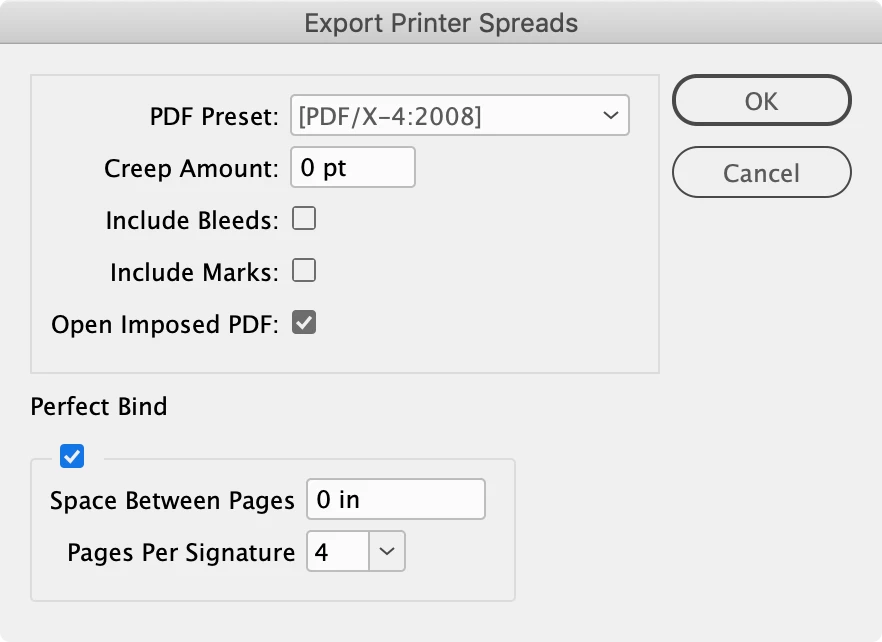
@Ray5CCB , I would not use this for commercial  printing (your printer should be handling imposition)—for printing in-house this script imitates Print Booklet but exports the imposition to a PDF:


https://www.dropbox.com/scl/fo/2wjwe13fsrw9iszebo15e/h?rlkey=nwt5o3uex31fgra7oj15qvs7z&dl=0


6 replies

Participating Frequently
August 18, 2025

In my 25-odd years working in magazines, I've only once produced pre-imposed PDFs for a printer, and that was for a very specific job. Mostly I used it internally, and then only for proofing 16-page booklets.


The preferred means of providing final artwork varies from printer to printer, and depends largely on the software they're using ahead of the platemaking stage. If they're using an online portal, there's likely a preference for single-page-per-file or everything-in-one-PDF, but most systems these days are pretty flexible and could accept a mixture, if properly uploaded. Depending on the job, I might provide one PDF for each 16-page section of a magazine, for example. Their back-end system will accept the pages sequentially, usually based on filename (eg. 001-Cover.pdf, 002-IFC.pdf, 003-Contents.pdf, etc. or 001-004.pdf, 005-016.pdf, etc., or 001-016_Section1.pdf, 017-032_Section2.pdf, etc.), or it'll collect everything that's been uploaded into a pasteboard and you'll place the pages/batches manually.


If they're not using an online portal - some ask clients to upload to Dropbox, or to send via a service like WeTransfer, for example - just ask their preference. There's a good chance they're just using the portal locally rather than opening it up to customers.

Ray5CCBAuthor
Participating Frequently
August 18, 2025

Yeah, I unfortunately don't know enough about printing and I have never looked into learning more because we are usually just doing brochures or smaller tasks. We occasionally print out bigger books and I've never had problems with using distiller until now. And now I'm seeing its not even the ideal way to do it, so even this is useful feedback.

Dave Creamer of IDEAS
Community Expert
Community Expert
August 18, 2025

With 45-odd years in magazine and book design and production, along with a gazzilion ancillary products (I'mnot some youngster like @Gord@APL 😁), I've only sent imposed jobs to my own 11x17 printer. 

My advice:

1) Send PDF/X-4 files. If the printer can't handle that, send PDF/X-1a but be sure of your conversion settings.

2) EXPORT the PDF; do not print to PostScript and distill. 


David Creamer: Community Expert (ACI and ACE 1995-2023)
rob day
Community Expert
rob dayCommunity ExpertCorrect answer
Community Expert
August 16, 2025

@Ray5CCB , I would not use this for commercial  printing (your printer should be handling imposition)—for printing in-house this script imitates Print Booklet but exports the imposition to a PDF:


https://www.dropbox.com/scl/fo/2wjwe13fsrw9iszebo15e/h?rlkey=nwt5o3uex31fgra7oj15qvs7z&dl=0


Ray5CCBAuthor
Participating Frequently
August 18, 2025

So is the best option to just send over individual pdfs of the pages and have printers rearrange? Or just send over working/InDesign files? As I mentioned in the other replies, I just try to make the printers life better but I cant keep up and directly talk to every printer due to timing/staff limitations. I want to save time on my end, while also saving the printers time too.

BobLevine
Community Expert
Community Expert
August 18, 2025

If you send an imposed PDF you will make their life harder and probably get billed for it.

Just export a normal PDF from InDesign (PDF X/4 is the best choice in a modern workflow) and send that. 

rob day
Community Expert
Community Expert
August 16, 2025

Hi @Ray5CCB , Print Booklet is intended for inhouse proofing not commercial printing. If you want to distill a PDF you will need to install Adobe PDF 9.0 in ⁨Adobe InDesign 202X⁩ ▸ ⁨Presets⁩ ▸ ⁨PPDs⁩, which you can download here:


https://www.dropbox.com/scl/fo/fhnvventjc7vxpzzmft5f/AKwgMb_SlYYf5JUfSfpr2nk?rlkey=e7ruj0dh52vvwku98mqbmbqen&dl=0


BobLevine
Community Expert
Community Expert
August 16, 2025

That's only for Mac. For Windows, if you have Acrobat installed you can print directly to PDF.


Only pointing this out since the OP hasn't specified their operating system.

Ray5CCBAuthor
Participating Frequently
August 18, 2025

I am on a Mac. My knowledge of printing is not what it could be and I am just printing the way I was tought in the one printing class I took in school 5 years ago. My company works with clients across the country and that means I run into a ton of different printers with different capabilites and requests when sending files over. I just try to help the printers out but more often than not, clients are asking for print peices last second and I dont have time to communicate with the printer directly to see how they need the files sent over.


So if there are better ways then distilling them, I am all ears.

Community Expert
August 16, 2025

File>Export and choose PDF. 

Then in Acrobat use the Print Booklet feature.

leo.r
Community Expert
Community Expert
August 16, 2025

If you're on Mac, you can try virtual PDF printers such as PDF Printer, VipRiser and some others (look them up, you'll find right away). I don't know though if they can produce the desirable print-ready PDFs.

Inspiring
August 15, 2025

Adobe hasn't included that option as you are aware. 

Why? Well, five out of ten print shops are going to want it layed out differently than whatever InDesign might offer. You can disagree but that's a fact. Few "booklets" are commercially produced on exactly two up, half fold signatures.

Your print provider doesn't want to receive what you want InDesign to do; I can say this as I've been printing for a long time.

That being said, it is a simple process to export to pdf and print in simple booklet spreads from Acrobat.

Ray5CCBAuthor
Participating Frequently
August 18, 2025

Thank you for chiming in here, especially being a printer yourself. I think the issue for me, and like you said, is every printer is different. I am in the unfortunate spot of being a solo desinger in a small company that works with as many clients as we have employees. Our clients are all mainly american but some international, and the means we run into printers of all kinds. And truthfully, I genuinely dont know how to send files universally to make printers lives easier, so I try to get everything exported as print ready as possible.

As a printer yourself, how do you prefer receiving files for bigger print pieces? The work I do ranges from brochures to guiedbooks with up 50+ pages and while sending over small things like brochures are easy, I feel like I lose a lot of time trying to get books set up.