Inspiring
September 15, 2026
Answered

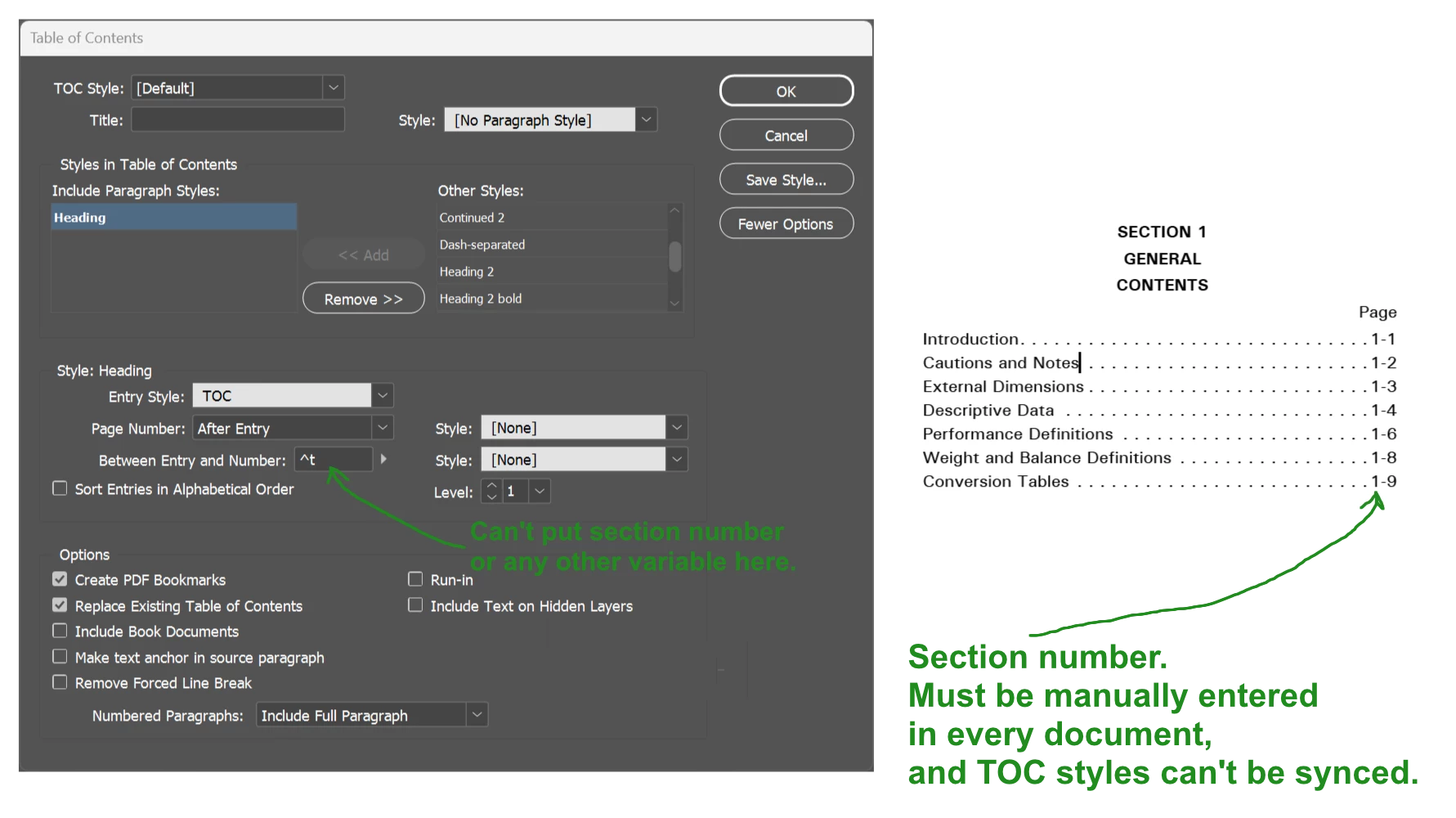
Is there a workaround to not being able to put variables in TOC entries?

  • September 15, 2026
  • 4 replies
  • 76 views

Many publications include the section number in their page-number formats. This appears to be impossible in InDesign in 2026.

The result is that we must manually edit the TOC-entry styles in every document. And then, if we sync our book without remembering to disable TOC-style syncing, every TOC in the book is now wrong and we have to manually go through dozens of documents and fix every TOC style by hand.

Has anyone devised a workaround?
 

    Correct answer Peter Kahrel

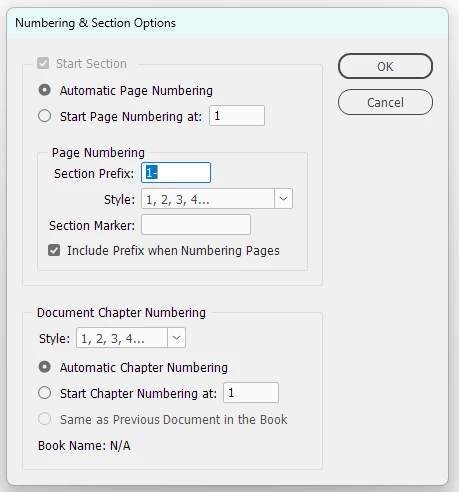
    In the Numbering & Section Options window, check Include Prefix When Numbering Pages.

    If you want the section prefixes only in the TOC, then before generating the TOC, check the Include Prefix box at each section (or in each document in a book job) and generate the TOC. Then uncheck the Include Prefix box.


    4 replies

    Inspiring
    September 17, 2026

    Thanks for the answers, guys. Because we use the “section” or “chapter” number in text, I have a “chapter number” running-header/footer variable set up. It picks up text from the first page of the document based on a character style, and uses it in the page-number area in the footer on each page.

    So even if we can embed the “section prefix” in text, it won’t work because it’ll have the following hyphen.


    Also, because our documentation is government-approved by page number, the insertion of new pages requires “A,” “B,” etc. page numbers to be added. To achieve this in the footer and have it show up correctly in the TOC requires the following gymnastics; we interrupt the document with a new “section” and set the following numbering scheme, which hijacks the section “marker” and “prefix:”


    After the added pages, I start another new section and return to the normal page-numbering flow.

    TᴀW
    Legend
    September 16, 2026

    When you say “section number” what exactly do you mean? Do you mean “section prefix”? If so, make sure to check the option that says “Include prefix when numbering pages” in the Numbering and Sections Options” panel. If you do that, the section prefix will appear as part of the page number variable.


    id-extras.com | InDesign tools & scripts for typesetters, form designers, and translators
    Peter Kahrel
    Community Expert
    Peter KahrelCommunity ExpertCorrect answer
    Community Expert
    September 16, 2026

    In the Numbering & Section Options window, check Include Prefix When Numbering Pages.

    If you want the section prefixes only in the TOC, then before generating the TOC, check the Include Prefix box at each section (or in each document in a book job) and generate the TOC. Then uncheck the Include Prefix box.


    TᴀW
    Legend
    September 16, 2026

    You beat me to it!

    id-extras.com | InDesign tools & scripts for typesetters, form designers, and translators