

Zebra Jamie
Known Participant
March 22, 2024
Question

Is there another setting that includes stroke weight to a text box's size? How do I turn it off?

  • March 22, 2024
  • 3 replies
  • 2341 views

I have some text boxs with strokes. (I'm hoping it's easier to do it this way than to fuss with centering a colored box behind the text, especially when I'm going to repeating this layout over 50+ client postcards, all with unique fonts and colors, this month.) The weight of the stroke is being added to the total size and transformation dimensions--EVEN THOUGH IT'S UNCHECKED ON THE TRANSFORMATION SETTINGS. (See screenshot.)  
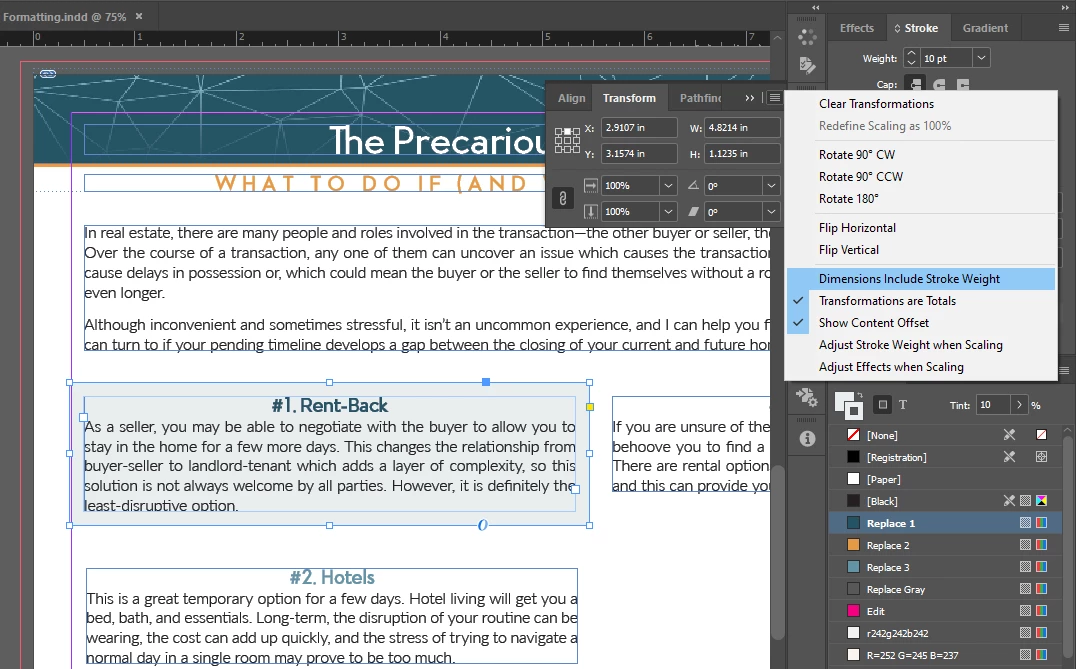


Basically, even though the WxH numbers don't include the 10pt stroke, I can't scale it using the corners without the edge of the stroke counting as the edge of the box. I also can't align it to the boxes edges--only the stroke's edges. My current work-around is to remove the stroke, edit the size/shape/layout, and then reengage the stroke (which it never remembers the settings of, so I have to reset those every time). All fo this is annoying and increases work time by a few minutes per piece, which adds up when you're trying to do 50+ pieces.


So is there another setting that I'm missing? Where is it?


Working on Windows 10 with Indesign updated to v.19.3.

This topic has been closed for replies.

3 replies

Robert at ID-Tasker
Legend
March 23, 2024

@Zebra Jamie 


What is your ALIGN STROKE setting:


Zebra Jamie
Known Participant
March 25, 2024

My stroke aligmnent puts the entire stroke outside the text box.

rob day
Community Expert
Community Expert
March 23, 2024

Hi @Zebra Jamie , You can do this without using a stroke. Look at the Text Frame Options and apply Inset Spacing:


Also, look at the Paragraph Shading and Span Columns features which can be set via Paragraph formatting or Paragraph styles. It would be a more advanced technique, but you wouldn’t need multiple text frames to do what you are showing. This is a single text frame:


Split Columns for the body text after the intro:


And Paragraph Shading for the heads and body text:


Zebra Jamie
Known Participant
March 25, 2024

Inset spacing and/or putting the stroke on the inside of the box to bump the text in is not really what I'm looking for. I have just one 8.5x11" page to put this content, and I need to use the space as efficiently as possible, so I want the shaded border of the alternating paragraphs to flow beyond the structure of the text boxes. Like so:


The reason I'm trying to make this work with strokes instead of just putting colorful boxes behind the text boxes is that I want a faster way to get an even overflow around the paragraph, instead of trying to eyeball it or repeat the style settings on 50-60 templates.

Also, these postcards have the same base every month, but the content will change, so what held 500 words last month needs to accommodate 350 words this month, meaning font sizes, paragraph/line spacing, and margins are all liable to be adjusted from month to month, in order to fit the content into the page without leaving awkward gaps.

By using the strokes, I can do a simple color swap after I paste the content into the new template. However, depending on the fonts (e.g. going from Lato to Proxima Nova or Avenir), I may need to expand or contract the text box sizes to keep everything looking even. I don't know of any automatic way to do this, so I'm trying to shave off steps to achieve the organized look I'm going for. The challenge is that the strokes are not allowing me to edit the text box sizes as a unit--including the stroke is actually deforming the final alignment. I was hopeful that i was just missing a secondary setting that would allow the text boxes to be resized while ignoring the strokes, but that doesn't seem to be the case.

rob day
Community Expert
Community Expert
March 25, 2024

but the content will change, so what held 500 words last month needs to accommodate 350 words this month, meaning font sizes, paragraph/line spacing, and margins are all liable to be adjusted from month to month, in order to fit the content into the page without leaving awkward gaps.


The Paragraph Shading feature is designed for this. The shading can be set to extend outside of the text frame, and because it is a paragraph format property, it can be set as a style sheet.


The shading flows with the text, so you don’t need to size text frames—try editing the text in my attached example.


Mike Witherell
Community Expert
Community Expert
March 23, 2024

Have you considered defining a new Object Style where all such attributes can be written down and re-used conveniently and efficiently.

Also, a stroke can be set in the Stroke panel (and the Object Style panel, too) to measure from the path inwards, outwards, or centered. You might like to choose inwards from the path. That way the Transform panel numbers won't confuse you.

Mike Witherell
Zebra Jamie
Known Participant
March 25, 2024

I have found that styles in general (text, paragraph, and object) create more problems than they solve. Because I'm repeating the content across multiple postcards (50-60 every month), all with different brand font and colors, the styles tend to cross-polute and create a layer of setting entanglement I have to sort through, which increases the time I work on each postcard.


I'm not confused by the transform panel numbers. I'm confused that the numbers don't match what is being transformed. For example, if I had a 2x3" text box, the transform panel should say w:2" h:3", right? But when I add a 10pt stroke to the outside of that text box, the transform panel still reads w:2" h:3" but when I go to re-shape it via the corners, it puts those controls outside the stroke and all the smart align tools treat the outside of the stroke as the outside edge of the object, even when I have the "do not include stroke" option unchecked.


Here's a visual:

No stroke, note the transform sizes:

With stroke, transform sizes stay the same, even though the outside of the stroke is treated as the outisde edge of the text box:


I don't see how an object style would correct this, or make it easier to paste this content and formatting into the next 20 mailers that need it.


Robert at ID-Tasker
Legend
March 25, 2024
quote

I have found that styles in general (text, paragraph, and object) create more problems than they solve. Because I'm repeating the content across multiple postcards (50-60 every month), all with different brand font and colors, the styles tend to cross-polute and create a layer of setting entanglement I have to sort through, which increases the time I work on each postcard.

[...]


By @Zebra Jamie


If you keep names of the Styles EXACTLY THE SAME - then when you copy something between documents - only "contents" will be copied - formatting will be used from the "destination" document.


quote

[...]

I'm not confused by the transform panel numbers. I'm confused that the numbers don't match what is being transformed. For example, if I had a 2x3" text box, the transform panel should say w:2" h:3", right? But when I add a 10pt stroke to the outside of that text box, the transform panel still reads w:2" h:3" but when I go to re-shape it via the corners, it puts those controls outside the stroke and all the smart align tools treat the outside of the stroke as the outside edge of the object, even when I have the "do not include stroke" option unchecked.


Here's a visual:

No stroke, note the transform sizes:

With stroke, transform sizes stay the same, even though the outside of the stroke is treated as the outisde edge of the text box:


I don't see how an object style would correct this, or make it easier to paste this content and formatting into the next 20 mailers that need it.


By @Zebra Jamie


Maybe you should create a grid?


Or resize boxes through the panel instead of using mouse - InDesign will do the math for you - you can use +, -, *, /.


And - I'm pretty sure you don't have to resize width - you can use CTRL+ALT+C and InDesign will "Fit Frame To Content" vertically.