Inspiring
December 4, 2025
Answered

Is there another way for headers to appear in footers than Text Variables aproach?

  • December 4, 2025
  • 3 replies
  • 1342 views

Hi there,


Let's say I am designing a book. I want the chapters to start on the right-hand page. The footer of that page will be the chapter number and name. For the rest of the pages in each chapter, I want the subheadings at level 2 to appear in the footer.

How I will do it:

1. I create a master page for a chapter. In the footer, I will add Text Variables -  Running Headers. I will instruct InDesign to use the Paragraph style "Chapter title".

2. For the body pages, I will set another master page, and in the footer, I will add Text Variable - Running Headers, and I will instruct InDesign to look for Paragraph Style named Heading 02.


Am I doing right? I think so.


However, I received an InDesign document in English. The document was translated into German. I was surprised to see that the footers are still in English. So, I opened the Master pages to try to see what was wrong. To my surprise, there is no Text Variable on any of the master pages. So, how did the designer do it? Is there another way than the one I described above?


Thanks in advance.


Sebastian

Correct answer Joel Cherney

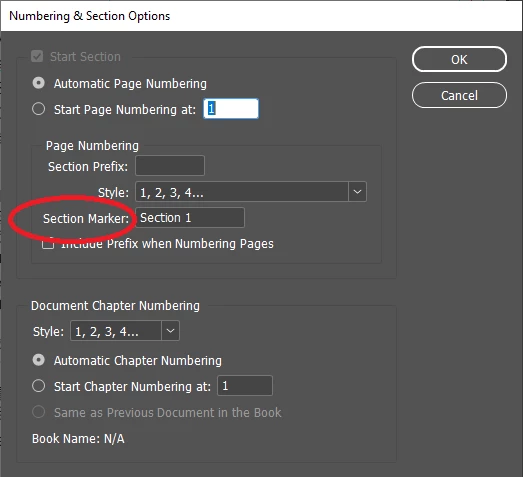
The ^x is how you'd search for a "Section Marker.' This isn't a feature I've used in InDesign before, to be honest. I have certainly divided InDesign documents into sections many times, and in doing so I've specified values for the "Section Prefix" field  without stopping to wonder what this other field did:


sect.png


You can insert these Section Markers into your text from Type -> Insert Special Character -> Markers. They render almost exactly as if they are text variables. One notable exception is that text variables get a fine dotted line around them when you turn on Type -> Show Hidden Characters, but there's no visible marking at all on the Section Marker. But ^x is how they're represented in the Find/Change dialog. So it looks like you should be able to do this with a Find/Change operation:

1) Insert your Running Header variable

2) Copy it to your clipboard

3) Search for ^x the "Section marker"

4) Replace with ^c "Clipboard Contents, Formatted"


Still no way to know if this is a case where your provider's translation tool damaged the IDML and turned your text variables into section markers, or if someone in DTP or engineering didn't understand how your running headers worked and tried to fake it up with section markers? 

3 replies

sebdeaAuthor
Inspiring
December 8, 2025

Interesting thing. As I tried various approaches to find out how they make it, I found that if I go to the Parent Page and select SECTION, then I go to FIND/REPLACE and paste it in there, I get this ^x instead of SECTION. I tried to search the web to understand what it means, but it was in vain.

So, I tried to replace ^x with a chapter named 1.0 GENERAL. It worked surprisingly. It changed ALL pages in the document with 1.0 GENERAL. Even on pages where I am supposed to have 2.0 CHAPTER NAME, 3.0 CHAPTER NAME. So, I am really stuck.

Screenshot 2025-12-08 110702.pngScreenshot 2025-12-08 110758.png

Joel Cherney
Community Expert
Joel CherneyCommunity ExpertCorrect answer
Community Expert
December 10, 2025

The ^x is how you'd search for a "Section Marker.' This isn't a feature I've used in InDesign before, to be honest. I have certainly divided InDesign documents into sections many times, and in doing so I've specified values for the "Section Prefix" field  without stopping to wonder what this other field did:


sect.png


You can insert these Section Markers into your text from Type -> Insert Special Character -> Markers. They render almost exactly as if they are text variables. One notable exception is that text variables get a fine dotted line around them when you turn on Type -> Show Hidden Characters, but there's no visible marking at all on the Section Marker. But ^x is how they're represented in the Find/Change dialog. So it looks like you should be able to do this with a Find/Change operation:

1) Insert your Running Header variable

2) Copy it to your clipboard

3) Search for ^x the "Section marker"

4) Replace with ^c "Clipboard Contents, Formatted"


Still no way to know if this is a case where your provider's translation tool damaged the IDML and turned your text variables into section markers, or if someone in DTP or engineering didn't understand how your running headers worked and tried to fake it up with section markers? 

Joel Cherney
Community Expert
Community Expert
December 4, 2025

However, I received an InDesign document in English. The document was translated into German. I was surprised to see that the footers are still in English. So, I opened the Master pages to try to see what was wrong. To my surprise, there is no Text Variable on any of the master pages. So, how did the designer do it? Is there another way than the one I described above?


I think that Bob's supposition is correct, although it's possible that the designer didn't do it. If your InDesign document was translated into German, it is quite likely that someone exported IDML from InDesign, and then that IDML was handed off to a German translation provider that then opened that IDML up in a translation environment like SDL Trados or memoQ or Smartling or some other tool that can parse the innards of the IDML (without InDesign) and expose the text for the translation team. Perhaps the tool itself failed to read the variables, or some localization tech manually preprocessed the file to convert variables to text, knowing that their translation platform couldn't capture the variable contents. 


However, any translation provider that just processes someone else's IDML and never looks at the resultant INDD file might not notice that e.g. headers and footers were not correctly processed by the translation tool. That is both bad localization practice, and an extremely likely circumstance. So no designer did it, I'd guess - unless what the designer did was "select a shoddy language service provider" or "fail to QA the file they got back from the LSP" or something along those lines. 

sebdeaAuthor
Inspiring
December 4, 2025

The InDesign package was received by me. The client provided it IDML included. The agency I am collaborating with translates the file. My concern is not why the agency failed to translate the footers, though they were not locked or on a hidden layer. How were they created without using Text Variables and yet being on master pages? In order for me to manually update the footers, I had to select them, page by page, with CTRL+SHIFT+mouse click, and edit them. Lucky me, it was 120+ pages. What if it were 400+ pages? Also, I was lucky that I didn't have to add pages. That is why I opened this thread, as I thought that might be another way to do that, and I am not aware of it. I have been using InDesign for a long time. I do not think of myself as a master of InDesign. Nevertheless, that thing made me wonder if I am missing something.


Thank you for your time.

Joel Cherney
Community Expert
Community Expert
December 5, 2025

How were they created without using Text Variables and yet being on master pages?


No way to know. I don't think I'm really understanding your description correctly. You have an English title in footer of chapter body, with the dotted line frame around it that indicates that it's on a master page - but when you go to the master page, there's no footer there? Or the footer is there in plaintext instead of as a variable? The way this question was asked, it sounds like the answer is "you go to the master page and draw a text box and paste in a footer." Doesn't sound like that is the answer you are looking for. But there are some other possibilities:


1) A translation tool that I've never personally used on a file with text variables has some kind of text variable translation feature that breaks the linkage of the parent and child pages 

2) In-house script whipped up to automate translation of headers missed by the translation tool, that interacts with your master pages oddly and breaks the linkage of parent and child pages

3) Set up manually by some DTP operator who was told "match the source" with no real instruction on how to handle text variables


BobLevine
Community Expert
Community Expert
December 4, 2025

Perhaps the variables were converted to text. Without seeing the file it's impossible to know.

sebdeaAuthor
Inspiring
December 4, 2025

It makes sense. Thank you very much.