dublove
Legend
July 13, 2024
Question

Is there any script to fine -tune the lines of text selected, so that they are full of text boxes?

  • July 13, 2024
  • 4 replies
  • 689 views

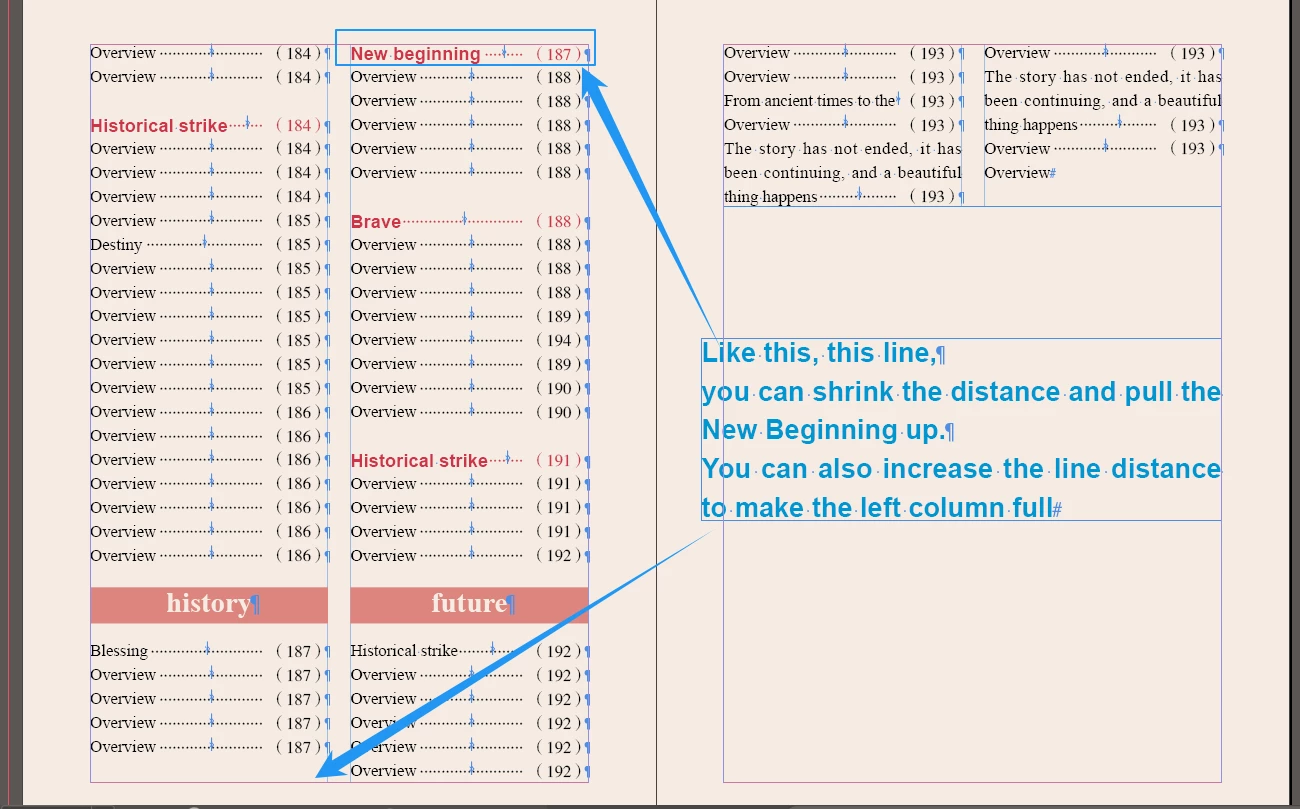
When I adjust the directory, I often encounter inconsistencies at the bottom.
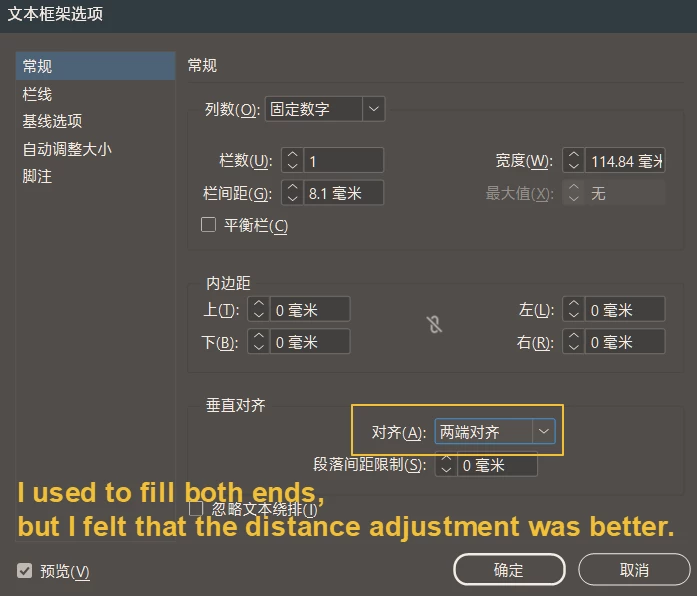
I used to align both ends, but later I found that it was not very useful.

I am now fine -tuning the line, either increased the distance, fill it, or reduce the line of row.
IIs there any script to fine -tune the lines of text selected, so that they are quickly full of text boxes? 

That must be great
Two functions: sometimes+, sometimes--, One with a script panel.

Thank you~


This topic has been closed for replies.

4 replies

leo.r
Community Expert
Community Expert
July 15, 2024
quote

Yes, you can use scripts like Adobe's Auto Leading plugin for InDesign or Illustrator, or tools like Justify Text or Align Text in Photoshop to fine-tune text alignment and spacing automatically. These tools help adjust text boxes to fill spaces effectively.


By @whites385192593sxv


This is some kind of AI spam. Just in case you attempt to look for these "plugins".

rob day
Community Expert
Community Expert
July 13, 2024

Your head style has a space above that equals the leading and maintains the baseline alignment, so it doesn’t fit on the last baseline. Your only choice would be to override and set it to 0— but then it doesn’t match the other heads. I would leave the empty space.


dublove
dubloveAuthor
Legend
July 14, 2024

You don't understand what I mean, what I want is free control.

rob day
Community Expert
Community Expert
July 14, 2024

Right, I don't understand how you expect a script to fix the problem. If you want to keep the baselines aligned, there are only 2 choices, which I am showing above-- both create inconsistent spacing.

rob day
Community Expert
Community Expert
July 13, 2024

Also check your Paragraph’s Keep Options:


dublove
dubloveAuthor
Legend
July 13, 2024

I tried to keep the options.
It is too rigid.
I now need to be flexible control, not fixed rules.

Robert at ID-Tasker
Legend
July 13, 2024

You either want text in TextFrames to be aligned or not - otherwise - it will look very bad. 


And as always - you need to be more specific... 


Robert at ID-Tasker
Legend
July 13, 2024

As per previous discussion - about baseline alignment - you need to define Baseline Grid in hour document - and set all texts / ParaStyles to align to it.