

dublove
Legend
February 17, 2025
Question

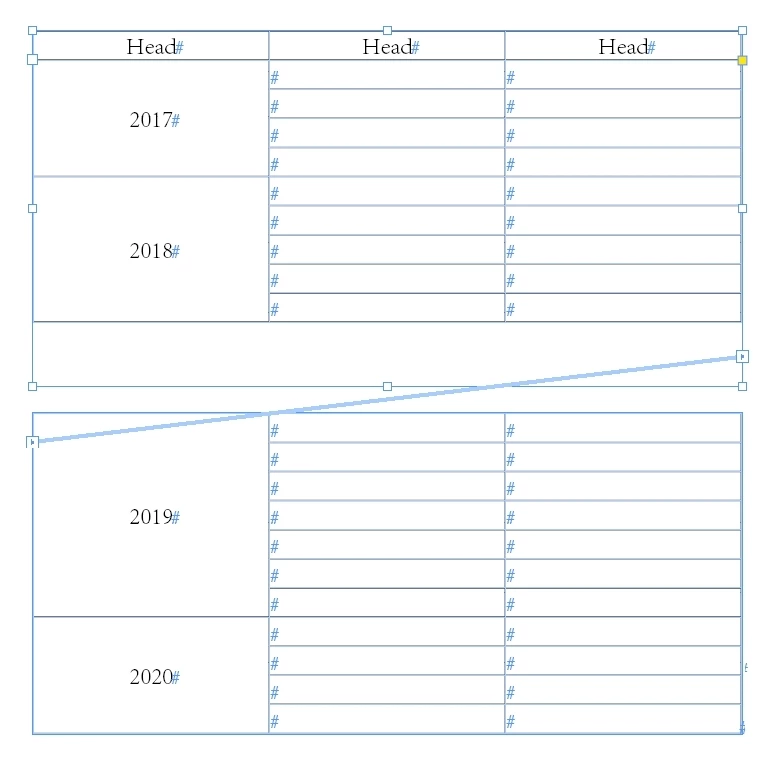
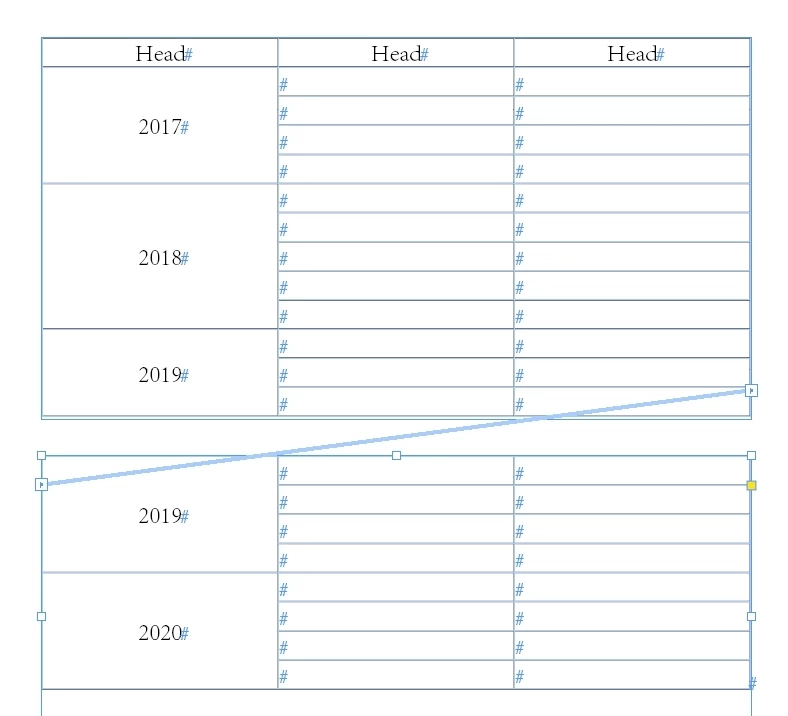
Is there any way to automatically split and merge columns that span multiple rows?

  • February 17, 2025
  • 4 replies
  • 747 views

The client always wants to see standardized typography, so it has to be adjusted every time.
But the next time, you need to unmerge the cells again, adjust, and then merge again.

Is there any way to minimize repetitive, useless operations.
Word seems to have this feature in this area?


I've seen examples of setting the middle horizontal line to no color, but that's prone to errors and off is not a good idea.
 

4 replies

Participant
February 19, 2025

Yeah, I get what you're saying. It’s a hassle to keep unmerging and merging cells just to adjust the formatting each time. Unfortunately, Excel doesn’t really have a built-in feature to automate this process, but you could try setting up a macro to automate the unmerge, format, and then merge steps. That would save you from doing it manually every time.

Another idea could be using the "Format as Table" feature, which can help maintain consistent typography without as much manual work. But I totally hear you—it's still a bit of a workaround.

Robert at ID-Tasker
Legend
February 19, 2025

@robert_7702


Why are you mentioning Excel? 


Dave Creamer of IDEAS
Community Expert
Community Expert
February 17, 2025

I THINK this could be done with a database plugin such as Em Software's InData. However, some minor changes would need to be made:

The year would need to be in the top row, and the following rows with the same year would make the type and rules white/none, until it hits a new year. Technically, the years would still be in the data, just not visibile. 


David Creamer: Community Expert (ACI and ACE 1995-2023)
Robert at ID-Tasker
Legend
February 17, 2025

@Dave Creamer of IDEAS


You're on the right track 😉 but not without a script 😉


Data could be loaded as "rows" - with year duplicated in each row - then script can go though cells in this/1st column - check if next cell in this column has the same contents AND is still on the same page. 


It would be a slight modification to the script I've posted recently in another thread - the one that checks applied CellStyle - after "range" has been found - do merge. 


So even no need for any database plugins / plug-ins - just import it as a table.

Unless there are images / QR codes to be generated automatically - but that can be done with a simple script(s) as a post-processing. 


Dave Creamer of IDEAS
Community Expert
Community Expert
February 17, 2025

I'm 90% sure that InData could handle it--I just wanted some wiggle room until it could be tested. Obviously, I a script would be able to also, but I would not say "not without a script". 


David Creamer: Community Expert (ACI and ACE 1995-2023)
Randy Hagan
Community Expert
Community Expert
February 17, 2025

I don't think there's any way to make this automatically happen for you.


Anytime you ask automated functions to make discretionary calls, it's difficult to get any system to do the things you make discrete calls to do. Automated systems, even with AI, are little more than stupid, but eminently logical machines. They have no idea of what they should do, and are clueless about what they're supposed to do. 


They can only do what they're programmed to do. Unless you can fully define and program the exceptions you want them to consider. In this case, as your client makes discretionary calls for what breaks up where, I'd suggest that you'd have insurmountible issues predicting what those calls would be, and where they'd occur in your layouts.


In short, I believe automation is built to lose here.


Randy

dublove
dubloveAuthor
Legend
February 17, 2025

Yes, I also think scripting is not very realistic here.
But there are always ways to do it that can save a lot of work.

Randy Hagan
Community Expert
Community Expert
February 17, 2025

Perhaps if you can come up with a standardized set of "exceptions" you can define, you could maybe minimize the instances where you'd have to dive in yourself to perform the discretionary ones. Maybe that could lessen the workload a bit.


But in my experience, it's hard to predict what even my longtime clients want.


Maybe a work agreement with your client would help:


  • Initial layouts incorporate "plain" tables for evaluating the accuracy of the document and general placement of which tables go where.
  • Second to last go-around incorporates your "standardized typography" to client standards and review.
  • Your client provides input/corrections to meet interepretations of that "standardized typography" which is then provided on the last go-around. if exceptions are still required, you work with your client to provide such changes on a billable basis.


If you can't change the situation with your client making changes, maybe you can provide financial incentives to speed and simplify the review/change process and reward yourself for enduring it. That's something ...


Randy

Robert at ID-Tasker
Legend
February 17, 2025

Automaticcally - NO. 


Only through scripting.


Haven't you asked this question before?


dublove
dubloveAuthor
Legend
February 17, 2025

Doesn't seem to have been asked .

As I don't think scripting is likely to make it happen.

Scripting is potentially unsafe here.

Robert at ID-Tasker
Legend
February 17, 2025
quote

Doesn't seem to have been asked .

As I don't think scripting is likely to make it happen.

Scripting is potentially unsafe here.


By @dublove


Scripting is the only solution and already has been done. 


"Brute force" solution: 

https://id-tasker.com/split-cells-between-pages/


Not sure what do you mean by "unsafe"?