

dublove
Legend
November 1, 2024
Question

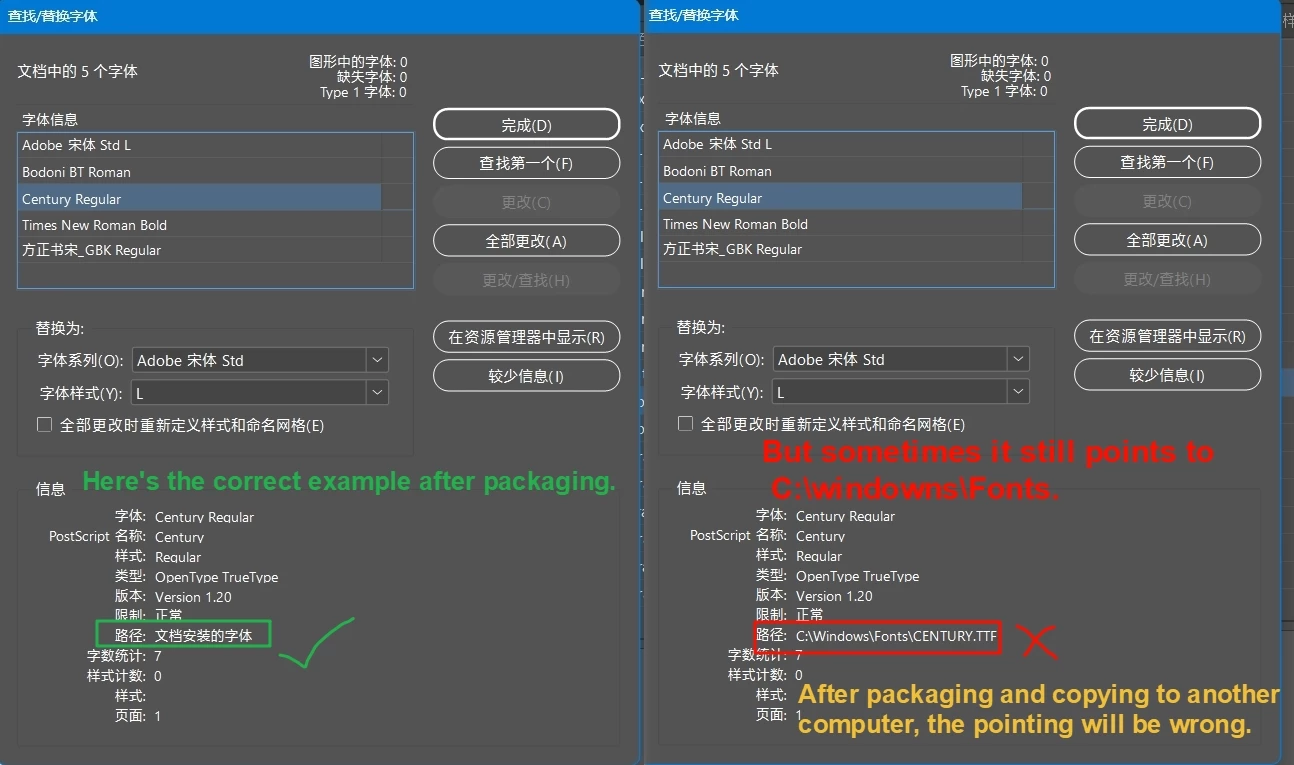
Is there any way to make the packaged fonts not point to C:\windowns\Fonts?

  • November 1, 2024
  • 3 replies
  • 908 views

Is there any way to make the packaged fonts not point to C:\windowns\Fonts?
Especially after packaging and copying to another computer, if the same font in “C:\windowns\Fonts” and “Document fonts” have the same name but different versions, it will point to the “C:\windowns\Fonts”. There will be an error.


Sometimes there will be a hint of missing characters, but you want to change it, but you can't.
Sometimes it is scary, the document will not prompt, will be used directly under the “C:\windows\Fonts”.
The correct way of thinking should be to prioritize the use of “Document fonts”.


Is there any way to use a script to set the fonts of a certain document to point only to “Document fonts” and disable pointing to “C:\windows\Fonts”.

Thank you very much.
 

The full documentation is here(this is not an example of an error occurring and may not be informative)

http://www.fileconvoy.com/dfl.php?id=g699b5549b21dd62c1000567623835ed14e5b8cda60 

This topic has been closed for replies.

3 replies

Robert at ID-Tasker
Legend
November 1, 2024

@dublove


If you know in which situation what folder should be used for each font - it could be scripted.


BobLevine
Community Expert
Community Expert
November 1, 2024

I was always under the impression that the document fonts folder should be the primary source for exactly this reason, but I think if you open in a new version of ID you might need to save it, close it and then reopen for that to happen.


IIRC one of the big reasons for the document fonts folder was to be sure that the proper version of a font was being used because the assumption is that the user already has a license for the font.

BobLevine
Community Expert
Community Expert
November 1, 2024

Are you opening the file in a newer version of InDesign than it was created in? 

Vivek-Sharma
Community Manager
Community Manager
November 1, 2024

Hi, Thank you for reaching out to us. We've shared this query with our product team to explore further recommendations. We will keep you posted. 


^VS