

dublove
Legend
Oct 30, 2026 6:38 AM UTC
Answered

Is this the original aspect ratio of the image? How to obtain it?

Hello everyone.

I have been searching for the width to height (W/H) ratio of the image before it is deformed in InDesign.

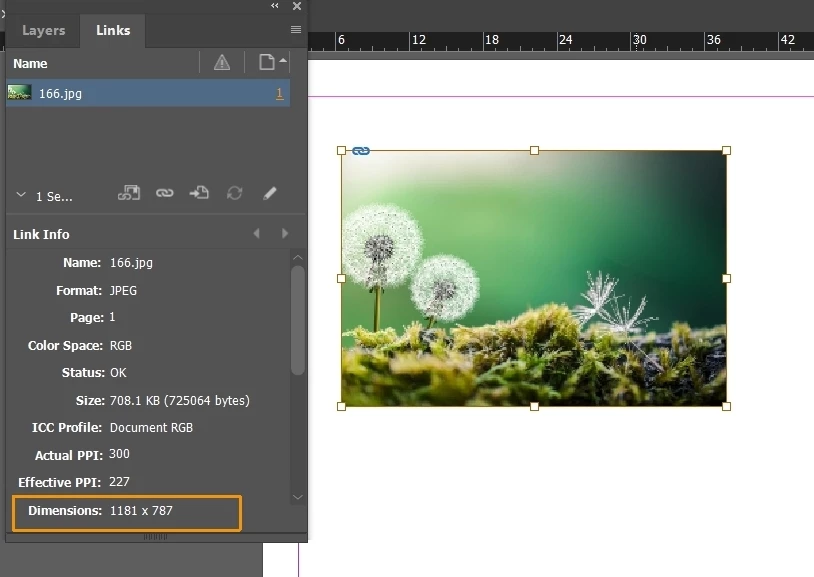
Today, I suddenly discovered a genus named Dimensions,
Unless modified in Photoshop, this value will not change in Indeisgn, right?
I only found item.HorizontalLayoutConstraints in ExtendeScrip; I don't know how to use it.

How to obtain this value using a script?

Thank you.
 

    dublove
    dubloveCorrect answer
    Legend
    Nov 1, 2026 5:37 PM UTC

    This post is messy, rob day has been resolved.
    Look here:


    44 replies

    dublove
    dubloveAuthorCorrect answer
    Legend
    Nov 1, 2026 5:37 PM UTC

    This post is messy, rob day has been resolved.
    Look here:


    Translate
    Mike Witherell
    Community Expert
    Community Expert
    Nov 1, 2026 4:45 PM UTC

    The title of this question reminds me that I am often wishing for better reportage of a page or an image’s ratio (as in 5x7 or 2x3 or 16x9). I have been slowly developing a script that adjusts a graphics frame in InDesign to the nearest simple ratio, or else adjusts a frame to a chosen common ratio. 

    I often wish for the same thing in Photoshop, which readily tells me the pixel height and width, but I wish it would also report the ratio (or nearest common ratio). I find thinking and designing with ratios in mind makes for better-looking page design.

    Translate
    Mike Witherell
    Legend
    Oct 31, 2026 1:13 PM UTC


    click inside the frame (make sure you have selected the image) and notice the scale for the image from control panel.


    and yes  you are right this is the original image dimension in the Link Info panel 

    for the script please follow other answers.

    Translate
    rob day
    Community Expert
    Community Expert
    Oct 31, 2026 1:27 PM UTC

    Hi ​@manal shanableh , I cant blame you for not reading this full thread, but the question is about getting the Dimensions listed in Link Info for a transformed image via scripting (ExtendScript).

    Translate
    Legend
    Oct 31, 2026 2:14 PM UTC

    I have read the question, but I believe the dimensions of the original image will remain unchanged.

    Retrieving the Dimensions value displayed in Link Info for a transformed image using ExtendScript should not modify the original image or its dimensions. The script is simply reading the information, not modifying the original image file.

    I'm happy to be corrected if I've misunderstood anything. Thank you!

    Translate
    rob day
    Community Expert
    Community Expert
    Oct 30, 2026 11:03 AM UTC

    Hi ​@dublove , This gets the aspect ratio of the image, not its container. The image’s container could mask it and have a different ratio.


    var d = app.activeDocument;
    var sel = app.selection[0];
    if (sel.constructor.name == "Image") {
    var gb = sel.geometricBounds;
    var w = gb[3] - gb[1];
    var h = gb[2] - gb[0];
    var r = w.toFixed(0) + ":" +h.toFixed(0)
    if (w > h) {
    alert("Horizontal " + r)
    } else {
    alert("Vertical " + r)
    }
    }


    Translate
    rob day
    Community Expert
    Community Expert
    Oct 30, 2026 11:25 AM UTC

    Also note that the ratio values are using your millimeter ruler units. If you need consistent numbers you might want to set the scripting measurementUnit. It also doesn’t handle any transformations that might be applied to the image or its container(s)—rotation, sheer, skew, etc


    app.scriptPreferences.measurementUnit = MeasurementUnits.MILLIMETERS;


    //reset units
    app.scriptPreferences.measurementUnit = AutoEnum.AUTO_VALUE;


    Translate
    leo.r
    Community Expert
    Community Expert
    Oct 30, 2026 7:31 AM UTC

    I don’t think there’s a property to retrieve it directly (although I could be wrong, too). You’ll need to retrieve it from image metadata one way or another. InDesign offers some convoluted way to do this via LinkMetadata then getProperty (namespace: string, path: string); I don’t know if Extendscript offers access to easier ways of doing this. (In theory, you can also calculate pixel dimensions via physical dimensions and resolution, but I don’t think it’s the right way of doing this).

    It’s quite possible there are much easier ways to obtain this info that I’m missing, in which case I’m sure others will let us know.

    Translate
    dublove
    dubloveAuthor
    Legend
    Oct 30, 2026 9:44 AM UTC

    Look at this, what works is var ep=sel. interactivePpi;

    (with attachments)
    When the image is not deformed, ep[0]=ep[1], Only display one.
    After the image is deformed, two different values are displayed
    But if the deformation of ep [0] ≠ ep [1] as shown in the figure, how can you retrieve the original effective Ppi

    var d = app.activeDocument;
    var sel = app.selection[0];

    if (sel.constructor.name == "Image") {
    var ap = sel.actualPpi;
    var ep = sel.effectivePpi;
    var gb = sel.geometricBounds;

    var w = gb[3] - gb[1];
    var h = gb[2] - gb[0];
    alert(ep[1]);
    alert(ep[0]);

    // Original pixel size
    var pixelW = Math.round(w * (ep[0] / ap[0]));
    var pixelH = Math.round(h * (ep[0] / ap[0]));
    var ratio = pixelW / pixelH;
    }
    alert(ratio)


    Translate