
Inspiring
April 1, 2025
Answered

Issue with copying master pages

  • April 1, 2025
  • 2 replies
  • 304 views

I'm using InDesign 2025 on a PC. 

I'm trying to create a photo book in one of the Blurb templates. I've done several of these, and every one uses the same master pages. I've created a grey background that I use throughout the Blurb book.

I googled how to copy the master pages from a source document to a new one, and every time I go into Layout-Pages, the ability to Load Pages is either grayed out, or not showing up at all. I have done this before but forgot how to do it. The more I google, the more confused I am getting. 

Can anyone give me simple instructions as to how to do it, please? I must be highlighting something incorrectly. Thank you. 
Correct answer Robert at ID-Tasker

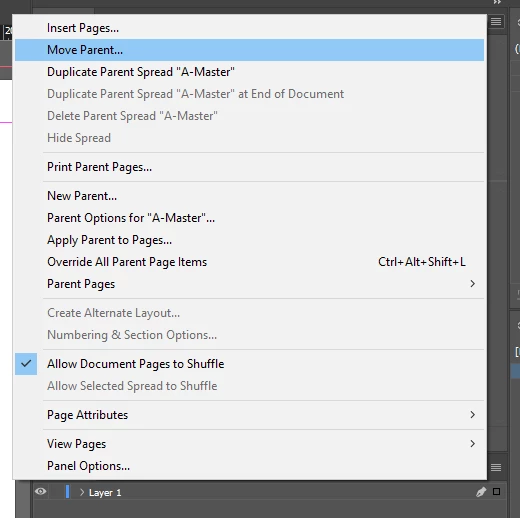
With more than ONE document open - the MOVE option will be active:


2 replies

Dave Creamer of IDEAS
Community Expert
Community Expert
April 1, 2025

Although you solved your problem, you shouldn't of had a problem with the Load parent pages menu. Where were you looking?


David Creamer: Community Expert (ACI and ACE 1995-2023)
Inspiring
April 1, 2025

Layout, then Pages. I thought the Load option would be there. I did see it, albeit grayed out. I honestly don't know what I was doing wrong. 

Dave Creamer of IDEAS
Community Expert
Community Expert
April 2, 2025

Try it from the Pages panel--it's under the Parent Pages submenu.


David Creamer: Community Expert (ACI and ACE 1995-2023)
Robert at ID-Tasker
Robert at ID-TaskerCorrect answer
Legend
April 1, 2025

With more than ONE document open - the MOVE option will be active:


Inspiring
April 1, 2025

OK, that works for me! Thank you so much. 

As usual in InDesign, there's more than one way to accomplish a task.