

Issue with Default Black Color Appearing Purple in InDesign 2025 Print Jobs
- October 25, 2024
- 3 replies
- 558 views
Hello,
We updated to Adobe Cloud 2025 a few days ago. Today we completed the first major print job and when checking the print data, we noticed that there is a significant problem with the ‘Black’ colour created in the colour palette in InDesign, which is created by default by InDesign and cannot be deleted.
We have an area in 100% magenta and above it an area with 100% black. If you write the whole thing as PDF-X4, the black area does not appear black but slightly purple. This is similar to setting the black area to multiply
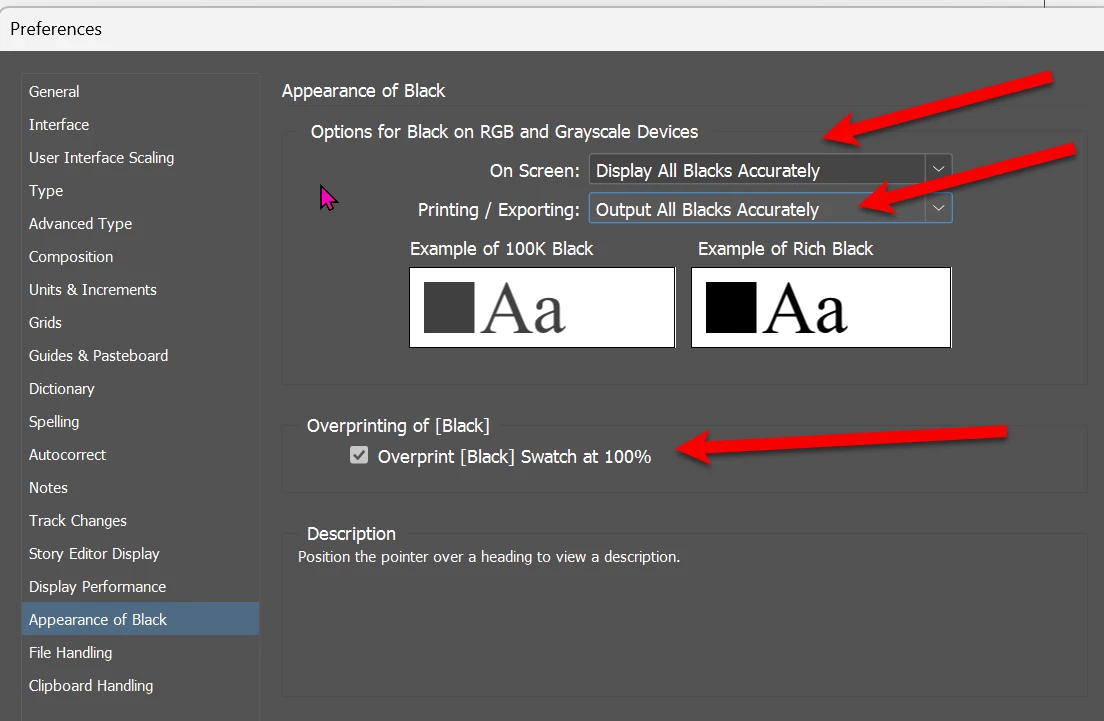
We then checked whether anything is set to ‘overprint’, but it is not.
In Acrobat you can then see quite clearly in the output preview that the total colour application on the black is 200%.
If you create your own new colour with 100% black, then everything works.
Very strange.
@Adobe is there a reason for this?
Here are my test documents
Greetings
Toby
<Title rnemaed by MOD>


 AdChoices