Participating Frequently
August 22, 2024
Answered

Issue with Enter Key Resulting in Page Breaks Instead of Column Breaks in InDesign

  • August 22, 2024
  • 6 replies
  • 2920 views

I have been working with indesign for almost 20 years.
But suddenly I can no longer write in indesign.


No matter whether I press Enter, Return, or these combined with Shift, I always get a page break instead of a column break.

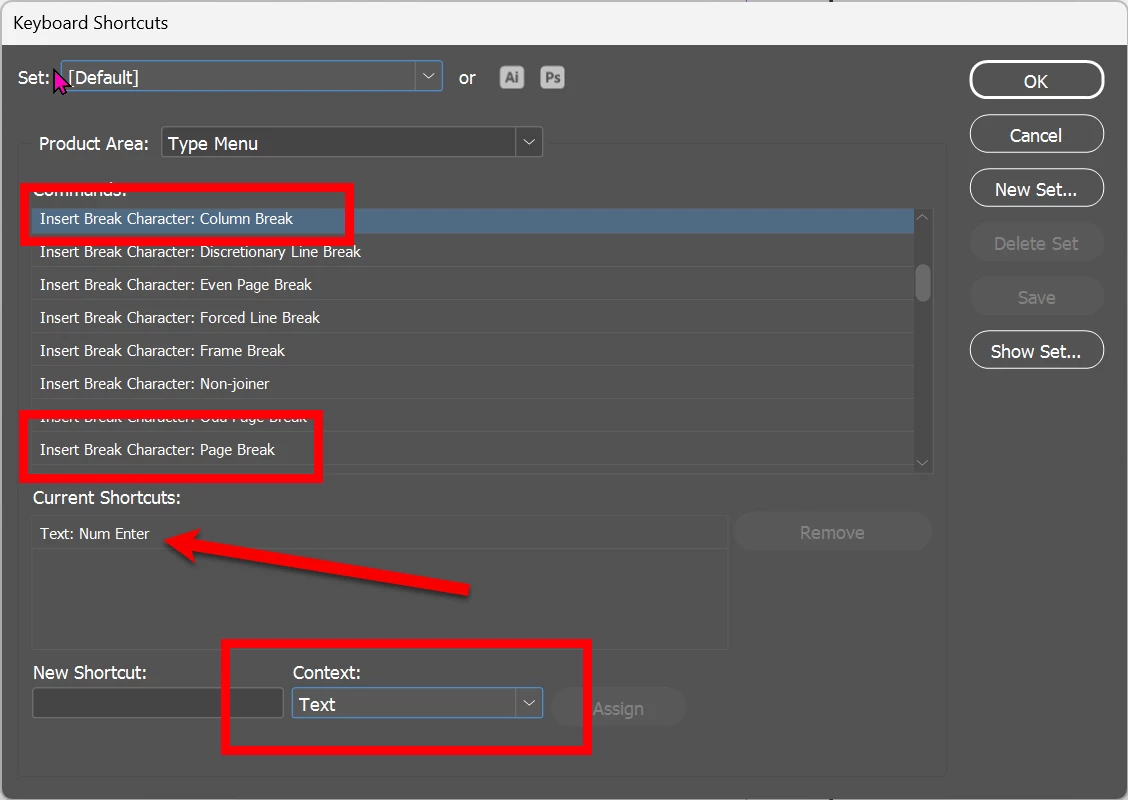
But if you look at the key assignment, Return is correctly set for column break.

So, what can I do?


ps:
I can write normally in other programs.
I only have this problem with indesign (current version).


<Title renamed by MOD>



This topic has been closed for replies.
Correct answer Dave Creamer of IDEAS

Its a brand new (2 weeks) Medion. And it has a numlock. But i turn it off every day and never uses it.

I also never use enter, always Return (or Shift Return).


Some Medion laptops have full sized keyboards, but I assume yours does not. You can remap (or add to) the keyboard commands for column and page breaks. Be sure to enter the new KB commands as Text context.

6 replies

Robert at ID-Tasker
Legend
August 24, 2024
Dave Creamer of IDEAS
Community Expert
Community Expert
August 23, 2024

Can you show correct screen captures with two columns per page to demonstrate the problem? As mentioned, you example only shows one column per page, so it's hard to see the problem.


It's working normally on my system. 


David Creamer: Community Expert (ACI and ACE 1995-2023)
James Gifford—NitroPress
Legend
August 23, 2024

This. I really concur that what's happening here is an almost "semantic" issue in which columns and pages can't be distinguished. Create a multi-column layout and see if the behavior is more predictable; that KP Enter is actually inserting a column break, as is standard, when you actually have columns.

Dave Creamer of IDEAS
Community Expert
Community Expert
August 24, 2024

Yes, with a one-column layout, a column break is effectively the same as a page break. 


David Creamer: Community Expert (ACI and ACE 1995-2023)
Mike Witherell
Community Expert
Community Expert
August 22, 2024

What happens if you take the default Keyboard Shortcuts and make a newly-named custom Keyboard Shortcuts?

If that doesn't help, I would reset preferences.

https://community.adobe.com/t5/indesign-discussions/reset-indesign-preferences-and-other-troubleshooting/td-p/11990234

Mike Witherell
Participating Frequently
August 23, 2024

resetting was the first i did.

And my own shortcut doesnt change a thing either.

I even reinstalled it. Same problem.


Robert at ID-Tasker
Legend
August 22, 2024

@Jens219913485dsl


Try resetting preferences. 


jmlevy
Community Expert
Community Expert
August 22, 2024

Seeing your screenshots, it seems that you have a single column text frame on each page. So, it's logical that pressing the enter key makes a page break.

Participating Frequently
August 22, 2024

Its not.

This document was made only to showcase the problem.

Of course i work with regular pages with multiple paragraphs.


Participating Frequently
August 22, 2024

Edit


Its win 11 and yes, i searched for the problem and found a few articles in this forum where it was advised to press FN simultanely or switch between key binding sets.

That cant be a serious solution.


Tried a different set though: doesnt work. neither does FN.

Only way to get a column break is to enter it manually with the menu.

Impossible to work with.

Peter Spier
Community Expert
Community Expert
August 24, 2024

Your mention of the fn key suggests to me that you might be using a laptop keyboard. I have seen key-mapping issues in the past on some laptops that seem to be related to the status of the Numlock.

Do you have this problem if you connect an external standard keyboard?