Participant
October 26, 2021
Answered

Issue with font variables in InDesign

  • October 26, 2021
  • 3 replies
  • 1906 views

Hello!

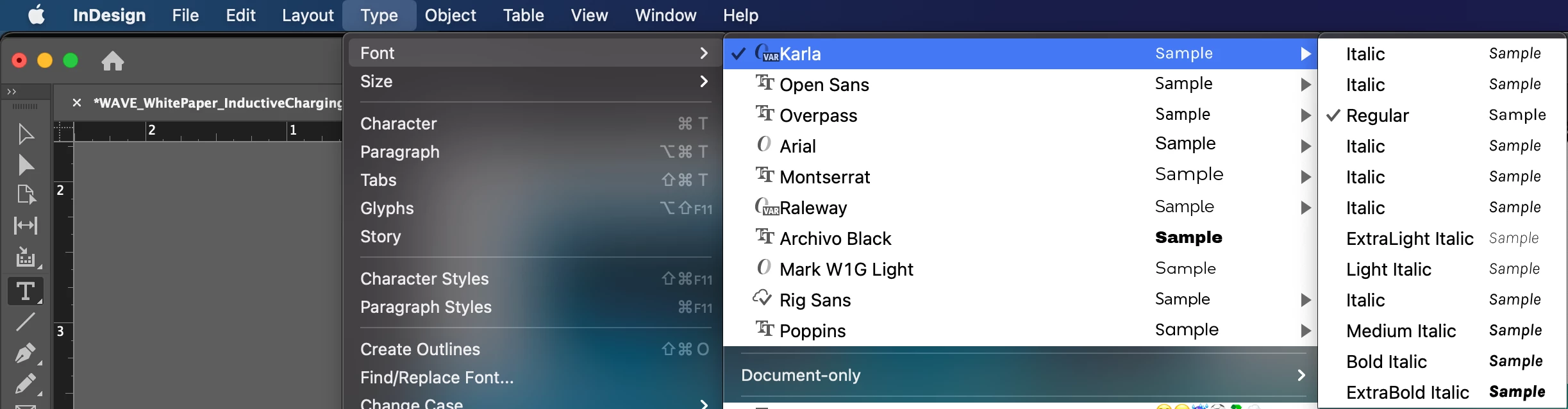
I am using the Google font Karla in my indd document, however all of the font variables are converting to Italic for some reason. For example, I am trying to use Karla Light for my body text, but indd is converting it to Karla Italic. I have tried creating a Paragraph Style with Karla Light, making sure Character Style is on "None", removed and reinstalled the font from my desktop, removed and reinstalled the font from the Document Fonts folder, etc. I do not have this issue with the font on Illustrator or Photoshop, so I believe it might be an InDesign issue.


Here is what I see on my screen:
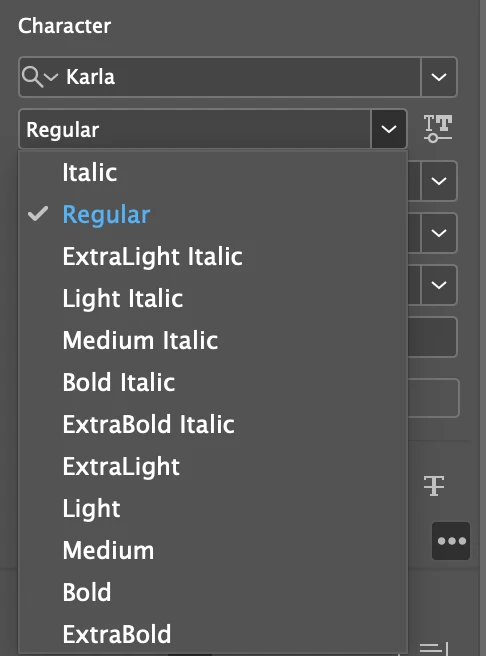
 

The font variables are showing up in the Character panel but are converted to Italic in the Type tab. This issue is unique to the current document I am working on right now. I tested this font on another document and all the font variables are displaying correctly.


I appreciate any ideas on what could be causing this!!

Correct answer Daphne5C68

Figured it out! Had to delete the entire Document Fonts folder from the package and it fixed itself 🙂

3 replies

Participating Frequently
April 3, 2023

OMG, this has plagued me for a year now, as Karla is the brand font for one of my clients. I can't believe I just found your post. It worked like a charm. Thank you!

Community Expert
October 26, 2021

Hi Daphne,

well, you solved your issue with the Karla font on your machine.


I wonder how you installed the font after you trashed the Document fonts folder?

And what did that Document fonts folder contain? How many styles of that Karla font?

Maybe some styles in that Document fonts folder blocked other styles that were installed in a different way?


Thanks,
Uwe Laubender

( ACP )

Participant
March 13, 2023

Just had exactly the same issue. Was using variable weight of Karla in both regular and italic within the document and it kept trying to change everything to italic after packaging the file! Deleting the package of fonts fixed the issue. Weird glitch.

scottc21012333
Participant
March 18, 2025

How/where do we delete the font package? Thanks.

Daphne5C68AuthorCorrect answer
Participant
October 26, 2021

Figured it out! Had to delete the entire Document Fonts folder from the package and it fixed itself 🙂

Participant
March 7, 2023

Thanks so much for posting this solution! My company's brand font is Karla and this was driving me nuts. Deleting the  entire Document Fonts folder from the package worked like a charm!