Participant
January 27, 2025
Answered

Issue with InDesign Package Export – Missing Bleed in PDF

  • January 27, 2025
  • 3 replies
  • 1358 views

Hi Adobe Users,

I am experiencing an issue with InDesign when exporting a package. The document has been set up with a 3mm bleed, but when I export it as a package, the resulting PDF does not include the bleed.


When exporting a regular PDF, the bleed is correctly included. However, when using the Package feature, the generated PDF does not retain the bleed settings.


I have verified that the bleed is correctly set in the document settings, but it seems to be ignored in the package export process.


Has anyone encountered this issue before? Any advice or solutions would be greatly appreciated!


Thanks in advance for your help.

Correct answer Rene Andritsch

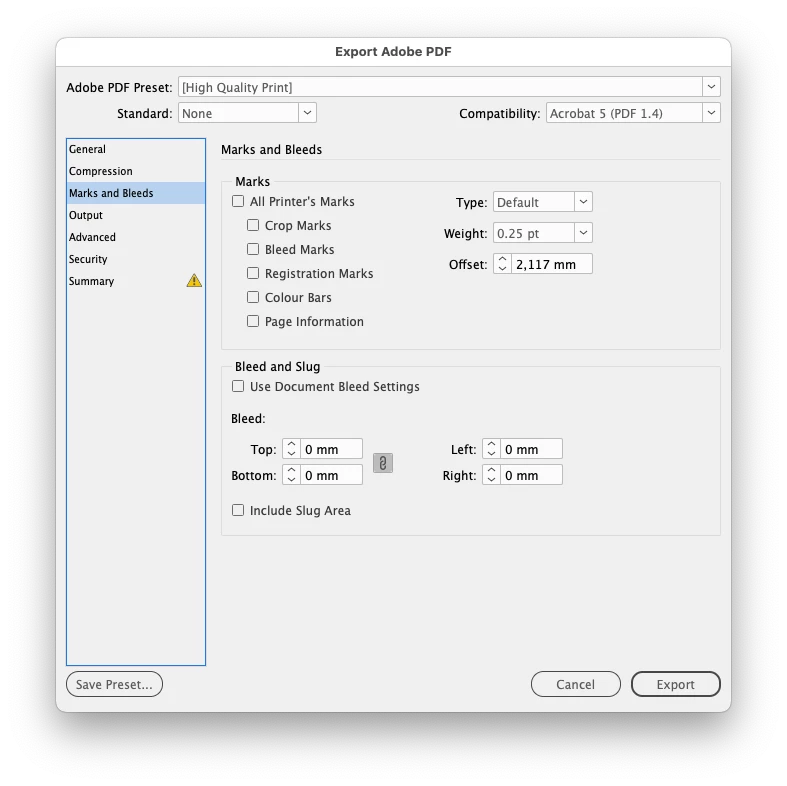
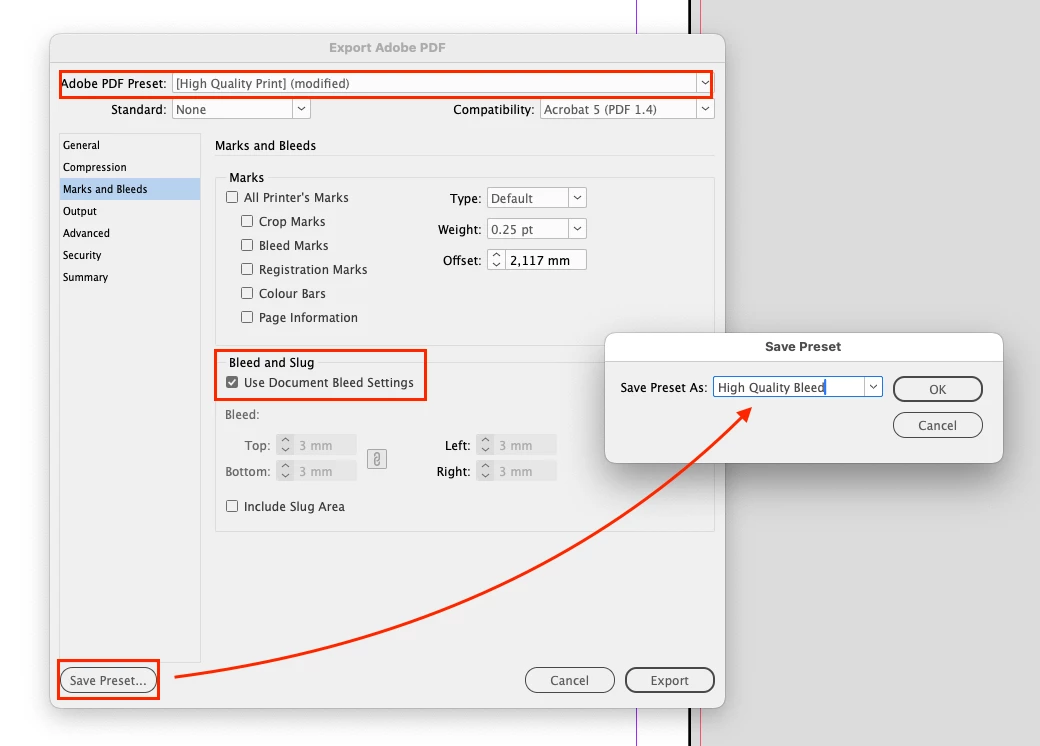
Yes because the default “High Quality” print setting does not include bleed. That is exactly what the info is showing you. You have to save your own setup. (see screenshot 2) then select that preset for the packaging. Use the regular Export dialogue to setup your custom PDF. There you can select “High Quality” then add the bleed and safe that as a new preset. You could also go via the “File > Adobe PDF Presets > Define…” menu select the “High Quality Print” setting and then click “New”, go to the “Marks and Bleed” section and activate the option. 

3 replies

Rene Andritsch
Community Expert
Community Expert
January 27, 2025

When you export a PDF via the Package-functionality, you have to check if the PDF-setting for the export has the option activated that includes the bleed. For instance the standard PDF/X-4 setting does not automatically apply the document bleed settings (see second screenshot). If you want to do that you have to create a custom PDF export setting that includes the activated bleed option.

maja_1731Author
Participant
January 27, 2025

I have all the right settings set. The strange thing is that when exporting a pdf the 'normal' way bleed settings are being honored, but not when exporting as a package. 


Rene Andritsch
Community Expert
Rene AndritschCommunity ExpertCorrect answer
Community Expert
January 27, 2025

Yes because the default “High Quality” print setting does not include bleed. That is exactly what the info is showing you. You have to save your own setup. (see screenshot 2) then select that preset for the packaging. Use the regular Export dialogue to setup your custom PDF. There you can select “High Quality” then add the bleed and safe that as a new preset. You could also go via the “File > Adobe PDF Presets > Define…” menu select the “High Quality Print” setting and then click “New”, go to the “Marks and Bleed” section and activate the option. 

Willi Adelberger
Community Expert
Community Expert
January 27, 2025

When you package you have to select a PDF preset with bleed.

jmlevy
Community Expert
Community Expert
January 27, 2025

When you package a file and want to include a PDF in the package folder, you have to choose the right PDF preset. Maybe the one you have choosen ignores the bleed.

Edit: to be perfectly clear, I do not mean that you have to choose this PDF preset. It's just to show you where you choose it.