
Known Participant
October 9, 2026
Answered

Issue with text box, the text inside jumps around when I move it

  • October 9, 2026
  • 8 replies
  • 18 views

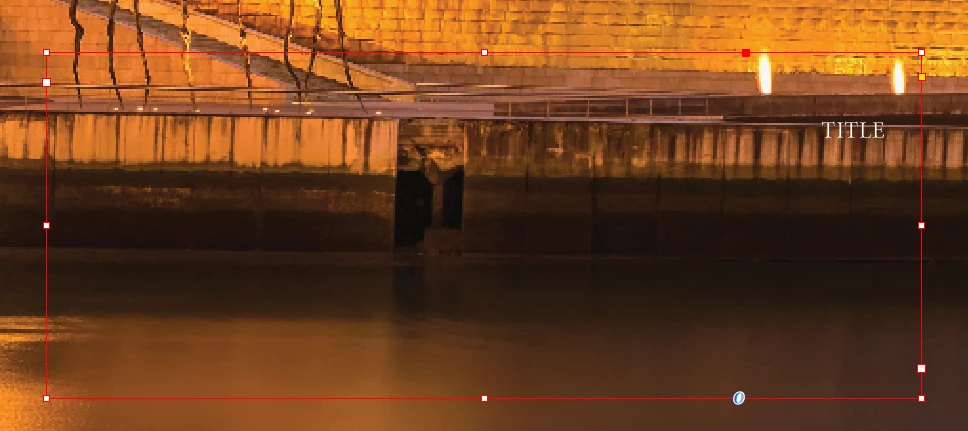
I think this might be a problem related to text wrap, because I previously put a block of text with text wrap and now apparently doesn’t have it (even though it does). So when I check for this text box (image below) it has no text wrap either but that might not be the case. There’s no appearance panel so I’m not sure how I should check this.
 

    Correct answer Monika Gause

    Probably text wrap applied to the image.

    You can select the text box, go to Object > Text frame options and turn ob the option to ignore text wrap. If that solves it, then there is some text wrap interfering.

    8 replies

    BobLevine
    Community Expert
    Community Expert
    October 9, 2026

    Are there any objects on other layers that might be interfering? Even if they’re hidden they will still effect it. 

    Known Participant
    October 9, 2026

    I do have other objects but I don’t see why they would interfer

    Known Participant
    October 9, 2026

    Apparently it doesn’t let me post more than one image at once


    leo.r
    Community Expert
    Community Expert
    October 9, 2026

    Apparently it doesn’t let me post more than one image at once

     just copy-paste as many images as you want.

    Known Participant
    October 9, 2026

    I did but the second image doesn’t show up

    Monika Gause
    Community Expert
    Community Expert
    October 9, 2026

    So you want to know why the text sits there? Or is there supposed to be more text than that?


    Can you please show the text wrap options?

    The paragraph settings?

    Known Participant
    October 9, 2026

    I want to know why it sits there even though it’s aligned to the left. 


    Monika Gause
    Community Expert
    Monika GauseCommunity ExpertCorrect answer
    Community Expert
    October 9, 2026

    Probably text wrap applied to the image.

    You can select the text box, go to Object > Text frame options and turn ob the option to ignore text wrap. If that solves it, then there is some text wrap interfering.