

Jagged edges in photographs printed from InDesign
Hi everyone,
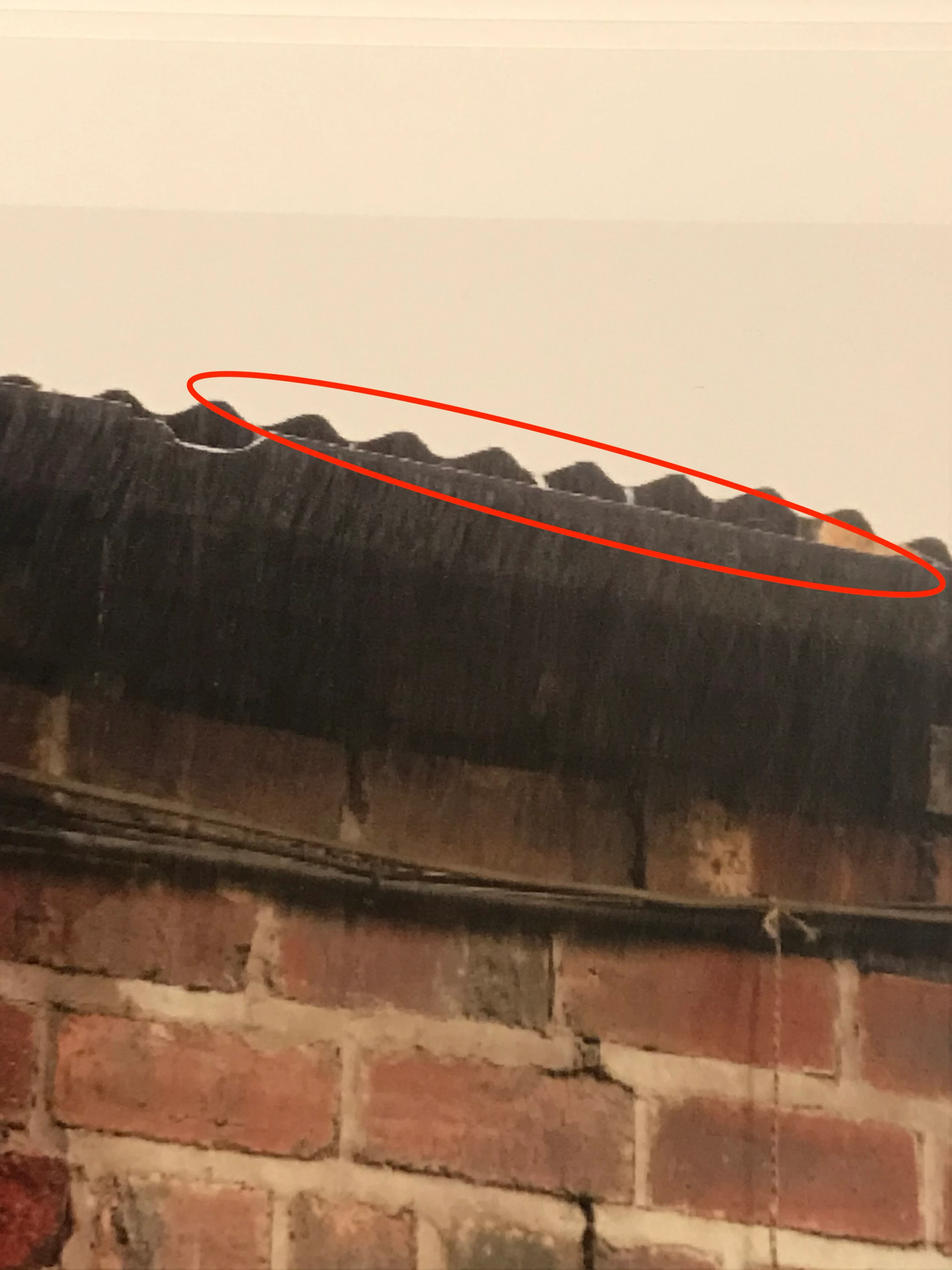
I recently began printing my own double sided inkjets for my photographic portfolio. In case it matters I'm using an Epson SC P600 printer with my own custom paper profiles. I lay out the folio pages in InDesign and I've been printing directly from InDesign. I'm very happy with the quality of the prints but I've noticed an issue with a few of them, whereby certain areas appear jagged / saw toothed - see example attached. I pretty sure it's usually on an area in the image which has a straight edge - e.g. in this case the edge of a gutter on a building.
When viewed in Photoshop there is no jagged area and when printed from Photoshop there is no jagged area either. So, I'm assuming this is something I'm doing wrong in InDesign, or perhaps that I shouldn't be printing directly from my InDesign file. But there is an inconsistency here - only images shot on my digital camera seem to have this issue in InDesign. If I print images shot on film and scanned, they never have jagged areas and look great when printed from In Design. The resolution of the files placed into my InDesign file is the same for both types of image - 360ppi. And all of the original files are larger than required for my layout, and appear perfectly sharp / at the expected sharpness/resolution in general - it isn't general pixellation in the image.
Any ideas?
Thanks!
Thom


 AdChoices