

Andrea HG
Participating Frequently
March 25, 2025
Question

Jagged text when using 'Text Wrap'

  • March 25, 2025
  • 4 replies
  • 783 views

Hi All,

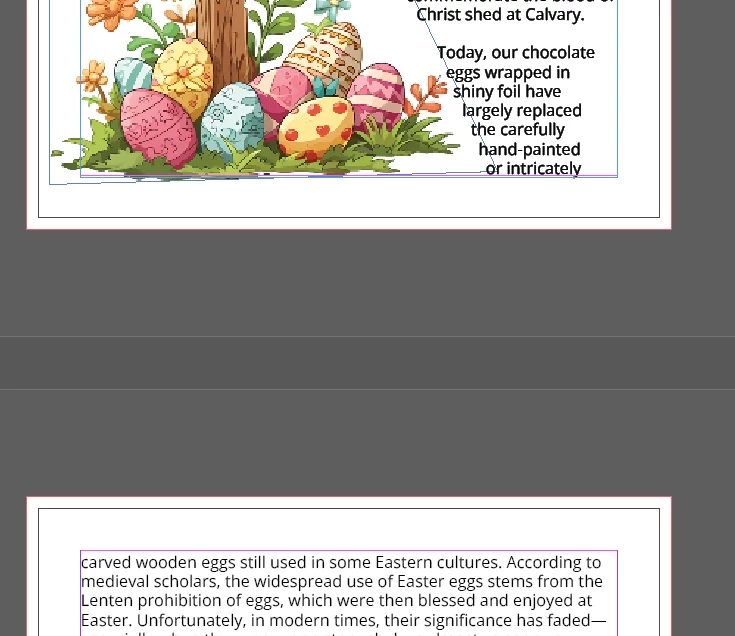
I regularly compile a Senior's newsletter and whenever I use 'Text Wrap' the text on the page becomes pixelated (jagged). The issue appears to be with Transparency Blend Space., specifically when this is set to CMYK. The newsletter is printed and I would assume the Blend Space needs to be CMYK. You can see the imperfect text when the document is exported to PDF for printing and then printed.


The attached image shows two pages. The same [regular] font is used on both pages. It occurs regardless of what font I use.


Has anyone else had this issue and overcome it?
 

4 replies

Dave Creamer of IDEAS
Community Expert
Community Expert
April 1, 2025

Check your Flatener Preview panel (Window>Output>) for any outlined or raster-filled text. 


David Creamer: Community Expert (ACI and ACE 1995-2023)
James Gifford—NitroPress
Legend
March 26, 2025
quote

The issue appears to be with Transparency Blend Space., specifically when this is set to CMYK. The newsletter is printed and I would assume the Blend Space needs to be CMYK.


I am not sure this is the case. Working in CMYK is a somewhat archaic method, used (IIRC) when InDesign went directly to press output. With the evolution of Acrobat/PDF, it's far more common now to work entirely in RGB and manage all color conversion etc. in the export to PDF.


Others here can correct or amplify, but I suspect the problem is entirely avoidable by simply not using CMYK settings in the document.


This is all doubly true if you're not going to commercial four-color printing. All (modern) digital printing assumes RGB input as well and does not always handle CMYK input well.

Andrea HG
Andrea HGAuthor
Participating Frequently
March 26, 2025

The issue goes away when I set the transparency to RGB, @James Gifford—NitroPress. Then I get the following message when I go to export to PDF for [external] printing. Am not sure if it would make a great difference or not. I usually export to PDF using 'Press Quality' or 'PDF/X-1a:2001'. I am more than happy to accept any suggestions/recommendations for settings! I usually work with web-based graphics and only have to deal with printed publications every so often. 😁


Robert at ID-Tasker
Legend
March 25, 2025

@Andrea HG


What are your PDF export settings? 


Willi Adelberger
Community Expert
Community Expert
March 25, 2025

Do you work with layers?

Do so and put the text in a layer ABOVE the image.

Andrea HG
Andrea HGAuthor
Participating Frequently
March 25, 2025

Hi @Willi Adelberger , yes, I work with layers and have the text above any graphics. I have had this issue for at least 15 months and with two different versions of Indesign. I am working with the current 2025 version. 

Willi Adelberger
Community Expert
Community Expert
March 25, 2025

Is any kind of transparency involved on that page?