


Participating Frequently
August 4, 2019
Question

JavaScript Fehler (InDesign Creative Suit 6)

  • August 4, 2019
  • 2 replies
  • 1221 views

Hallo allerseits,

Ich habe seit neuestem das Problem, dass InDesign eine Fehlermeldung anzeigt mit der Fehlernummer 54, nähere Details findet ihr unten im beigefügten Screenshot.

Die Dateien lassen sich nur noch über das Programm öffnen indem ich auf "Datei->Öffnen..." klicke.

Beenden lässt sich InDesign auch nicht mehr, ich muss es erzwingen (was ja eigentlich nicht gut ist).

Es öffnet sich auch ab und zu das Fenster zur Aufforderung "Java für OS X 2015-001" zu installieren, was aber nicht möglich ist.
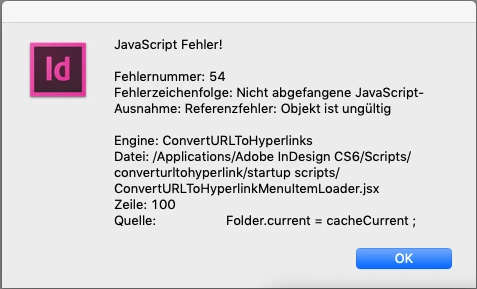
Eine Deinstallation und Installation kommt leider auch nicht mehr in Frage. Ich konnte das Paket nicht installieren, bis ich über Umwege den Paketinhalt anzeigen lassen habe und nur so installieren konnte. Danach kam aber auch das 2. Problem, dass meine Seriennnummer nicht überprüft werden konnte. Nun stand ich da, bis ich auf die Idee kam InDesign durch meine externe Festplatte wiederherzustellen.

Aber Fehlernummer 54 wurde dadurch auch nicht behoben.

Der Kundendienst konnte mir da auch nicht weiterhelfen. Ich hoffe dass ich hier die nötige Hilfe bekomme.

LG

Aylin.

This topic has been closed for replies.

2 replies

rob day
Community Expert
Community Expert
August 4, 2019

The error is from a startup script. You can disable by removing the converturltohyperlink folder and its contents from your Scripts folder

AylinAuthor
Participating Frequently
August 4, 2019

I removed the folder as you said. Now the error window doesn't show up. But I still can't open the files through finder. I have to open it from InDesign itself. And also I can't quit without forcing. Now I will try to delete line 100, as I read in the internet somewhere. Hope this will help.

AylinAuthor
Participating Frequently
August 4, 2019

Deleting line 100 in the skript has achieved nothing unfortunately. So by now I will keep the converturltohyperlink folder removed. But hope I will get help here

Bill Silbert
Community Expert
Community Expert
August 4, 2019

What Mac operating system are you using? CS6 is not supported for any Mac OS later than Yosemite (10.10). If you are using a later version of the Mac OS then your problem is probably the result of that.

AylinAuthor
Participating Frequently
August 4, 2019

I'm using the latest operating system for mac and I thought so, that these programs don't function normal anymore. I bet some day we even won't be able to open and have to do subscription.