

vinny38
Legend
January 22, 2018
Answered

Js error 45 "Object is Invalid"

  • January 22, 2018
  • 3 replies
  • 5582 views

Hi Community.

I'm trying to write a small script that would fix the inconsistent numbered list paragraphs when the date of creation of text frames does not he follow the layout.
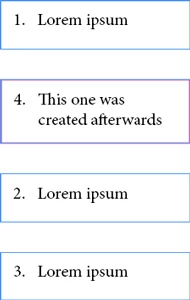
So here's the script:

var myDocument = app.documents.item(0); 

var myParaStyle = "numbered"; 

var myFrames = []; 


//create collection 

for (i = 0; i < myDocument.textFrames.length; i++) { 

    if (myDocument.textFrames.paragraphs[0].appliedParagraphStyle.name == myParaStyle) { 

        myFrames.push(myDocument.textFrames); 

    } 


//sort collection 

function sortFramesinArray(a, b) { 

    if (Math.round(a.geometricBounds[1]) === Math.round(b.geometricBounds[1])) { 

        return Math.round(a.geometricBounds[0]) - Math.round(b.geometricBounds[0]); 

    } 

    return Math.round(a.geometricBounds[1]) - Math.round(b.geometricBounds[1]); 

myFrames.sort(sortFramesinArray); 


// cut and paste in place 

for (i = 0; i < myFrames.length; i++) { 

    myFrames.select(); 

    app.cut(); 

    app.pasteInPlace(); 

}

I've tested it on a very basic CS6 document and it seems to be working.

Now, tested by another user on a CS5.5 document, the script returns a 45 "Object is Invalid" error.

See here: automatic numbering gone wrong

Could anyone advice on why this happened? Is a script issue (I'm a beginner), a document issue, or a Indd version issue?

Thanks in advance for your enlightening help.

Vinny

This topic has been closed for replies.
Correct answer Loic.Aigon

Hi vinny38

Here you are:

//Main routine 

var main = function() { 


//======VAR======// 

var doc = app.properties.activeDocument, 

fgp = app.findGrepPreferences.properties, 

ps, found, n, nText, data = {}, page, ptf, vb; 


//Exit if no documents open 

if ( !doc ) return; 


ps = doc.paragraphStyles.itemByName ("listeNum"); 


//Exit if paragraph style is not present 

if ( !ps.isValid ) { 

alert("The style \"listeNum\" is required !\rScript exits" ); 

return; 


//Setting grep prefs for finding texts 

app.findGrepPreferences = null; 

app.findGrepPreferences.properties = { 

findWhat:".+", 

appliedParagraphStyle:ps, 


found = doc.findGrep(); 

n = found.length; 


//Looping through text results  

//and store text frames reference inside object  

//for further processing 

while ( n-- ) { 

nText = found

ptf = nText.parentTextFrames; 

if ( !ptf.length ) continue; 

ptf = ptf[0]; 

if ( !ptf.parentPage ) continue; 

vb = ptf.visibleBounds;

data[ptf.parentPage.id] = data[ptf.parentPage.id] || {}; 

data[ptf.parentPage.id][ptf.id] = { 

tf:ptf,  

num:Number ( nText.paragraphs[0].bulletsAndNumberingResultText.replace (/[^\d]+/g, '') ), 

x : vb[1],

y : vb[0] 

}; 


//Reordering frames per page 

for ( prop  in data ) { 

reorderTFS ( data[prop] ); 

app.findGrepPreferences.properties = fgp; 


//reordering routine 

function reorderTFS ( tfsObj ) { 


var posArr = [], obj, yArr = [], n = 0, tf; 


//generating two arrays to be sorted 

//One per "index" 

//One per y location 

for ( prop in tfsObj ) { 

obj = tfsObj[prop]; 

posArr.push (  obj ); 

yArr.push ( obj ); 

//Sorting function to get frames ordered by "bullet" num

posArr = posArr.sort( function(a,b){ 

return a.num>b.num 

} ); 

//Sorting function to get frames ordered by x,y locations

yArr = yArr.sort ( function(a,b){ 

return  (a.y==b.y)? a.x > b.x : a.y > b.y  ;

} ); 


//Then looping through one of the two arrays 

//And relocate given the expected natural location 

n = posArr.length; 

while ( n-- ) { 

tf = posArr.tf; 


tf.move ( [yArr.x, yArr.y ] ); 


var u; 

//Running routine 

app.doScript ( "main()",u,u,UndoModes.ENTIRE_SCRIPT, "The Script" ); 

HTH

Loic

http://www.ozalto.com/

3 replies

Loic.Aigon
Legend
January 23, 2018

Would you mind sending me your demo files. I know I could redo it but I would be certain to reproduce the behaviour you describe. It's seems it's mostly a "x" location issue.

Regarding to code, UI operations are definitively to be avoided (select, copy, paste, pasteInPlace).

Loic.Aigon
Loic.AigonCorrect answer
Legend
January 23, 2018

Hi vinny38

Here you are:

//Main routine 

var main = function() { 


//======VAR======// 

var doc = app.properties.activeDocument, 

fgp = app.findGrepPreferences.properties, 

ps, found, n, nText, data = {}, page, ptf, vb; 


//Exit if no documents open 

if ( !doc ) return; 


ps = doc.paragraphStyles.itemByName ("listeNum"); 


//Exit if paragraph style is not present 

if ( !ps.isValid ) { 

alert("The style \"listeNum\" is required !\rScript exits" ); 

return; 


//Setting grep prefs for finding texts 

app.findGrepPreferences = null; 

app.findGrepPreferences.properties = { 

findWhat:".+", 

appliedParagraphStyle:ps, 


found = doc.findGrep(); 

n = found.length; 


//Looping through text results  

//and store text frames reference inside object  

//for further processing 

while ( n-- ) { 

nText = found

ptf = nText.parentTextFrames; 

if ( !ptf.length ) continue; 

ptf = ptf[0]; 

if ( !ptf.parentPage ) continue; 

vb = ptf.visibleBounds;

data[ptf.parentPage.id] = data[ptf.parentPage.id] || {}; 

data[ptf.parentPage.id][ptf.id] = { 

tf:ptf,  

num:Number ( nText.paragraphs[0].bulletsAndNumberingResultText.replace (/[^\d]+/g, '') ), 

x : vb[1],

y : vb[0] 

}; 


//Reordering frames per page 

for ( prop  in data ) { 

reorderTFS ( data[prop] ); 

app.findGrepPreferences.properties = fgp; 


//reordering routine 

function reorderTFS ( tfsObj ) { 


var posArr = [], obj, yArr = [], n = 0, tf; 


//generating two arrays to be sorted 

//One per "index" 

//One per y location 

for ( prop in tfsObj ) { 

obj = tfsObj[prop]; 

posArr.push (  obj ); 

yArr.push ( obj ); 

//Sorting function to get frames ordered by "bullet" num

posArr = posArr.sort( function(a,b){ 

return a.num>b.num 

} ); 

//Sorting function to get frames ordered by x,y locations

yArr = yArr.sort ( function(a,b){ 

return  (a.y==b.y)? a.x > b.x : a.y > b.y  ;

} ); 


//Then looping through one of the two arrays 

//And relocate given the expected natural location 

n = posArr.length; 

while ( n-- ) { 

tf = posArr.tf; 


tf.move ( [yArr.x, yArr.y ] ); 


var u; 

//Running routine 

app.doScript ( "main()",u,u,UndoModes.ENTIRE_SCRIPT, "The Script" ); 

HTH

Loic

http://www.ozalto.com/

vinny38
vinny38Author
Legend
January 23, 2018

Amazing!

Works like a charm... You definitely are a great scripter! This one goes straight to my scripts favorites ^^

Now, I'll try to get into this code and try to understand it, I'm sure I'll learn a lot.

Right now, I'm trying to understand how to rewrite the yArr.sort function in order to sort from top to bottom... It's a struggle

vinny38
vinny38Author
Legend
January 22, 2018

Hi Loic

Thanks for your answer.

Definitely right about checking if there's a document open. I'll add that ^^

About the issue I have, we have realized that grouped frames were the trouble-makers.

It does make sense, but I couldn't find a way to get textFrames while grouped.

As a workaround, I just add a "ungroup everything" function, but it's quite dirty and unsatisfactory.

Any better idea would be welcome ^^

Loic.Aigon
Legend
January 22, 2018

There are several ways to approach your problem and none is better than the other. However how are you list numbers generated. Is it a numbering option of the paragraph Style or some typed in text ?

vinny38
vinny38Author
Legend
January 22, 2018

Yes, numbered list which is set up in paragraph style...

Loic.Aigon
Legend
January 22, 2018

You are experiencing a reference error value.

Simple question :

You write

var myDocument = app.documents.item(0);

Then

myDocument.textFrames.length;

What if the end user runs your your script but no documents is actually open ?

Answer: he will get the error you are describing.

ALWAYS check twice before using objects properties:

if ( app.documents.length > 0 ) {

var doc = app.documents[0]; //or app.activeDocument;

//Next

}

else {

alert("Please open a document first then run teh script…" );

}