
Participant
September 5, 2012
Question

[JS] How to create a table in Javascript

  • September 5, 2012
  • 2 replies
  • 3639 views

Hello,

I am French and my English is poor. Sorry in advance if anything is unclear.

I would like to create a table entirely in javascript. An example:
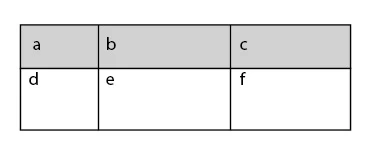
How to make? I not find how to create rows and columns and how to fill cells with text ...

Thanks,

This topic has been closed for replies.

2 replies

SumitKumar
Inspiring
November 5, 2016

// reset the Find/Change dialog

app.findGrepPreferences = app.changeGrepPreferences = null;

// formulate a grep search string

app.findGrepPreferences.findWhat = 'hsm18.+?$';

// find all occurrence, last one first

f = app.activeDocument.findGrep (true);

for (i = 0; i < f.length; i++)

{

// construct file name

name = f.contents.replace (/@/g, '');

// place the pdf and REPLACE the destination with the folder of links

f.insertionPoints[0].place (File ('/Users/f-0262/Desktop/temp/' + name));

}

// delete all @??@ codes

app.activeDocument.changeGrep()

-Sumit
Community Expert
November 5, 2016

Hi Oriup,

this thread is about creating tables with ExtendScript.
Not about using GREP Find/Change.

Please add a new thread about your problem with a telling title here in the forum.
And also add a description of what you like to do with some words. What is working and what is not.

Regards,
Uwe

SumitKumar
Inspiring
November 7, 2016

Hi Laubender,

I am new to forum, I have mistakenly place this code here.

I do not know how to delete.

By the way this code is find text and place image.

Sumit

-Sumit
Community Expert
September 5, 2012

You could use the add() method for the Table object and define some properties:

var myTable = myTextFrame.insertionPoints[0].tables.add({columnCount:3,headerRowCount:1,bodyRowCount:1});

If you want to add properties, work on with the "myTable" variable…

For full documentation see:

http://www.jongware.com/idjshelp.html

Uwe