

Inspiring
February 10, 2017
Answered

[JS] How to determine version of InDesign document?

  • February 10, 2017
  • 2 replies
  • 2450 views

With InDesign scripting how can I determine the version of an InDesign document - e.g was this saved with CC 2015 or CC 2017?

Thanks !

This topic has been closed for replies.
Correct answer Kasyan Servetsky

Just downloaded and tested it in InDesign CC 2017, but it doesn't provide proper result:
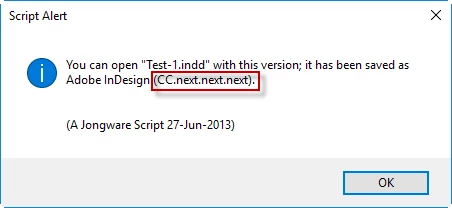
However, the code is open so it's possible to update it to work with the new versions released after 2013.

— Kas

2 replies

Kasyan Servetsky
Kasyan ServetskyCorrect answer
Legend
February 10, 2017

Just downloaded and tested it in InDesign CC 2017, but it doesn't provide proper result:

However, the code is open so it's possible to update it to work with the new versions released after 2013.

— Kas

Inspiring
February 10, 2017

Thanks I can work with that.

pjb

Kasyan Servetsky
Legend
February 10, 2017

Jongware wrote the 'IDentify' script, but I'm not sure if it works with the latest versions.

— Kas

Loic.Aigon
Legend
February 10, 2017

oups too late

var main = function() {

  if ( !ExternalObject.AdobeXMPScript )

  {

  try

  {

  ExternalObject.AdobeXMPScript = new ExternalObject('lib:AdobeXMPScript');

  }

  catch (e)

  {

  alert('Unable to load the AdobeXMPScript library!');

  return false;

  }

  }

  var f = File.openDialog();

  if (!f ) return;

  var xmpFile = new XMPFile(f.fsName, XMPConst.UNKNOWN, XMPConst.OPEN_FOR_READ);

  var xmp = xmpFile.getXMP();

  xmpFile.closeFile(XMPConst.CLOSE_UPDATE_SAFELY);

  alert( xmp.getProperty ( XMPConst.NS_XMP, "CreatorTool") );

};

main();

Kasyan Servetsky
Legend
February 10, 2017

Loic,

I'm not sure if some old versions -- e.g. CS2 -- have metadata to check the version. At the moment I don't have such a file at hand to check it.

— Kas