

Answered
[JS] Problem with checking if the file was selected in the dialog box
Dear forum,
Though I have done this many times before, today I encountered a strange problem.
I want to make sure that the user selects a file before the script continues:
main();

function main() {
     if (File.fs == "Macintosh") {
		var csvFile = File.openDialog("Select a CSV File", function (f) { return (f instanceof Folder) || f.name.match(/\.csv$/i);} );
     } else {
		var csvFile = File.openDialog("Select a CSV File","CSV files:*.csv;All files:*.*");
     }

	if (cvsFile != null) {
		// do something
	}
}
The file has been selected and its properties are visible in the data browser, but the script throws an error: the file is undefined.
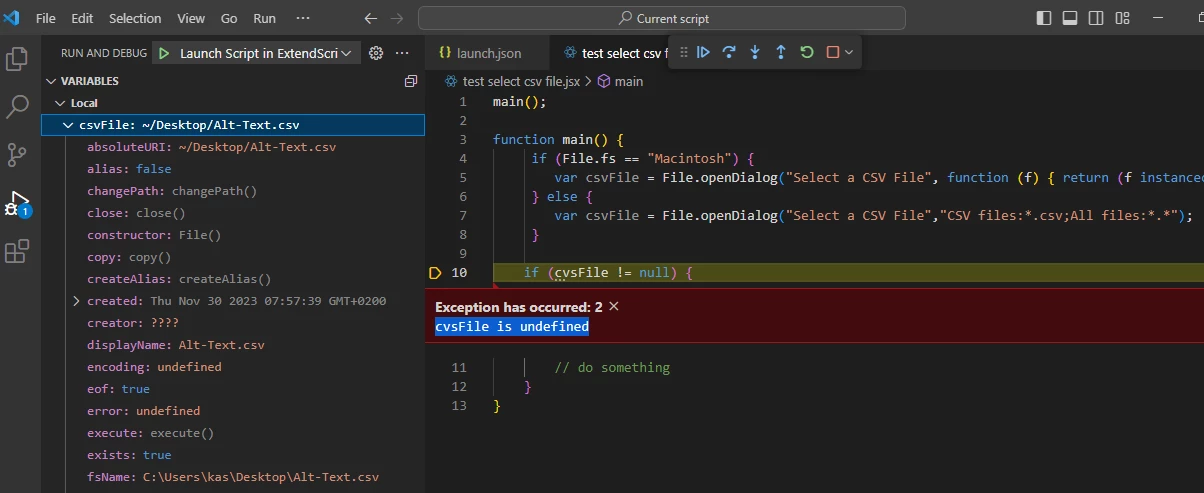
This happens on Windows 10, both in ESTK and VSCode: in InDesign 2023 and 2024, Bridge 2024, ESTK.
Any ideas?
— Kasyan


 AdChoices