


Answered
JSX + AppleScript / custom arguments from InDesign
Hi,
I am trying to pass parameters from InDesign jsx to AppleScript to open up a url with some custom handling based on the user's default browser.
I have this code arrangement so far:
var scriptFile = new File($.fileName); // or new File(app.activeScript)
var folderPath = scriptFile.path;
var myscriptPath = folderPath + "/mycustom.scpt";
var myscriptFile = File(myscriptPath);
var myargs=["Hello "];
var myargsString=myargs.join(",");
var script = 'set scriptFile to POSIX file "' + myscriptFile.fsName + '"\n' + 'set myargs to {' + '"' + myargsString + '"' + '}\n' +
'run script scriptFile with parameters myargs';
app.doScript(script,ScriptLanguage.APPLESCRIPT_LANGUAGE);
On the AppleScript side:
use framework "Cocoa"
use AppleScript version "2.4"
use scripting additions

property NSURL : a reference to current application's NSURL
property NSWorkspace : a reference to current application's NSWorkspace
property NSFileManager : a reference to current application's NSFileManager

on run {myarg}
    set any_url to "http://www.apple.com"

    set the_url to NSURL's URLWithString:any_url
    set theApp to (NSWorkspace's sharedWorkspace()'s URLForApplicationToOpenURL:the_url)
    if theApp is not missing value then
        -- Get the display name of the application
        set appPath to theApp's |path|()
        set browserName to (NSFileManager's defaultManager()'s displayNameAtPath:appPath)
        display dialog (browserName as text)
    else
        display dialog "No application found to open the URL."
    end if
end run
I get this error:
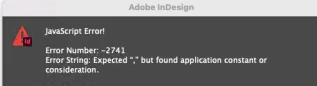
1. What is the reason for this error and how to fix it?
2. Is there a better way to pass custom arguments from jsx to AppleScript and how to extract the arguments on AppleScript side?
Thanks

 AdChoices