Inspiring
May 7, 2022
Answered

jsx export PDF using preset but pageRange is an alternate layout

  • May 7, 2022
  • 2 replies
  • 489 views

Hi, all,

Hoping a kind soul can come to the rescue.

I'm trying to get this script working so that every open document will have four PDFs exported, using two PDF presets and two alternate layouts:

"[Press Quality]" - (US Letter and A4)

"Press Quality with Crops" - (US Letter and A4)


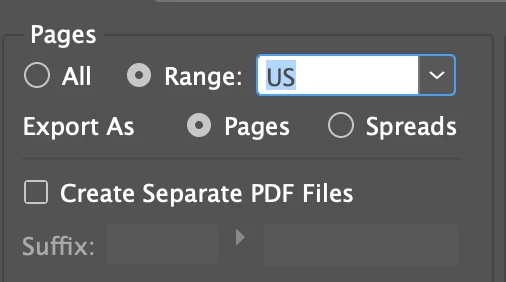
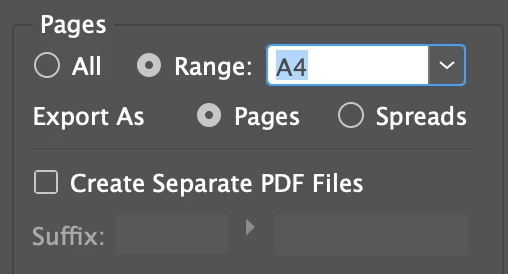
In the Adobe PDF Presets export options, it's easy to see the alternate layout names but I can't seem to be able to get the script to use them. 
...and I can't seem to get it to stop opening the PDF in Acrobat upon export.


Here's the script so far:


// amended from Kai's script found here https://creativepro.com/topic/export-pdf-in-original-folder/
// your Adobe PDF Presets name
var pdfPreset = app.pdfExportPresets.itemByName("[Press Quality]");
if (!pdfPreset.isValid) {  
  alert("Your preset doesn’t exist!");
  exit();
}

while (app.documents.length) {
  var curDoc = app.activeDocument;

  // check if the doc was saved or modified
  if (!curDoc.saved || curDoc.modified) {
    alert ("Save your doc before!");
  exit();
  }

//PDF alternate layout name e.g. US or A4
	pageRange = "US"; 
	viewPDF = false; 

  // build the PDF name
  var pdfName = curDoc.name.replace(/\.indd$/i,"_US.pdf");

  // path to the folder of the indd-file
  var fPath = curDoc.filePath;

  // reference to the new file
  var pdfFile = new File(fPath + "/" + pdfName);  

  // export the current file …
  curDoc.exportFile(ExportFormat.pdfType, pdfFile, false, pdfPreset);

  // … and close the document
  curDoc.close(SaveOptions.NO);
}

 Many thanks if anyone can point me in the right direction.

This topic has been closed for replies.
Correct answer rob day

Hi @JustyR , your code declares 2 variables pageRange and viewPDF that don’t do anything.


For PDF exports pageRange is a property of pdfExportPreferences, so if you are trying to set a page range and prevent the PDF from opening you would need something like this:


app.pdfExportPreferences.properties = {pageRange:"US", viewPDF:false};


// amended from Kai's script found here https://creativepro.com/topic/export-pdf-in-original-folder/
// your Adobe PDF Presets name
var pdfPreset = app.pdfExportPresets.itemByName("[Press Quality]");
if (!pdfPreset.isValid) {  
  alert("Your preset doesn’t exist!");
  exit();
}

while (app.documents.length) {
    var curDoc = app.activeDocument;

    // check if the doc was saved or modified
    if (!curDoc.saved || curDoc.modified) {
        alert ("Save your doc before!");
        exit();
    }

    //PDF alternate layout name e.g. US or A4
    app.pdfExportPreferences.properties = {pageRange:"US", viewPDF:false}; 

    // build the PDF name
    var pdfName = curDoc.name.replace(/\.indd$/i,"_US.pdf");

    // path to the folder of the indd-file
    var fPath = curDoc.filePath;

    // reference to the new file
    var pdfFile = new File(fPath + "/" + pdfName);  

    // export the current file …
    curDoc.exportFile(ExportFormat.pdfType, pdfFile, false, pdfPreset);

    // … and close the document
    curDoc.close(SaveOptions.NO);
}


Here‘s the pdfExportPreferences API, which list all of the properties you can set:


https://www.indesignjs.de/extendscriptAPI/indesign-latest/#PDFExportPreference.html

2 replies

JustyRAuthor
Inspiring
May 8, 2022

My final code is below for future reference.

Quick reminder...

  • Each indd has two alternate layouts called "US" and "A4"
  • The filename includes "-US-A4", e.g. Flyer-001-US-A4-v1.indd
  • The script checks the two PDF presets (Press Quality and ...Press Quality with Crops) are available
  • The script checks the open file has been saved
  • The script exports four PDFs from the document closes it when done, then it repeats

    • A4 - press quality

    • A4 - press quality with crops (adds "[PR]" to filename)
    • US - press quality
    • US - press quality with crops (adds "[PR]" to filename)


// amended from Kai's script found here https://creativepro.com/topic/export-pdf-in-original-folder/

// your Adobe PDF Presets name(s)
var pdfPreset_1 = app.pdfExportPresets.itemByName("[Press Quality]");
var pdfPreset_2 = app.pdfExportPresets.itemByName("Press Quality with Crops");

if (!pdfPreset_1.isValid || !pdfPreset_2.isValid) {  
  alert("Your preset doesn’t exist!");
  exit();
}

while (app.documents.length) {
    var curDoc = app.activeDocument;

    // check if the doc was saved or modified
    if (!curDoc.saved || curDoc.modified) {
        alert ("Save your doc before!");
        exit();
    }

    // build the PDF names, removing US or A4 accordingly
    var USpdfName = curDoc.name.replace(/(.*)(-A4)(.*)(\.indd)/i, "$1$3.pdf");
    var UScropspdfName = curDoc.name.replace(/(.*)(-A4)(.*)(\.indd)/i, "$1$3 [PR].pdf");
    var A4pdfName = curDoc.name.replace(/(.*)(-US)(.*)(\.indd)/i, "$1$3.pdf");
    var A4cropspdfName = curDoc.name.replace(/(.*)(-US)(.*)(\.indd)/i, "$1$3 [PR].pdf");
    
    // path to the folder of the indd-file
    var fPath = curDoc.filePath;

    // reference to the new file
    var USpdfFile = new File(fPath + "/" + USpdfName);
    var UScropspdfFile = new File(fPath + "/" + UScropspdfName); 
    var A4pdfFile = new File(fPath + "/" + A4pdfName);
    var A4cropspdfFile = new File(fPath + "/" + A4cropspdfName); 

    // export the current file using US and A4 alternate layouts, and changing filenames…
 
// selects US alternate layout to export
    app.pdfExportPreferences.properties = {pageRange:"US", viewPDF:false};

// using Press Quality
    curDoc.exportFile(ExportFormat.pdfType, USpdfFile, false, pdfPreset_1);

// using Press Quality with Crops
    curDoc.exportFile(ExportFormat.pdfType, UScropspdfFile, false, pdfPreset_2);

// selects A4 alternate layout to export
	app.pdfExportPreferences.properties = {pageRange:"A4", viewPDF:false};    

// using Press Quality
    curDoc.exportFile(ExportFormat.pdfType, A4pdfFile, false, pdfPreset_1);

// using Press Quality with Crops
    curDoc.exportFile(ExportFormat.pdfType, A4cropspdfFile, false, pdfPreset_2);

    // … and close the document
    curDoc.close(SaveOptions.NO);
}
rob day
Community Expert
rob dayCommunity ExpertCorrect answer
Community Expert
May 8, 2022

Hi @JustyR , your code declares 2 variables pageRange and viewPDF that don’t do anything.


For PDF exports pageRange is a property of pdfExportPreferences, so if you are trying to set a page range and prevent the PDF from opening you would need something like this:


app.pdfExportPreferences.properties = {pageRange:"US", viewPDF:false};


// amended from Kai's script found here https://creativepro.com/topic/export-pdf-in-original-folder/
// your Adobe PDF Presets name
var pdfPreset = app.pdfExportPresets.itemByName("[Press Quality]");
if (!pdfPreset.isValid) {  
  alert("Your preset doesn’t exist!");
  exit();
}

while (app.documents.length) {
    var curDoc = app.activeDocument;

    // check if the doc was saved or modified
    if (!curDoc.saved || curDoc.modified) {
        alert ("Save your doc before!");
        exit();
    }

    //PDF alternate layout name e.g. US or A4
    app.pdfExportPreferences.properties = {pageRange:"US", viewPDF:false}; 

    // build the PDF name
    var pdfName = curDoc.name.replace(/\.indd$/i,"_US.pdf");

    // path to the folder of the indd-file
    var fPath = curDoc.filePath;

    // reference to the new file
    var pdfFile = new File(fPath + "/" + pdfName);  

    // export the current file …
    curDoc.exportFile(ExportFormat.pdfType, pdfFile, false, pdfPreset);

    // … and close the document
    curDoc.close(SaveOptions.NO);
}


Here‘s the pdfExportPreferences API, which list all of the properties you can set:


https://www.indesignjs.de/extendscriptAPI/indesign-latest/#PDFExportPreference.html

JustyRAuthor
Inspiring
May 8, 2022

Aha, that's awesome. Many thanks, Rob. I'd seen that API yesterday but it wasn't clear to me how to actually use the things together. You've helped clear that up.