Inspiring
December 30, 2020
Answered

Jump to error occurence (e.g. missing font)

  • December 30, 2020
  • 1 reply
  • 347 views

I get warnings about missing fonts, I think this is because I changed how to handle quotation marks, but by copy paste I inserted some that were not supported by the current format. Preflight tells me what page the occurence is on, but I can't jump to the exact location. Searching for ' doesn't always seem to help. 

When I open the chapter, I see the warning about missing fonts, but I can't find the occurence.

Same for overset text. I just can't find it. I mean how could I, it's hidden.
This topic has been closed for replies.
Correct answer Steve Werner

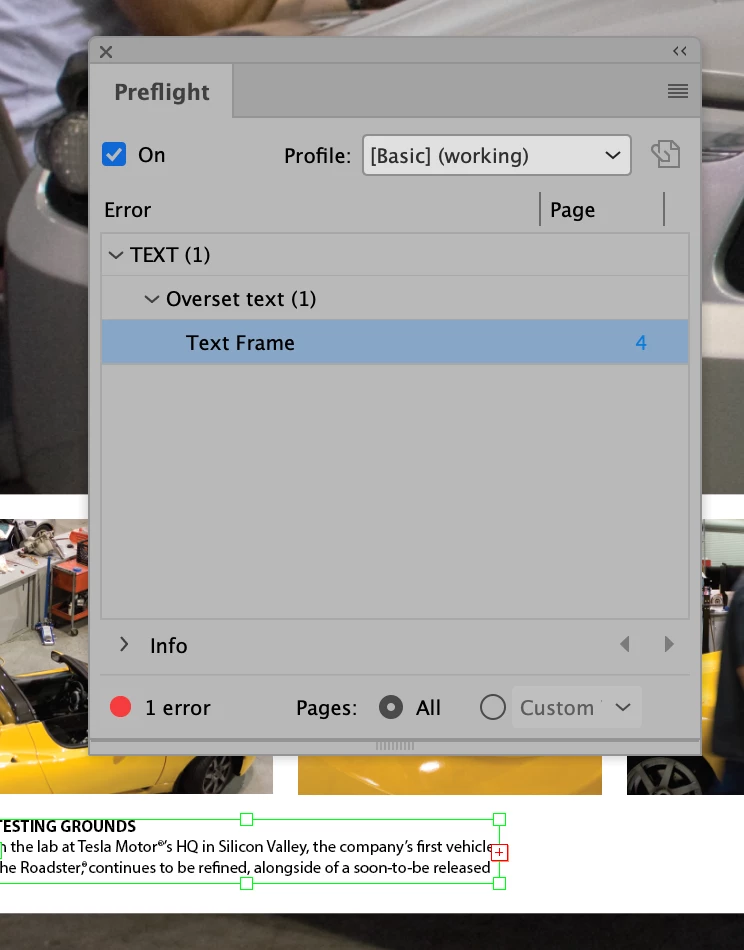
In Preflight, clicking on the page number of the overset text does jump to show the frame with the overset text as shown below:


1 reply

Inspiring
December 30, 2020

Nevemind the font, found it under Type -> Find Font.

Still don't know about the overset text though. Does it also find text that's hidden behind an image?

Steve Werner
Community Expert
Steve WernerCommunity ExpertCorrect answer
Community Expert
December 30, 2020

In Preflight, clicking on the page number of the overset text does jump to show the frame with the overset text as shown below: