

Siddalingayya
Known Participant
February 10, 2026
Question

Kannada Fonts Not Rendering When Opening PDF in Adobe InDesign 2026

  • February 10, 2026
  • 3 replies
  • 76 views

Convertion of PDF to Indesign file by open the pdf file in  2026 version, the Kannada fonts are not rendering! More junks even using proper paragrapher composer. And paragraphs alignment are missing. See the attched image.
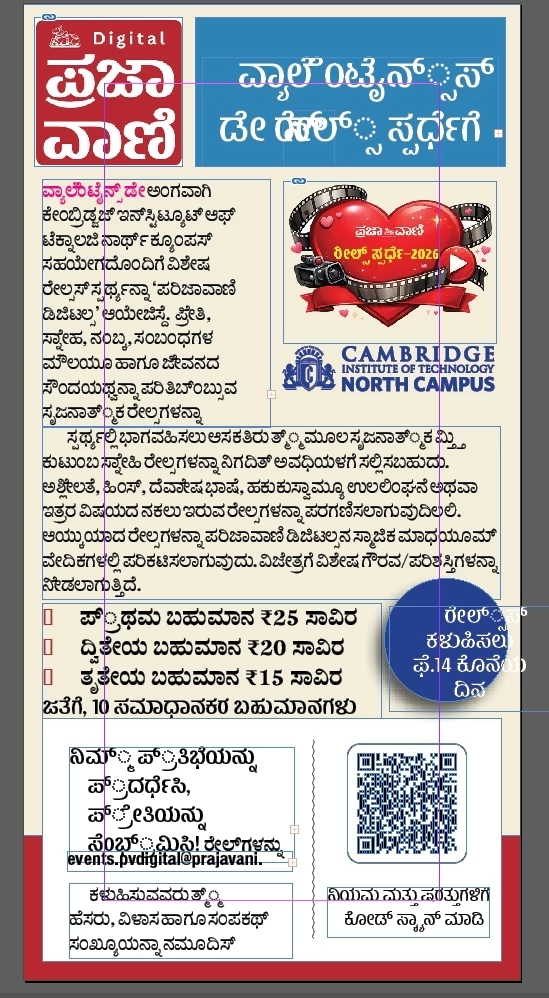

Junk and paragrapher alignment issued image☝Observe the headline in blue box at the top. and in corcle shape content. And all the text is junk
This is proper PDF (Exported)

So I am working for a newspaper that is Kannada daily (Prajavani Kannada daily in Karnataka India). Then what is the solution for this? We are planning to upgrade to 2026 version in comming march month. So consider it high priority and let me know for the solution..


Siddalingayya Kanakalmath

Chief Graphic Artist,

Bengaluru, Karnataka, India

3 replies

Siddalingayya
Known Participant
February 12, 2026

What is going there? Any solution?😉

Abhishek Rao
Community Manager
Community Manager
February 12, 2026

Hi ​@Siddalingayya,


Thanks for following up. Could you please confirm where the original PDF was created, including the application and workflow used to export it? I’d also recommend going through the “Points to Note” and “Limitations” sections in this article, as they explain important aspects of how PDF to InDesign conversion works: https://helpx.adobe.com/indesign/using/convert-pdf-to-indesign-file.html.

Please also test this in the latest InDesign version available on your system and let me know if the behavior is any different. Additionally, if you’ve already tried the steps mentioned in my previous response, kindly confirm the outcome. If possible, sharing an affected sample PDF would be very helpful for us to investigate this further with the team. If confidential, you can share it via DM on the community as well. 


Looking forward to your update.

Abhishek

Siddalingayya
Known Participant
February 12, 2026

@Siddalingayya Hi Abhishek,
I'm providing the complete workflow and error details through videos as requested. These details should help identify the issue with the Kannada language (Unicode).

As per your request, I've exported the relevant details and workflow, which are attached below (Video attached- Page export details) 
Comparison of the real InDesign page and the PDF opened page. This video highlights the color space changes in color swatches and image color changes from CMYK to RGB.
 (Video: Font junk-Rendering Image and Colors converted to RGB issue)  
Additionally, I've attached the InDesign version and preferences details, including paragraph composer details (Video: ID version and preferences (Paragraph composer)
Please also note the issue with page content spreading out of the page margin. You can observe the difference between the real page and the PDF opened page (Content out of Margin)


Exported pdf and Id page also attached...

I am not able attach the videos here due to file size limitation. For that I have given you my drive access below for time being.


https://drive.google.com/file/d/1NcUWyy8bRSlFo62Qy6DNpqV51wSfnNvs/view?usp=drive_link,

https://drive.google.com/file/d/1mGsbXtCnVjVoDZYUsPj9geH2_o3lhRao/view?usp=drive_link

https://drive.google.com/file/d/1ltPRV2un1MwUfaq1_VVoQA_pX26uKRWQ/view?usp=drive_link

https://drive.google.com/file/d/1NcUWyy8bRSlFo62Qy6DNpqV51wSfnNvs/view?usp=drive_link

https://drive.google.com/file/d/1IYo1QextXpKW5EqIrnlLJYd3EGN61IJr/view?usp=drive_link


Best regards

Siddalingayya Kanakalmath

Abhishek Rao
Community Manager
Community Manager
February 10, 2026

Hi @Siddalingayya Kanakalmath,


Thanks for sharing the detailed context and screenshots. Could you please confirm the current version of InDesign you are using? If you are on the 2025 version, I’d recommend testing this on the latest InDesign 2026 (21.2) as well, since you can keep both versions installed at the same time.

If the issue remains, please let us know where the original PDF was created. I’d also suggest opening the PDF in Acrobat and checking under Document Properties(Ctrl+D) > Fonts to confirm that all fonts are embedded. If possible, please try re-exporting the PDF in PDF/X-4 format with all fonts embedded, and then open it again in InDesign 2026 to see if the text renders correctly.

If the problem still persists after that, could you please share your OS as well and a sample affected PDF for us to test and investigate further?


Looking forward to your update.

Abhishek

Siddalingayya
Known Participant
February 10, 2026
Current InDesign version
Fonts embedded details
Export setting

ThanQ..

The details as above..


Regards


Siddalingayya

BobLevine
Community Expert
Community Expert
February 10, 2026

Can you back up a bit and tell us why you’re opening PDFs in InDesign? Granted it’s a less than perfect feature but it’s more of a starting point and is dependent on the quality of the original PDF. 

Siddalingayya
Known Participant
February 10, 2026

Thanks for the quick response!
Actually, I wanted to mention that the new version of InDesign has introduced a great feature to convert PDFs to ID documents. This is particularly useful in our daily work, as InDesign tends to crash frequently. When it crashes, the page often opens empty, and having an exported PDF can be a lifesaver, allowing us to continue our work without significant disruption.

Cool