Inspiring
November 27, 2025
Answered

keep option: with previous paragraph

  • November 27, 2025
  • 1 reply
  • 457 views

how can I make a paragraph style tos stay with the previous style

Correct answer Peter Kahrel

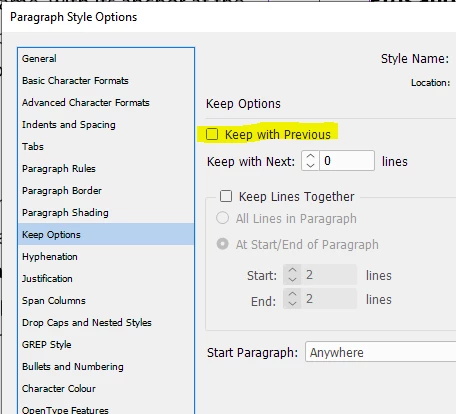
Use the Keep With Previous option in the paragraph style options window:


This keeps these paragraphs with instances of any other paragraph style. If you want to set the keep selectively, that is, to keep only with paragraphs of a certain style, you need need a script or a plug-in, such as https://creativepro.com/conditional-styling-rules-for-indesign/


1 reply

Peter Kahrel
Community Expert
Peter KahrelCommunity ExpertCorrect answer
Community Expert
November 27, 2025

Use the Keep With Previous option in the paragraph style options window:


This keeps these paragraphs with instances of any other paragraph style. If you want to set the keep selectively, that is, to keep only with paragraphs of a certain style, you need need a script or a plug-in, such as https://creativepro.com/conditional-styling-rules-for-indesign/


Inspiring
November 30, 2025

can you explain what 'keep with previous'?
I want this source here to always stay with a few lines of the previous paragraph (the sources are all separate styles)
but I don't see any difference when choosing 'keep with previous'

hendy_5450_0-1764490036344.png


Peter Kahrel
Community Expert
Community Expert
November 30, 2025

'keep with previous' means 'keep in the same text column as the previous paragraph'. The number of lines of the previous paragraph that are kept depends on the value set in the Keep Lines Together panel.