

LCdesign
Participant
January 27, 2020
Answered

Keep Options pushing two paragraphs to next page

  • January 27, 2020
  • 2 replies
  • 2340 views

In a book I'm typesetting, I have most paragraph styles set to keep the first two and last two lines together to avoid widows and orphans. But I've got at least once instance where it's pushing the last two lines of a paragraph that precedes a block quote to the next page unnecessarily, as though the paragraph and block quote were inseparable. (In screen shot below, see paragraph that breaks across pages 12 and 13, with the block quote adter.)
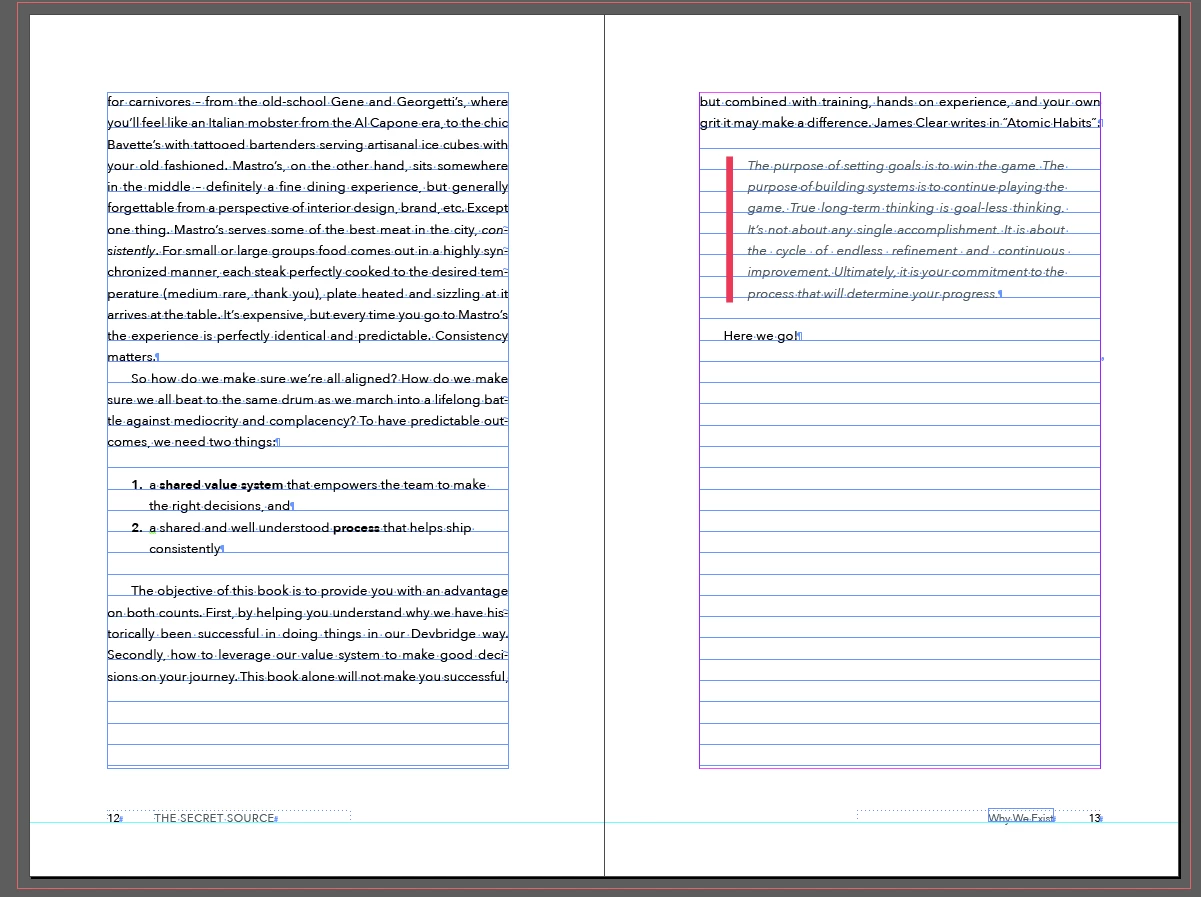
I've never encountered this issue and simply cannot figure out why it's doing this. I've tried turning off Keep Options on one or both paragraphs, removing the border from the block quote, turing off the snap-to-baseline setting. There is definitely a paragraph break between the body paragraph and block quote, so it's not an issue of a forced line break or similar.


The only way to get all of the lines of that body paragraph to stay on page 12 and the BQ to start at the top of page 13 is to replace the paragraph break with a frame or page break, but as this is just a design sample and could create issues later if any text changes, that's not a great solve.


Anyone ever encountered this or have any ideas? Thanks!

This topic has been closed for replies.
Correct answer LCdesign

Good call! I actually just came back to see if I could delete my question, because I figured it out. Although I did not have Keep with Previous checked off, I had a 1 in Keep with Next there. I changed 1 to 0 and it seems to have fixed it. Thanks for the prompt, though! You were obviously on the right track. Feel dumb I didn't see this earlier... 

2 replies

Participant
October 5, 2022

I did this exact same thing today! Thanks for not deleting it!!

James Gifford—NitroPress
Legend
October 5, 2022

There are a number of topics covering this exact point. That dialog is poorly organized and it's only clear with explanation that a nonzero value in the "keep with next" field will result in this behavior, seemingly without cause.


Dave Creamer of IDEAS
Community Expert
Community Expert
January 27, 2020

Do you have any Keep with Previous or Keep with Next settings on either paragraph style?

David Creamer: Community Expert (ACI and ACE 1995-2023)
LCdesign
LCdesignAuthorCorrect answer
Participant
January 27, 2020

Good call! I actually just came back to see if I could delete my question, because I figured it out. Although I did not have Keep with Previous checked off, I had a 1 in Keep with Next there. I changed 1 to 0 and it seems to have fixed it. Thanks for the prompt, though! You were obviously on the right track. Feel dumb I didn't see this earlier...