

Participant
June 30, 2022
Answered

Keep size of row when copying from place in a chart to another

  • June 30, 2022
  • 1 reply
  • 223 views

Hello!

I'm working on a multi-page chart and need to add 4 rows above an existing row so that I can copy/paste 4 rows from later on in the chart into it's new spot. However, when I try to do that, it pastes the content but doesn't keep the row sizing? Is there a setting to change to have it do that?


Thanks!
This topic has been closed for replies.
Correct answer Jeffrey_Smith

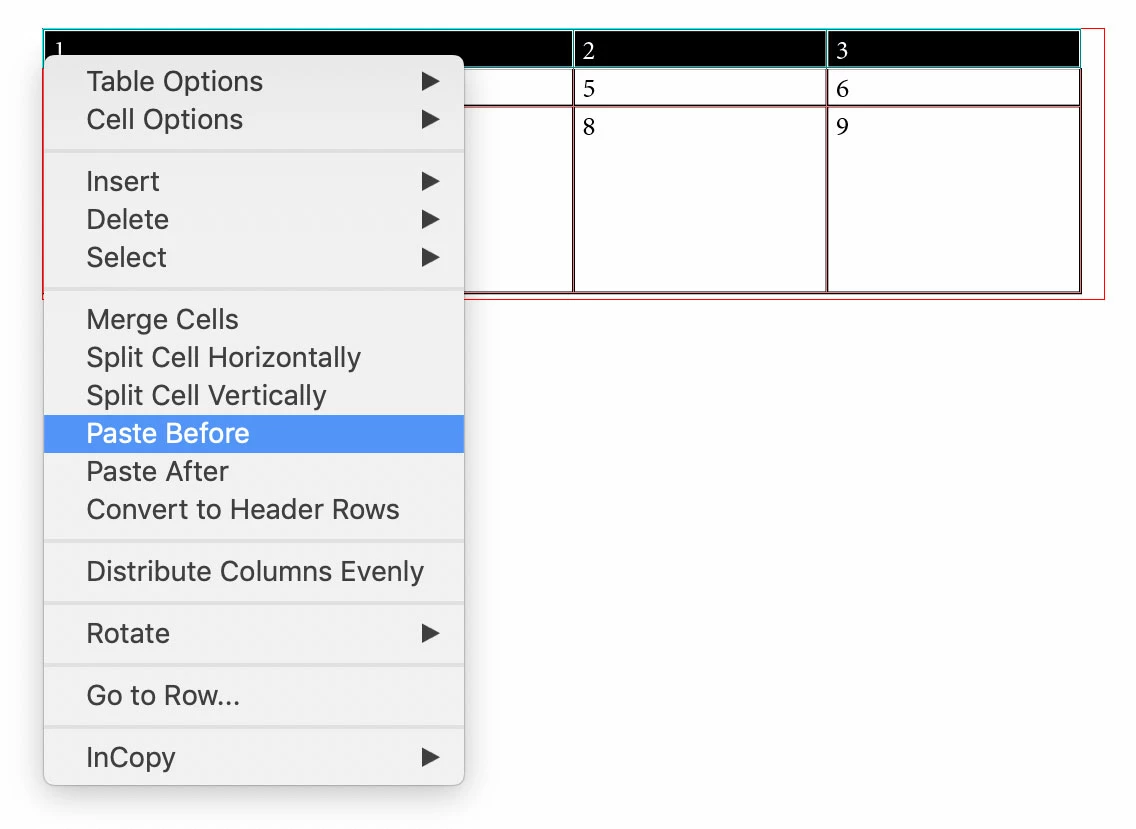
You don't need to add the 4 rows. Copy the 4 rows from different table, highlight the row where 4 rows will be inserted. Then you control click to bring up contexual menu, and Paste Before. This will retain cell/row height from copied cells.

1 reply

Jeffrey_SmithCommunity ExpertCorrect answer
Community Expert
June 30, 2022

You don't need to add the 4 rows. Copy the 4 rows from different table, highlight the row where 4 rows will be inserted. Then you control click to bring up contexual menu, and Paste Before. This will retain cell/row height from copied cells.

Participant
June 30, 2022

Oh my gosh, thank you SO much. You just saved me hours of work (more than the hours I've already spent :p)


I appreciate it!!!