Participant
January 23, 2023
Question

Keeping it all together

  • January 23, 2023
  • 2 replies
  • 763 views

Hi. So I'm stuck and any pulling my hair out looking for a solution. Any help would be great!

I'm working with a a fairly long document (500+ pages) in English and Franch languages.

In French, a space is required both before and after all two- (or more) part punctuation marks and symbols, including : ; « » ! ? % $ #

Seeing that there is that space (in this text it's just a regular space) how can I avoid a line starting with one of the characters (! ? « ») or having a « left alone on a line?
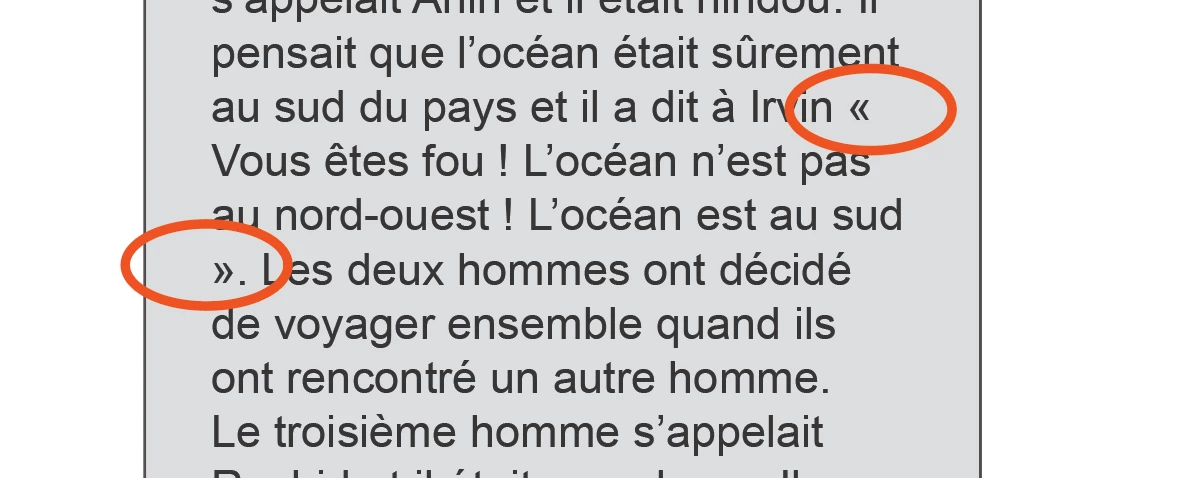


I hope I was clear enough in my question. ty 😉

This topic has been closed for replies.

2 replies

jmlevy
Community Expert
Community Expert
January 23, 2023

In French, a space is required both before and after all two- (or more) part punctuation marks and symbols, including : ; « » ! ? % $ #

Actually, it's a little bit more complicated: French typographic rules use a thin space before the question mark, the exclamation mark and the semicolon (! ? 😉 and a fixed width nonbreaking space before the colon (:), percent sign, currency signs, a closing quote (») and after an opening quote («).

You can run different find-change to replace the existing spaces by either thin spaces or fixed width non breaking spaces


You also can run a GREP find change to find in a single search question markks, exclamation marks and semicolons or percent sign, currency signs and other.

Mara2344Author
Participant
January 23, 2023
Much thanks for the replies.
 
Would there be a GREP style to search/find instances where these punctuation characters are out of line or hanging alone on new line or end of line? How do you keep them with the text they are punctuating?
Any idea of a style to apply to keep this from happening?
jmlevy
Community Expert
Community Expert
January 23, 2023

To replace ordinary spaces by thin spaces before ; or ? or !

Find

(?=[?!;])


Replace by

~<


To replace normal spaces with fixed width non breaking spaces before :, €, $, %

Find

(?=[$€%])


Replace by

~s


To find an ordinary space following an opening quote: 

(?<=«) and replace by ~<

To find an ordinary space followed by a closing quote: 

(?=») and replace by ~<


How do you keep them with the text they are punctuating?

These spaces are non breaking spaces, so they automatically will be kept with the following signs.

Willi Adelberger
Community Expert
Community Expert
January 23, 2023

You could do it with tracking.

  1. Create a character style where tracking is set to 200 (or any better value)
  2. Make in your basic paragraph style a GREP style and select the character style.
    «(?=.)|.(?=»)​
Willi Adelberger
Community Expert
Community Expert
January 23, 2023

No space is required here.