


Michael123SC
Participant
Jun 16, 2026 1:25 AM UTC
Question

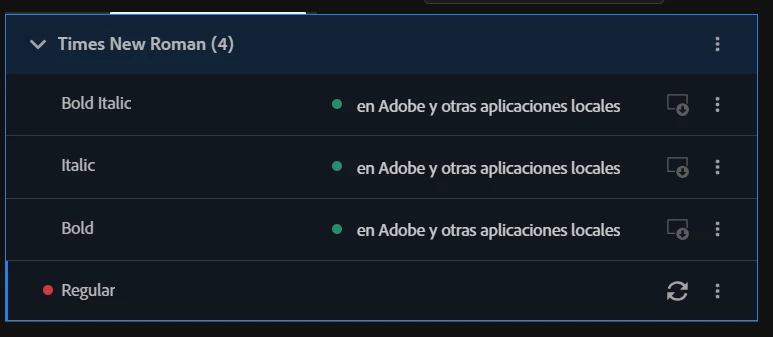
La fuente Times New Roman Regular no carga correctamente

Al descargar la fuente Times New Roman de Adobe Fonts no carga correctamente y no puedo usar la fuente Times New Roman Regular, como puedo solucionar el problema

 

    5 replies

    Abhishek Rao
    Community Manager
    Community Manager
    Jun 17, 2026 1:55 PM UTC

    Hi ​@Michael123SC, 


    I wanted to follow up and see if the issue has been resolved.

    If you're still running into the problem, could you please let us know whether you had a chance to try Bill's suggestion of signing out of Creative Cloud and signing back in? You can also try turning Adobe Fonts off and back on (via CCD preferences > Services) in the Creative Cloud Desktop app, then retry activating Times New Roman Regular.

    If the issue continues, please check for any locally installed versions of Times New Roman that may be conflicting with the Adobe Fonts version and clear the font cache as well. Ref: https://helpx.adobe.com/fonts/kb/troubleshoot-fonts-illustrator-indesign.html
    It would also be helpful if you could let us know whether clicking the retry icon next to Times New Roman Regular displays any specific error message.


    Looking forward to your update.

    Abhishek

    Translate
    Michael123SC
    Participant
    Jun 19, 2026 4:06 AM UTC

    Realice todas las recomendaciones, pero el problema sigue igual, al cargar la fuente no aparece ningun mensaje de error, y al querrer borrar la fonts cache el sistema no permite eliminar.

    mi sistema operativo el windows 11 pro.

    Translate
    Abhishek Rao
    Community Manager
    Community Manager
    Jun 29, 2026 4:54 PM UTC

    Hi ​@Michael123SC, 


    Thanks for your patience while I looked into this further.

    I tested the same behavior on a Windows 11 machine with another Windows system-protected font and was able to observe similar results. I'm currently checking this further with the product team to understand whether this is a known limitation or an issue with Adobe Fonts activation for system-protected fonts.


    I'll update the thread as soon as I hear back from the team.

    Thanks,
    Abhishek

    Translate
    BobLevine
    Community Expert
    Community Expert
    Jun 16, 2026 10:57 AM UTC

    Is InDesign fully updated to 21.4?

    Translate
    Bill Silbert
    Community Expert
    Community Expert
    Jun 16, 2026 9:47 AM UTC

    Try signing out of your Adobe account and then signing back in again in the Creative Cloud desktop app. Then try downloading the font again. As crude a solution as this sounds it will often work in solving problems with downloading Adobe fonts.

    Translate