MJontheRock
Participant
July 23, 2020
Question

Last Line / Tab Alignment

  • July 23, 2020
  • 6 replies
  • 334 views

Hi there,

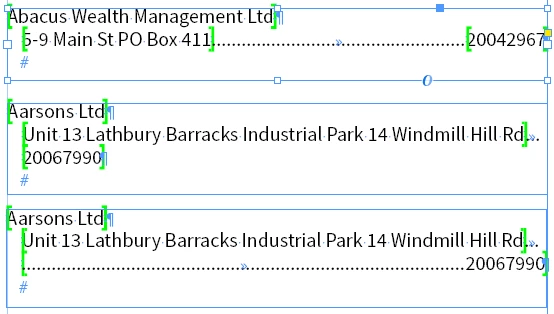
I'm creating a Telephone Directory using InDesign and EasyCatalog Pagination Addon. In the pic, Abacus Wealth is fine, but the address in Aarsons is longer and knocks the Tel no to the next line. How can I get the tel no. to sit or tab to the right with leader as in the 3rd example?
 

TIA 🙂


This topic has been closed for replies.

6 replies

David Popham
Participating Frequently
July 23, 2020

Barb,

What you did is exactly the way to create a Right Indent Tab with a leader, and it doesn't even have to be a right-aligned tab or in any exact position.


As long as the original requester is OK with not having a leader on the first line, that definitely works. In his example, there is a leader on the first line as well. That would require more than a single Tab or Right Indent Tab character.

Barb Binder
Community Expert
Community Expert
July 23, 2020

Rob, 


I haven't defined a leader with a right-indent tab and couldn't figure out how to do it. I ended up defining a right-align tab with a leader, then replaced it with a right-indent tab character (and removed the GREP style and right indents) and I think that's the solution. 


~Barb

~Barb at Rocky Mountain Training
David Popham
Participating Frequently
July 23, 2020

The issue lies with the fact that a tab is a single character, and as far as I know, there is no way to make it stretch across two different lines. You could run a manual Find/Change afterward and insert a Right Indent Tab after the first tab in instances that span two lines, or if you need automation, a script could do that.

rob day
Community Expert
Community Expert
July 23, 2020

There is also the Right Indent Tab (Type>Special Character>Other). You could apply a dotted underline to the Right Indent Tab for the leader:


Barb Binder
Community Expert
Community Expert
July 23, 2020

Hi MJ:


I can get there via Right Indent/Last Line Right Indent (as per Mike's suggestion) or with a GREP style, but both take Rd. with it to the next line. 


~Barb 

~Barb at Rocky Mountain Training
Mike Witherell
Community Expert
Community Expert
July 23, 2020

Paragraph Style > Indents and Spacing:

Maybe a Right Indent value pushing inwards along with a Last Line Indent (negatively) pushing outwards, as long as it is not pushing past the edge of your textframe. You might have to adjust a tab position, too.

Mike Witherell