Inspiring
April 14, 2020
Answered

Latex to inDesign

  • April 14, 2020
  • 6 replies
  • 12663 views

I've been browsing the forum for hours now, I only get half-answers to my questions, so I decided to post myself, I have a few very specific questions.

My book is 300+ Pages long. If that is too much for a sensible approach for idd, please let me know and we don't have to continue any further.
1. I have sections (ca. 80) each one has a different sized image that is supposed to be wrapped and on the right side. In Latex all I need to do is write a tiny macro and dynamically pass the filename, is there anything comparable?
2. The book is supposed to be translated to German, it's very technical, so I don't expect any automatic translation to work. Could that be done by dynamically linking text boxes to text? Other answers suggest Liquid and Alternate Layouts, but they seem to be designed to use different graphic layouts, not different texts, so I would consider this a hack.
3. Can we link to image captions or from image captions to text?
4. How complicated is automatic image labelling? I want all images in Chapter 4 (but only the ones I tag as labeled image) to be numbered as 4.# and/or 4.##, but ignore the section images when it comes to numbering.

Thank you for your time

 

This topic has been closed for replies.
Correct answer Barb Binder

How do I mark a heading as section or chapter? Or just start a new chapter?

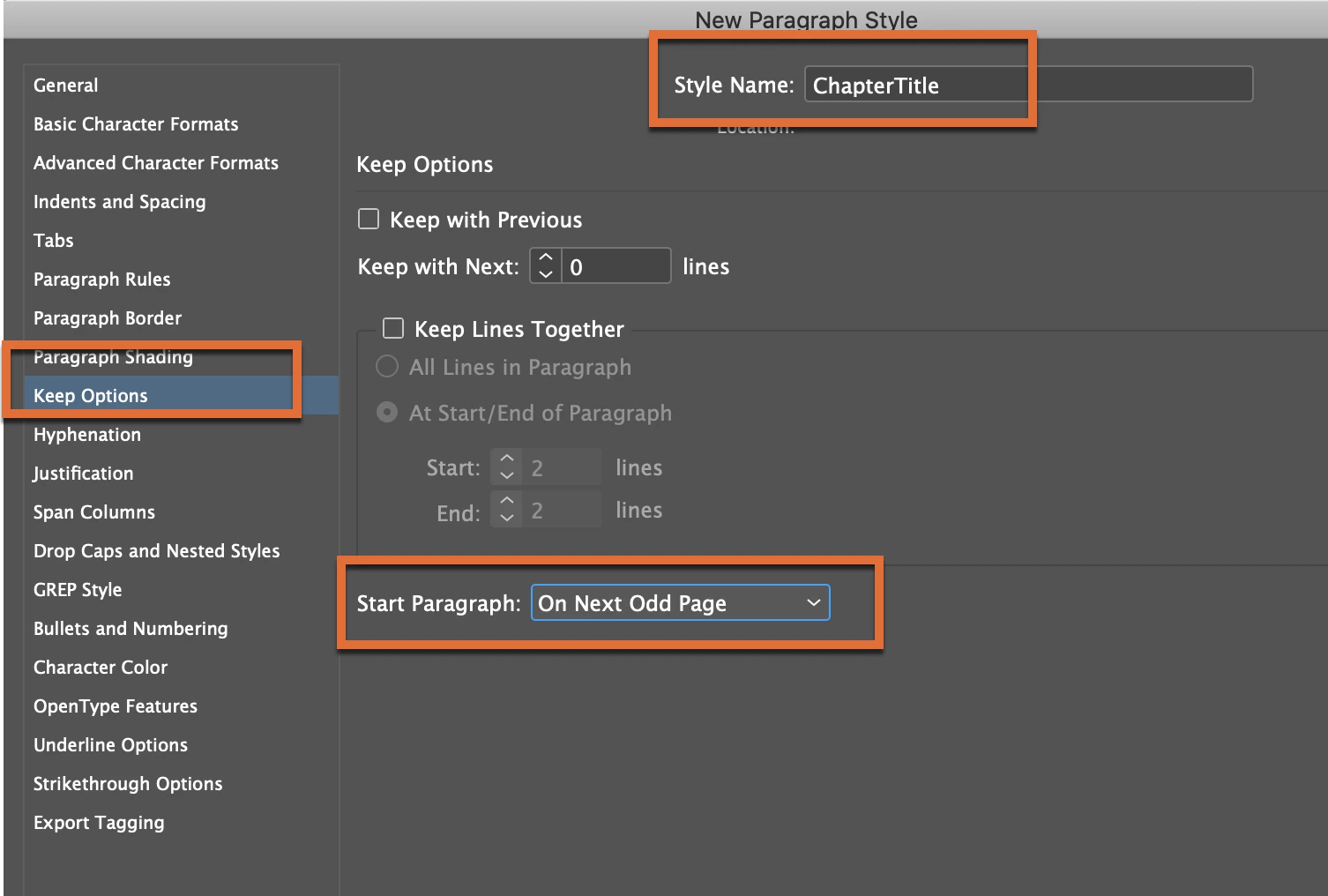
You can create a Paragraph Style with a logical name (i.e., ChapterTitle or SectionHead) and format it the way you would like them to look, add a chapter/section number automatically (using Bullets and Numbering) and add a Start Paragraph on the Next Odd Page attribute, so that when you assign the style, the head is numbered correctly and moves to the top of the next right page automatically to start the new chapter/section.


~Barb


6 replies

Participant
December 29, 2024

This is a couple years late and might not be completely relevant to you, but I ended up downloading a PDF that was compiled and formatted entirely in LaTeX and used the 'Place' feature to put each individual page on a page in an InDesign file so that it would be print friendly (since the notes in the margins of the original LaTeX --> PDF file would get lost in print / cut off entirely)

Barb Binder
Community Expert
Barb BinderCommunity ExpertCorrect answer
Community Expert
April 15, 2020

How do I mark a heading as section or chapter? Or just start a new chapter?

You can create a Paragraph Style with a logical name (i.e., ChapterTitle or SectionHead) and format it the way you would like them to look, add a chapter/section number automatically (using Bullets and Numbering) and add a Start Paragraph on the Next Odd Page attribute, so that when you assign the style, the head is numbered correctly and moves to the top of the next right page automatically to start the new chapter/section.


~Barb


~Barb at Rocky Mountain Training
Derek Cross
Community Expert
Community Expert
April 15, 2020

It's vital, if you're going to create a Reflowable ePub, that you use Paragraph and Character Styles. In fact you should use these Styles anyway.


I suggest you create, in InDesign, your  PDF version first, where you can employ the features of Master Pages (folios and running headers etc) and when you've finished that version you adapt the InDesign version for a Reflowable ePub where, you can't use Master pages, there are no page number, all images need to be anchored etc, and a knowledge of HTML and CSS will be helpful for fine tuning.

Derek Cross
Community Expert
Community Expert
April 15, 2020

Creating PDFs from inDesign documents is very easy. Creating Reflowable ePubs is not intuative and can be quite tricky to produce succesfully.

Whichever you do, I suggest you get some InDesign training – personal training is good but expensive,  there are some good books, such as: https://www.adobepress.com/store/adobe-indesign-classroom-in-a-book-2020-release-9780136502678 and Linkedin Learning have excellent online video tutorials (you can get a 30-day free trial): https://www.linkedin.com/learning/

And of course, you can ask specific questions on this friendly forum.

Inspiring
April 15, 2020

Thank you for your reply, our book is not very fancy, except for the image labeling, numbering and wrapped text I describe above. I'm still hoping to be able to figure it out, if I get stuck, I'll have a look at the links for sure.

Maybe you can answer this tiny question, I do not find the answer to on google (it only tells me how to add header, footer or chapter numbers): How do I mark a heading as section or chapter? Or just start a new chapter?

Derek Cross
Community Expert
Community Expert
April 14, 2020

Which version of InDesign do you have and OS?

Presumably the final output will be for a printed book, not a digital version?

Inspiring
April 15, 2020

Windows 10 and I haven't purchased inDesign yet, so it will be the latest.

Actually the final output will just be  a pdf, but we are also aiming for epub.

Peter Kahrel
Community Expert
Community Expert
April 14, 2020

300+ pages is easily handled by InDesign as a single file. You could also put each chapter in a separate file (indd) and collate them in a book file (indb).


1. Almost certainly yes (without seeing what you want exactly). You can use object styles for the placement. If you want to include a file name in your text, a simple script can create a link and place the image.


2. You could dynamically link text boxes. You could also use different layers so that you have the two languages in the same document. For the English edition, hide the German layer; for the German edition, hide the English layer.


3. If by 'link to' you mean create cross-references, then yes.


4. Probably not very complicated.


InDesign is highly scriptable. There's not much that you can't script. Even if (4) -- automatic image labelling -- is a challenge using InDesign's standard features, it's probably fairly easy to script. For example, there are no Latex import filters for InDesign, but you can script a lot. Years ago I started on a Latex-to-InDesign conversion script and it worked fine for relatively simple Latex files.


Peter

Inspiring
April 15, 2020

300+ was not referring to filesize, but rather to management of the heavy taks.

I most certainly want to divide out book into chapter files.

Thank you so much for your detailed reply. I'll have a look into idd scripting next.