
Participating Frequently
December 7, 2016
Question

Layering text

  • December 7, 2016
  • 1 reply
  • 2031 views

Hi,

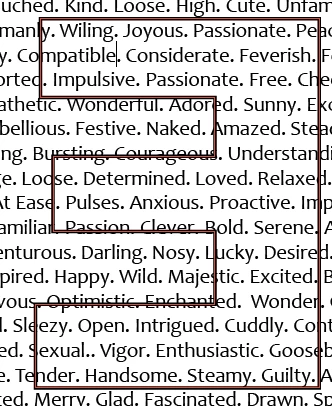
I am looking to make letters out of text in indesign. So, right now I have two layers. Layer 1 is all text covering the whole page (full spelt out words). Layer 2 (red outline) is an outline of the text I want above the words and because it is an outline, I can see the text below. I want to see the text below the letters in layer 2, but not the other text outside of the outline of the text in layer 2.

The photo below is a section from what I am working with. I am looking for the right steps in order to make the full spelt out words outside of the backwards letter "E" disappear so  I can only see the words within the outline of the "E"

Thanks,


A
This topic has been closed for replies.

1 reply

Barb Binder
Community Expert
Community Expert
December 7, 2016

How about selecting the text frame, and cutting it.

Select the E outline and use Edit > Paste Into.

~Barb at Rocky Mountain Training
Participating Frequently
December 7, 2016

The "E" is a vector outline now, so I can not treat it like text.... right? I lIke the idea but "past into" is not an option available when I select the "E"

Barb Binder
Community Expert
Community Expert
December 7, 2016

I typed in the E, set it to a large, bold font and then used Type > Create Outlines so that I could use Paste Into. You won't be able to paste into editable text.

~Barb at Rocky Mountain Training