Participant
April 4, 2019
Question

Layers and TOC ordering

  • April 4, 2019
  • 4 replies
  • 768 views

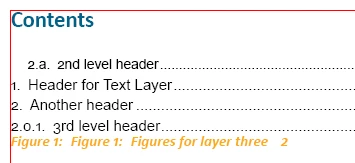
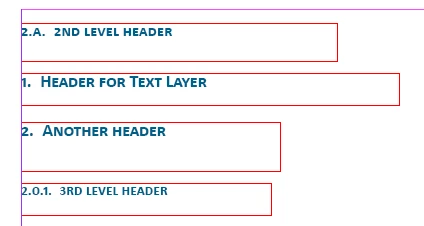
I am using layers to build a ToC by assigning paragraph styles for the header level I want, and the associating it in the ToC dialog box.  I'm using numbered/lettered levels (i.e., 1, 1.a, 1.a.1).  After some playing around, it looks like InDesign presents them in the ToC in the order they appear on the page (see screen shots).  Is there a way to fix this?
This topic has been closed for replies.

4 replies

JonathanArias
Legend
April 4, 2019

layers have zero effect on a TOC.

documents get stand top to bottom and left to right on each page and frames found in that order will display in that order in the TOC.

zigoru95551207
Participant
August 2, 2019

Hi Jonathan,

Is there any possibility to change the actual order in the table of contents without moving the text frames of their position?

Community Expert
August 2, 2019

Hi zigoru95551207 ,

the thing what would work, but don't know if it would help you:

You could flow the text through one story with several threaded text frames

The TOC would pick up the paragraphs in the order of appearance in the story:

Regards,
Uwe

Mike Witherell
Community Expert
Community Expert
April 4, 2019

Also, are your paragraph styles using the same LIST to number from?

Mike Witherell
Bevi Chagnon - PubCom.com
Legend
April 4, 2019

I'm not sure why your sample headings are numbered as in your screen capture, which makes it difficult to diagnose what's incorrect.

Generally, the sequence of items in a TOC should match the sequence in which headings appear on document pages. Your screen capture is showing that result.

If you want a different result, try these suggestions:

  1. Adjust the settings in your TOC Style definition. (Click the More button on the right to expand your options.)
    • Sort entries in Alphabetical Order
    • Numbered Paragraphs: Include Full Paragraph
  2. Merge down your layers, or at least the layers that hold the headings in your layout. (Personally, I can't think of any good reason why a document would need to have the headings portions of the text files on a separate layer.)

|    Bevi Chagnon   |  Designer, Trainer, & Technologist for Accessible Documents ||    PubCom |    Classes & Books for Accessible InDesign, PDFs & MS Office |
Mike Witherell
Community Expert
Community Expert
April 4, 2019

I'm not sure what layers have to do with anything.

What you need to pay attention to is the hierarchy of paragraph styles in the ToC generator dialog box.

Looking at the Include Paragraph Styles part of the box, did you drag them up and down into the correct hierarchy?

Mike Witherell
Participant
April 4, 2019

Thanks Mike and Bevi,

I am playing around with layers, trying different approaches just to see how they work, what they can do, etc.  So, I had the brain spark to try out headers and ToC just to see what would happen. 

@Mike - I did drag them around to see the result, and that's what you see in the screen cap.

@Bevi - the numbering sequence was just a trial.  Again, I've some down time, so I'm playing around with different things in INDD just in case I might need it later.  I like your solution, but part of what i'm trying to learn is how to use layers effectively.  I'll give the merge down a shot.

Again, thanks for the tips - I thought there was something I wasn't seeing in a setting somewhere, but i think what i discovered is an INDD characteristic.

Bevi Chagnon - PubCom.com
Legend
April 4, 2019

Here are some other things that might affect this:

  • Use a style to automatically number the heading paragraphs, rather than manually numbering them. This is more in line with what automated utilities are looking for.
  • Try different options in the TOC style panel.
  • Review Adobe's very good help sections on making TOCs and using Layers. See

|    Bevi Chagnon   |  Designer, Trainer, & Technologist for Accessible Documents ||    PubCom |    Classes & Books for Accessible InDesign, PDFs & MS Office |