
art 70 nyc
Participant
June 4, 2020
Answered

Leading in reformatted book not aligned with grid

  • June 4, 2020
  • 2 replies
  • 873 views

Reformatting a paperback book file to larger hardcover size: New trim size and margins were set in ADJUST LAYOUT. 

Then, changed text paragraph styles from 11pt with 14 pt leading to 12pt on 15 pt leading.
The text is now “double-spaced”, skipping a line in the baseline grid, see screen shot.
Preferences>Grid> were changed to 15 pt leading. See attached screen shots for paragraph style and grid settings.
 
What am I missing here? I have changed numerous settings and the text does not align properly to grid. In previous file (smaller trim size/smaller type size/leading, text was aligned to grid.
Thanks for any help.
-robert
This topic has been closed for replies.
Correct answer pixxxelschubser

Hi @FLASH_QUEST,

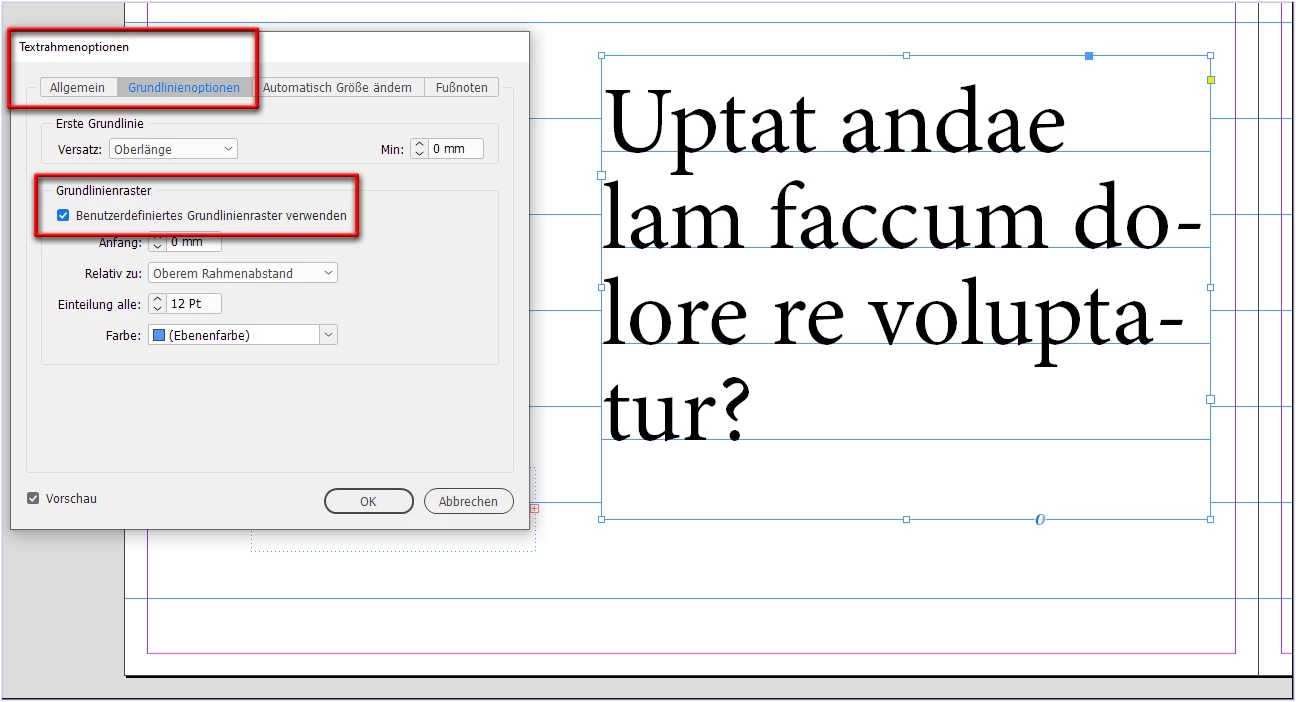
are you really sure that you didn't have defined a userdefined baseline grid for text frames in your document?

2 replies

pixxxelschubser
Community Expert
pixxxelschubserCommunity ExpertCorrect answer
Community Expert
June 4, 2020

Hi @FLASH_QUEST,

are you really sure that you didn't have defined a userdefined baseline grid for text frames in your document?

art 70 nyc
Participant
June 4, 2020

Thank you, pixxxel_schubser. That was the issue.


Object>Text Frame Options>Baseline Options>Baseline Grid was set to 14 pt instead of the revised 15 pt leading for this layout. 

rob day
Community Expert
Community Expert
June 4, 2020

Could you select some of the text and show a capture of your Paragraph, Paragraph Styles, Character, and Character Style panels—like this:


art 70 nyc
Participant
June 4, 2020

Thanks for replying. It was a conflict in Object>Text Frame Options>Baseline Options>Baseline Grid set to 14 pt instead of the revised 15 pt leading for this layout.