
Participant
November 16, 2020
Answered

Lenght of a path

  • November 16, 2020
  • 8 replies
  • 943 views

Hi all! I wonder if there is way of measuring the total lengt of path in Adobe InDesign - not the outer box dimensions nor the x/y-positions.
To make it clear: I was creating a new racetrack layout (true-to-scale) and now I have to know how many meters of barriers are needed to build it.
Many thanks in advance, Ralf
This topic has been closed for replies.
Correct answer pixxxelschubser
A thought:
Why not do your drawing in Illustrator? There you have a lot more options for creating and editing.
 
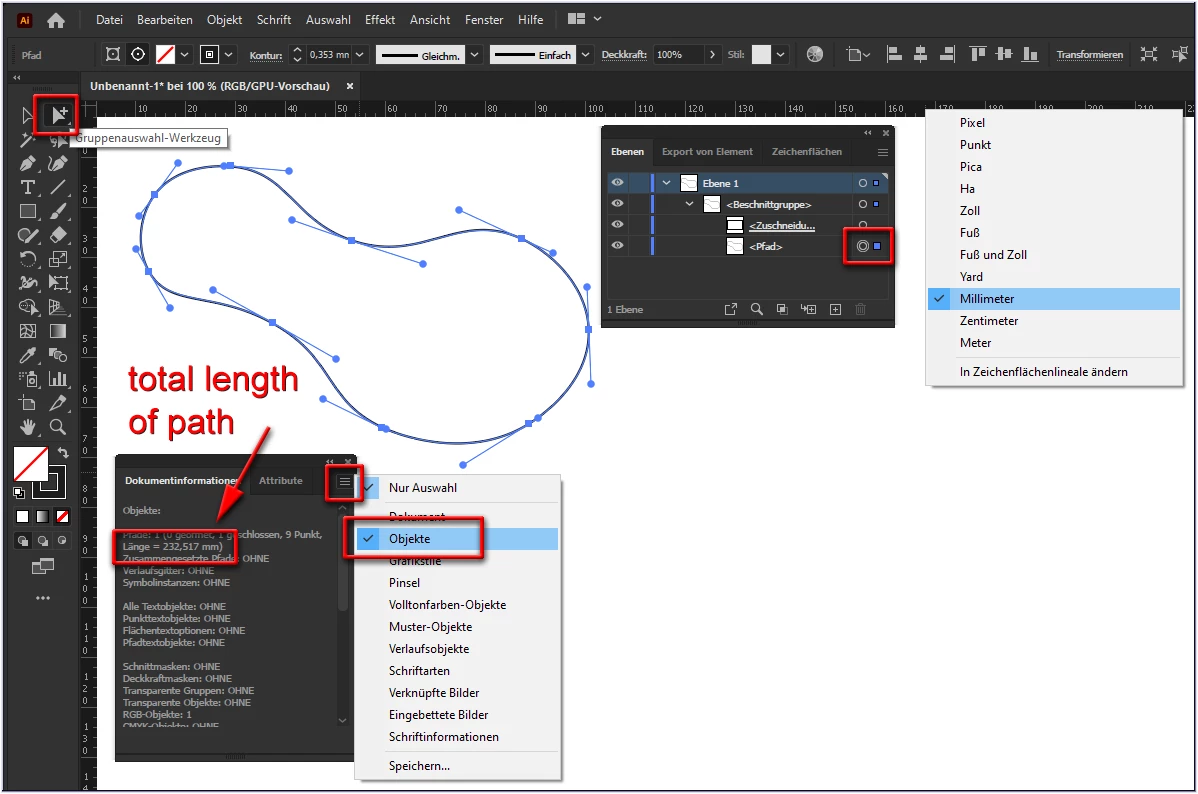
If you don't want to design it entirely in Illustrator, you can find the length of the path there in a very simple way:
  • copy your path in InDesign
  • paste it in Illustrator (set the ruler to the wished unit)
  • release the clipping mask and select only your path (or select your path directly with the Group Selection Tool)
  • open the Attributes palette - Document Information tab (Options: Objects)
 

8 replies

pixxxelschubser
Community Expert
Community Expert
November 22, 2020

@Ralf Steinert wrote: "Hi Pixxxelschubser, thanks a lot - it worked! 😉"


It seems that the problem is solved - is it?

pixxxelschubser
Community Expert
Community Expert
November 16, 2020

Hi @Geоrge 

also a good answer (but this script/thread was already mentioned here by @Laubender in post #6)

Geоrge
Legend
November 16, 2020
Remember, never say you can't do something in InDesign, it's always just a question of finding the right workaround to get the job done. © David Blatner
pixxxelschubser
Community Expert
Community Expert
November 16, 2020

Hi Uwe,

a very good solution by @Loic.Aigon (as always)


But ufff … so much maths required …

Illustrator as Graphic Program does the same with a small two-line script (include a little error management):


#target Illustrator

// pathItem_get_length_of selected_path.jsx
// please select only one path item
// regards pixxxelschubser 16. Nov. 2020

var sel = app.activeDocument.selection;
alert ((sel.length != 0 && sel[0].typename == "PathItem") ? new UnitValue(sel[0].length, "pt").as("mm").toFixed(2) + " mm" : "wrong selection");


Otherwise this one-liner is sufficient.

alert(new UnitValue(app.activeDocument.selection[0].length, "pt").as("mm").toFixed(2) + " mm");


Have fun

😉

Community Expert
November 16, 2020

Hi Ralf,

see this thread where the problem is discussed and solved with a script by Loic Aigon:


[CC 2018][JS] How to get length of path
tmmls, Jan 25, 2018

https://community.adobe.com/t5/indesign/cc-2018-js-how-to-get-length-of-path/m-p/9637665?page=1#M85626


Regards,
Uwe Laubender

( ACP )

pixxxelschubser
Community Expert
Community Expert
November 16, 2020

You are welcome.


One sidenote:
Supposed the path is your racetrack - your barriers are some distance from the track. Use in Illustrator the menu: Object -> Path -> Move Path (your distance in correct proportion) to create a second path with the correct distance. Find the length of this second path. This length will be much more accurate.

pixxxelschubser
Community Expert
pixxxelschubserCommunity ExpertCorrect answer
Community Expert
November 16, 2020
A thought:
Why not do your drawing in Illustrator? There you have a lot more options for creating and editing.
 
If you don't want to design it entirely in Illustrator, you can find the length of the path there in a very simple way:
  • copy your path in InDesign
  • paste it in Illustrator (set the ruler to the wished unit)
  • release the clipping mask and select only your path (or select your path directly with the Group Selection Tool)
  • open the Attributes palette - Document Information tab (Options: Objects)
 

Participant
November 16, 2020

Hi Pixxxelschubser, thanks a lot - it worked! 😉

Luke Jennings3
Community Expert
Community Expert
November 16, 2020

I don't know if there is a way to get the exact length of a line, but you could create a dashed line, count the dashes and gaps and multiply by the scale factor of your drawing, which should give you a ballpark number.

Participant
November 16, 2020

Hi Luke, that's a very clever work-around. Thank you very much!