
Participant
March 20, 2024
Question

Let's clean up!

  • March 20, 2024
  • 2 replies
  • 460 views

Hi,


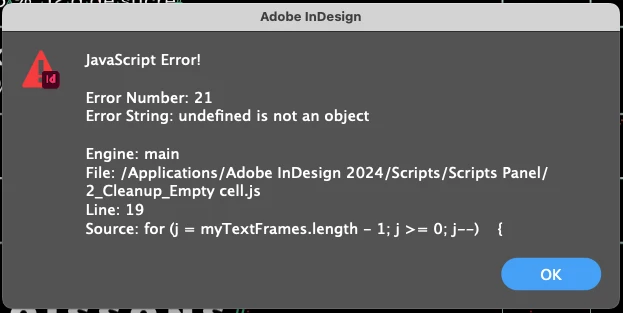
I have a datamerge generated menu that I need to remove all "unwanted characters" from. I found a script, but I always get an error :
for (s=0; s<app.activeDocument.stories.length; s++)

{

for (t=0; t<app.activeDocument.stories.tables.length; t++)

{

app.activeDocument.stories.tables.select();

var sel = app.activeDocument.selection[0];

if(sel instanceof Table)

{

var col = sel.columns;

for(var i=0;i<col.length;i++)

{

var cell = col.cells

for(var j=0;j<cell.length;j++)

{

if(cell.contents == " " || cell.contents == " ") //add your conditions here like double spaces, double non breaking space etc..

{

cell.select();

cell.texts[0].remove();

}

}

}

}

}

}


I'm a novice in scripting, and I need to remove all those unwanted invisible characters.

Any ideas why I get that warning?

Thank you

Patrick


This topic has been closed for replies.

2 replies

m1b
Community Expert
Community Expert
March 20, 2024

Hi @Patof, the error message you show is from a different script. Notice where it says "Line: 19" and

for (j = myTextFrames.length - 1; j >= 0l j--) {

well this isn't in the script you posted. Could you have another go? The script is called "2_Cleanup Empty Cell.js".

- Mark

PatofAuthor
Participant
March 20, 2024

Oopsy,
Think I need a coffee! Here!

var myDocument = app.activeDocument;

app.findTextPreferences = app.changeTextPreferences = null;

app.findTextPreferences.findWhat = "<FEFF>";

app.changeTextPreferences.changeTo = "";

myDocument.changeText();

app.findTextPreferences = app.changeTextPreferences = null;

var myStories = app.activeDocument.stories.everyItem().getElements();

for (i = myStories.length - 1; i >= 0; i--){

var myTextFrames = myStories.textContainers;

for (j = myTextFrames.length - 1; j >= 0; j--) {

var stroke = myTextFrames.strokeWeight;

var color = myTextFrames.fillColor.name;

var wrap = myTextFrames.textWrapPreferences.textWrapMode;

//alert (color)

if (myTextFrames.contents == "" && stroke == "0" && color == "None" && wrap === TextWrapModes.NONE){

//alert ("yes")

myTextFrames.remove();

}

}

}

var _d = app.documents[0],

_allStories = _d.stories;

for (var n = _allStories.length - 1; n >= 0; n--){

var _storyAllTextFrames = _allStories.textContainers;

for (var m = _storyAllTextFrames.length - 1; m >= 0; m--){

if (_storyAllTextFrames.contents === "")

try{

_storyAllTextFrames.contentType = ContentType.UNASSIGNED;

}catch(e){};

}

}

var myGraphicFrames = app.activeDocument.rectangles;

for (i=myGraphicFrames.length-1; i>=0; i--) {

var stroke = myGraphicFrames.strokeWeight;

var color = myGraphicFrames.fillColor.name;

var wrap = myGraphicFrames.textWrapPreferences.textWrapMode;

if (myGraphicFrames.graphics.length < 1 && stroke == "0" && color == "None" && wrap === TextWrapModes.NONE)

myGraphicFrames.remove();

}

var myOvalFrames = app.activeDocument.ovals;

for (i=myOvalFrames.length-1; i>=0; i--) {

var stroke = myOvalFrames.strokeWeight;

var color = myOvalFrames.fillColor.name;

var wrap = myOvalFrames.textWrapPreferences.textWrapMode;

if (myOvalFrames.graphics.length < 1 && stroke == "0" && color == "None" && wrap === TextWrapModes.NONE)

myOvalFrames.remove();

}

var myPolygonFrames = app.activeDocument.polygons;

for (i=myPolygonFrames.length-1; i>=0; i--) {

var stroke = myPolygonFrames.strokeWeight;

var color = myPolygonFrames.fillColor.name;

var wrap = myPolygonFrames.textWrapPreferences.textWrapMode;

if (myPolygonFrames.graphics.length < 1 && stroke == "0" && color == "None" && wrap === TextWrapModes.NONE)

myPolygonFrames.remove();

}


m1b
Community Expert
Community Expert
March 20, 2024

Hi @Patof, the main problem with your script was a couple of places where you were looping over an array or collection, eg. TextFrames, but then forgot to refer to the particular object by the loop's index, eg. myTextFrames.strokeWeight throws an error because a single `TextFrames` object does not have `strokeWeight` property. You meant to do myTextFrames[i].strokeWeight.


Aside from that mistake appearing a few times, there were just some little things. As a learning exercise, I've restructured your script a little (and got it to the point where it successfully runs using your test .indd). The big change I made was to create functions for a couple of things you do very often: check if something is empty, and remove it if it is empty. Functions a little sub-programs that perform the code inside them, ie. function (params) { code in here } whenever they are called. Calling a function is simply typing its name with parenthesis afterwards, and including any parameters inside the parenthesis. You can see this in action below.


I hope that helps a bit and you can move forward with your script.

- Mark

/**
 * Script by Patrick24627968ntbq
 * adjusted by m1b
 * @discussion https://community.adobe.com/t5/indesign-discussions/let-s-clean-up/m-p/14502663
 */
function main() {

    var myDocument = app.activeDocument;
    app.findTextPreferences = app.changeTextPreferences = null;
    // note that removing U+FEFF character from the document
    // may have unwanted consequences, such as removing index markers!
    app.findTextPreferences.findWhat = "<FEFF>";
    app.changeTextPreferences.changeTo = "";
    myDocument.changeText();

    // this returns an array of TextFrame objects for each story (array of arrays)
    var frames = app.activeDocument.stories.everyItem().textContainers;

    // loop over the array of arrays of textFrames
    storyLoop:
    for (var i = frames.length - 1; i >= 0; i--) {

        // loop over the array of textFrames
        textFrameLoop:
        for (var j = frames[i].length - 1; j >= 0; j--) {

            var frame = frames[i][j];

            // check that we have a valid textframe
            if (
                undefined == frame
                || !frame.isValid
            )
                continue textFrameLoop;

            var stroke = frame.strokeWeight;
            var color = frame.fillColor.name;
            var wrap = frame.textWrapPreferences.textWrapMode;
            //alert (color)
            if (
                frame.contents == ""
                && stroke == "0"
                && color == "None"
                && wrap === TextWrapModes.NONE
            ) {
                //alert ("yes")
                frame.remove();
                continue textFrameLoop;
            }

            if (frame.contents === "")
                try {
                    frame.contentType = ContentType.UNASSIGNED;
                } catch (e) { };

        }
    }

    // this function returns true if the item is empty
    function isEmpty(item) {
        var stroke = item.strokeWeight;
        var color = item.fillColor.name;
        var wrap = item.textWrapPreferences.textWrapMode;
        return (
            item.graphics.length < 1
            && stroke == "0"
            && color == "None"
            && wrap === TextWrapModes.NONE
        );
    };

    // this function checks if empty and removes empty items
    function removeItemsIfEmpty(items) {
        for (var i = items.length - 1; i >= 0; i--) {
            if (isEmpty(items[i]))
                items[i].remove();
        }
    };

    removeItemsIfEmpty(app.activeDocument.rectangles);
    removeItemsIfEmpty(app.activeDocument.polygons);
    removeItemsIfEmpty(app.activeDocument.rectangles);
    removeItemsIfEmpty(app.activeDocument.ovals);

};

app.doScript(main, ScriptLanguage.JAVASCRIPT, undefined, UndoModes.ENTIRE_SCRIPT, 'Clean Text');
PatofAuthor
Participant
March 20, 2024

 Here is an example of what I need to get rid off

m1b
Community Expert
Community Expert
March 20, 2024

Can you post a demo .indd document with that example? That is the best way.

- Mark